Business Process Automation Examples — 7 Use Cases and Savings

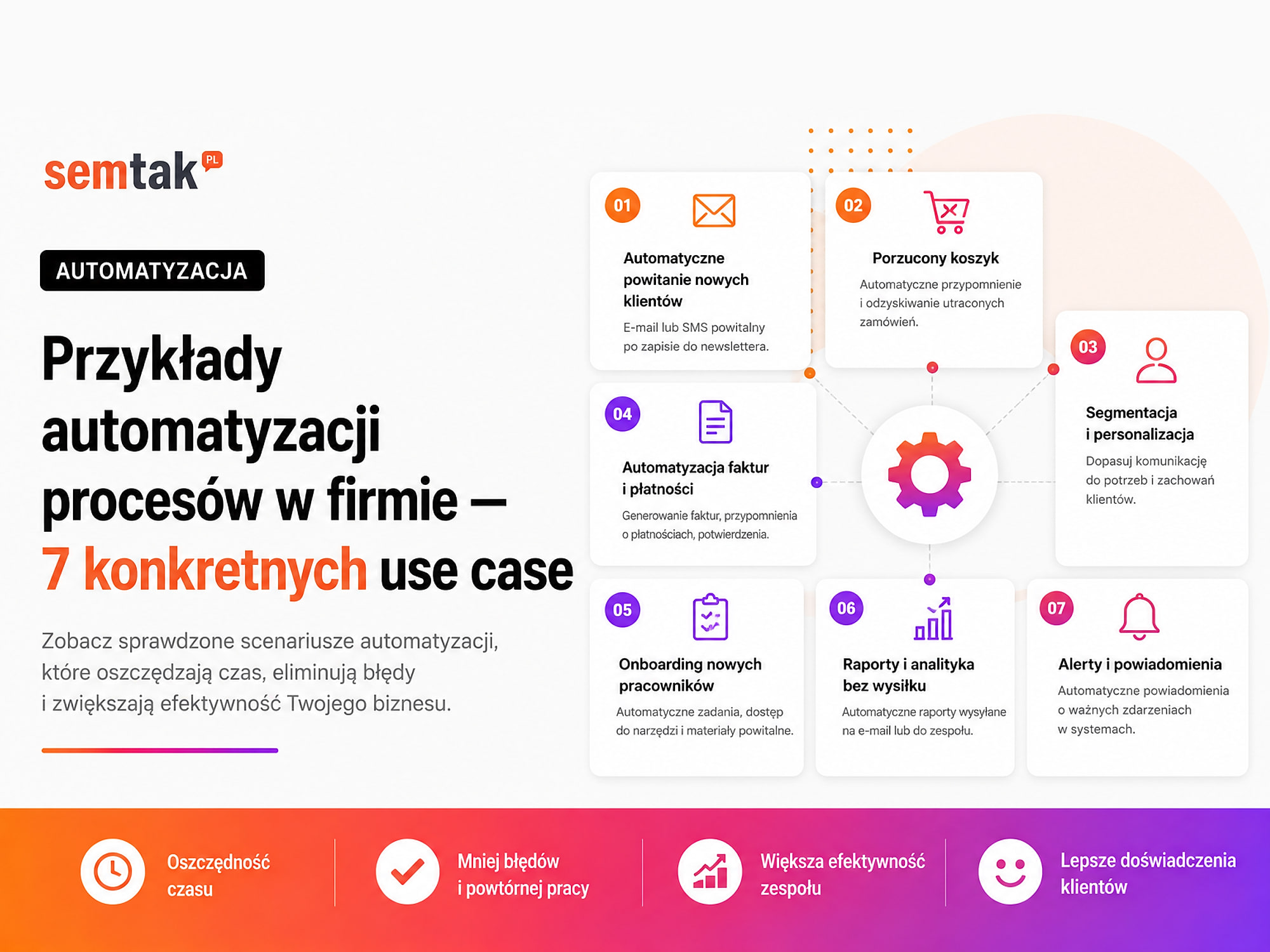
Business process automation sounds abstract until you see the specifics. So instead of theory, we show 7 real-world use cases that a mid-sized company adopts most often — from handling leads, through store orders, to documents, reports and employee onboarding.
We describe each example using the same pattern: which problem it solves, how the automation works and what result it delivers — time savings, fewer mistakes or faster customer service. This makes it easy to assess which scenario pays off the most in your particular case.
Process automation doesn't have to mean rebuilding the entire company. Often it's enough to connect two or three systems you already use and remove a single manual step that regularly causes delays or errors.
In short
The best processes to automate are those that occur frequently, rely on well-organised data and can be described with clear rules. A good scenario looks like this:
A specific event occurs
→ the system fetches the data
→ checks the defined conditions
→ performs the repetitive tasks
→ passes exceptions to a human
→ records the result and any errors
Automation shouldn't make every decision on its own. For an individual quote, a complaint, a large payment, a price change or data deletion, a human should still approve the result.
TL;DR
- A good starting point is form → CRM → sales rep → reminder.
- In e-commerce you can connect an order with the ERP, the invoice, the warehouse and shipping.
- AI is useful for classifying messages, analysing documents and preparing drafts, but it isn't needed in every process.
- The automation should handle duplicates, missing data, system failures and manual verification.
- The result of an implementation is measured by process time, the number of errors and the share of cases requiring intervention.
- Every important process needs logs, alerts and a fallback procedure.
- It's worth launching a single pilot first and only later connecting further departments and systems.
7 process automation examples — a quick comparison
| Use case | Department | What the system does | What stays on the human's side |
|---|---|---|---|
| 1. Form → CRM → sales rep | Marketing and sales | Saving data, assigning, confirming and reminding | The conversation and customer qualification |
| 2. Enquiry → quote draft | Sales | Gathering data, picking a template and preparing the document | Scope, price and approval |
| 3. Order → ERP → invoice → shipping | E-commerce and operations | Moving data and changing statuses | Handling exceptions and unusual orders |
| 4. Email → ticket → priority | Customer service | Classification, assignment and deadline tracking | The substantive reply |
| 5. Document → reading → approval | Finance and administration | Reading data, validation and document routing | Approval and the accounting decision |
| 6. New employee → accounts → tasks | HR and IT | Checklist, documents, accounts and notifications | Training and approving permissions |
| 7. Data → dashboard → alert | Management | Fetching, combining and reporting data | Interpretation and business decisions |
Use case 1. Contact form → CRM → sales rep → follow-up
This is one of the most common and safest processes for a first automation.
How does the process work without automation? The customer submits a form → the message lands in a shared inbox → an employee reads the enquiry → copies the data into the CRM → checks which sales rep should handle it → creates a task → sends a confirmation to the customer → and has to remember to follow up. The problem isn't only the time spent re-typing data — the enquiry may be overlooked, assigned to the wrong person or left unanswered during someone's holiday.
What does the automation look like?
The customer submits a form
→ the system checks the required fields
→ searches for the contact in the CRM
→ creates a new record or updates an existing one
→ saves the source of the enquiry
→ recognises the service or topic
→ assigns a sales rep
→ creates a task with a deadline
→ sends a confirmation to the customer
→ no response triggers a reminder
Which data is worth passing on? Besides the name, phone number and email address, it's worth saving the acquisition source, the campaign name, the page address the form was sent from, the type of service, the content of the enquiry, the date and time of contact, the communication consent (if it was given), the person responsible, the enquiry status and the date of the next action. This way you can later check not only the number of leads, but also which sources bring valuable conversations and sales.
Where can AI help? AI can preliminarily classify a freely written message:
Topic: building a new store
Industry: cosmetics
Priority: standard
Scope: WooCommerce + payments + shipping
Department: sales
It shouldn't, however, reject valuable contacts on its own or make a binding offer. What does the human still do? Checks the customer's actual need, runs the conversation, assesses the fit, prepares the scope, sets the price and negotiates the terms.
What needs to be tested? A form with a full set of data, a missing phone number, a repeat submission from the same person, an enquiry about several services, a submission outside working hours, the absence of the assigned employee, a CRM failure and an invalid email address. How to measure the result? The time from form to assignment, the time of the first response, the number of lost enquiries, the number of duplicates, the share of leads with a recorded source, and the conversion of a lead into a conversation and a quote. We cover sequences, segmentation and scoring in more detail in our guide to marketing automation for companies.
Use case 2. Customer enquiry → quote draft → approval
Preparing a quote often requires gathering information from messages, the CRM, the price list, the service catalogue and earlier documents. The automation doesn't have to set the price on its own — it can prepare an orderly draft that the sales rep checks and approves.
The lead moves to the "preparing a quote" stage
→ the system fetches the customer data from the CRM
→ pulls in the selected products or services
→ selects the current template
→ fills in the company details and the scope
→ AI can prepare a draft description
→ the sales rep checks the price and terms
→ the system generates a PDF
→ saves the quote in the CRM
→ sends the document
→ creates a follow-up task
AI can summarise the customer's needs, detect missing information and prepare a first version of the description. A human should still approve the scope of work, the price and discounts, the deadlines, the responsibilities of the parties, the legal clauses and the final version of the document. Before implementation you need to tidy up the price lists, templates and approval rules — if everyone uses a different version of the document, the automation will simply replicate the mess faster.
In wholesale sales the quote can additionally take into account the contractor's group, an individual price level, a trade credit limit and the payment term. We also describe such mechanisms in our guide to a B2B store on WooCommerce. The most important metrics: the time to prepare a quote, the number of revisions, the share of quotes with a completed follow-up and the conversion of quotes into orders.
Use case 3. WooCommerce order → ERP → invoice → warehouse → shipping
A store can accept an order, but the further fulfilment often takes place across several separate systems. The data goes, among others, to WooCommerce, the warehouse software, the ERP, the invoicing system, the order-handling system, the carrier panel, the accounting and the sales report. If the systems aren't connected, employees enter the same information several times.
What does the manual process look like? An employee opens the order → checks the payment → copies the data into the ERP → reserves the products → issues the invoice → moves the address into the courier panel → generates a label → enters the tracking number into the store → changes the order status → sends information to the customer. Each step can be done correctly, but the number of manual operations increases the risk of a typo in the address, a double invoice, shipping the wrong product, an outdated stock level, skipping an order, an incorrect status and sending the document to the wrong person.
How can the automation work?
The order receives the correct payment status
→ the system checks the completeness of the data
→ searches for the customer in the ERP
→ creates or updates the contractor card
→ passes on the order items
→ reserves stock
→ creates a sales document
→ generates an invoice
→ passes the shipment to the courier system
→ saves the tracking number
→ updates the WooCommerce status
→ sends a notification to the customer
When should the process stop? The case should go to manual verification when a product is missing, the customer provided an incomplete address, there's an unusual delivery method, a foreign invoice is needed, the VAT number is invalid, a non-standard discount was applied, the order exceeds the agreed limit, the product requires personalisation or the ERP system isn't responding.
Watch out for the payment status
Not every order that is created has been paid. You need to define which status triggers issuing the invoice, when to reserve stock, how to handle a rejected payment, what to do with a bank transfer, how cash on delivery works, when to create a correction and how to handle returns.
What does the human still do? Handles unusual orders, approves exceptions, resolves stock conflicts, controls returns, checks faulty documents and reacts to integration failures. What needs to be tested? A correctly paid order, a rejected payment, a bank transfer, cash on delivery, a missing product, an incorrect address, an order change, a cancellation, a return and a temporary failure of the ERP or courier system.
How to measure the result? The time from payment to passing the order on, the number of manually re-typed fields, the number of address errors, the number of duplicate documents, the time to prepare a shipment, the share of orders requiring intervention and the consistency of stock between the store and the warehouse. WooCommerce exposes data via an API, so it can exchange orders, products and statuses with other systems — we cover the basics in the article WooCommerce API — what it is and what it's for.
Use case 4. Customer email → ticket → priority → response deadline
Many companies handle sales, complaints, faults and questions through a single email inbox. The automation can:
receive the message
→ find the customer and earlier cases
→ recognise the category
→ assign an initial priority
→ create a ticket
→ assign the right team
→ start the response deadline
→ send a confirmation
→ remind about the lack of a reply
AI delivers value when the customer describes the problem in their own words. It can prepare a summary:
Category: payment / missing order
Priority: high
Customer: existing
Required department: order handling
Data to check: email, payment, transaction number
A human, however, should approve replies concerning complaints, refunds, compensation and unusual decisions. The most important tests: several topics in one message, a reply to an existing thread, a message with no subject and an incorrect classification. The most important metrics: the time of the first response, the number of cases without an owner, the number of wrong assignments and the share of tickets handled on time.
Use case 5. Invoice or document → reading data → validation → approval
Documents arrive at the company by email, through a form, as PDF files, scans or photos. An employee downloads the attachment, reads the data, saves the document, enters the amount and the deadline, assigns the cost to a project, passes the document for approval, sends it to accounting and keeps an eye on the payment deadline. This is a good candidate for partial automation, but not for switching the human off entirely.
The document lands in a designated inbox or form
→ the system saves the file
→ OCR or AI reads the data
→ checks the document number
→ searches for the contractor
→ compares the amount and the company details
→ detects a possible duplicate
→ assigns a category or project
→ routes the document for approval
→ after approval, passes it to accounting
→ saves the status and the history
OCR is a mechanism that reads text from a scan or photo. AI can additionally help interpret documents with a variable layout, but the result should be checked. Which data can be read? The document number, the seller and the buyer, the VAT number, the issue date, the payment deadline, the net/VAT/gross amount, the bank account number, the currency, the item description and the order or project number.
Example rules:
If a document with this number already exists
→ mark it as a possible duplicate

If the amount exceeds the set limit
→ additional approval is required

If the bank account number differs from the one on file
→ stop the process and send an alert

If the project number is missing
→ route the document for completion
What not to automate without control? Making a large transfer, changing a contractor's bank account, approving an unusual cost, settling a tax matter, deleting a document and approving a poor-quality file. What needs to be tested? A correct PDF document, a low-quality scan, a duplicate, a missing document number, a different currency, an incorrect bank account, a multi-page document, a contractor missing from the database and an amount requiring additional approval.
How to measure the result? The time from receipt to passing the document to accounting, the number of manually re-typed fields, the number of detected duplicates, the share of incorrectly read data, the number of overdue documents and the waiting time for approval. For documents with a variable layout, AI automation for companies can be helpful.
Use case 6. New employee → accounts → access → onboarding
Onboarding a new person requires cooperation between HR, the manager, administration and IT. The automation can start once the candidate's status changes to "hired":
HR fills in the starting form
→ the system creates an onboarding checklist
→ informs the manager and IT
→ creates account requests
→ prepares a folder and tasks
→ sends organisational information
→ schedules training
→ reminds about unfinished steps
The system can automate requests and reminders, but it shouldn't grant the highest administrator permissions without control. A human still chooses the scope of access, runs the welcome conversation, delivers the training, assesses progress and approves the removal of permissions.
Don't forget about offboarding. An employee's departure should trigger a separate checklist:
HR indicates the end date
→ the manager selects the matters to hand over
→ IT plans the access block
→ equipment goes onto the return list
→ tasks receive new owners
→ accounts are disabled on the agreed date
The most important metrics: the share of accounts ready before the first day, the number of missing accesses, the working time of HR and IT, and the number of active accounts after an employee's departure.
Use case 7. Data from several systems → dashboard → report → alert
Reporting often looks like this: an employee exports data from Google Ads → pulls sales from the store → exports leads from the CRM → copies the results into Excel → fixes the column names → creates charts → sends the report → and does the same thing all over again a week later. An automated process can look like this:
At a set hour
→ the system fetches data from Google Ads
→ pulls sales from WooCommerce
→ pulls leads and statuses from the CRM
→ checks completeness
→ combines the data according to the defined rules
→ updates the dashboard
→ compares the result against thresholds
→ sends the report
→ flags deviations that require a reaction
A good dashboard should answer the questions: how much the company sold, what the cost of acquiring sales was, which sources valuable customers come from, how many leads are waiting for contact, which orders are delayed, whether the number of complaints has grown and whether data from all systems was fetched.
A correct dashboard can show incorrect data
If a purchase is counted twice, the CRM statuses are out of date or returns aren't subtracted, the dashboard will simply show the wrong result more clearly. That's why you need to define the source of each metric, how it's calculated, the update frequency, the data owner, the validation rules and how gaps are marked. Before combining ad costs with sales, it's worth checking whether conversions in Google Ads are measured correctly.
A human still interprets the results, takes context into account and makes decisions about budgets and priorities. The most important metrics: the time to prepare a report, the number of manual exports, the number of discrepancies and the time from a problem appearing to it being detected. With a larger number of sources, dashboards and automatic reports can be useful.
What do good automations have in common?
Although the examples concern different departments, correct processes share a similar structure.
A clear start. The process is triggered by a specific event: a new form, a status change, a paid order, an email, the receipt of a document, the hiring of an employee or the arrival of a particular hour.
Unambiguous data sources. You need to know where the customer's address comes from, where the lead status is saved, which system holds the stock level, where the current price is pulled from and where the approved version of the document is. If three systems are simultaneously the source of the same information, the data can drift apart.
Rules and conditions:
If the data is complete
→ perform the next step

If a field is missing
→ pass the case on for completion
Exception handling. The process should know what to do when data is missing, a system isn't responding, a record already exists, an amount exceeds a limit, a user withdrew consent, a payment was cancelled or AI isn't sure of the result.
Human control. A human should approve decisions whose error can have serious consequences: a price, a transfer, a complaint, a change of permissions, a publication, the deletion of data and an unusual contract.
Logs and alerts. The process should record when it started, which case it concerned, which steps it performed, what the result was, what failed, whether the operation was retried and who received the alert. Without logs it's hard to determine whether a document wasn't created because of a data error, an API failure or an incorrect rule.
Which use case to choose first?
Don't choose the most impressive process. Choose one that offers a good ratio of benefit to risk and difficulty.
| Criterion | Question |
|---|---|
| Frequency | How many times does the process occur per week or month? |
| Time | How long does the manual handling of one case take? |
| Errors | What most often needs fixing? |
| Waiting | Where does the process stand still the longest? |
| Rules | Can the next steps be described clearly? |
| Data | Is the input data complete? |
| Risk | What happens if the automation makes a mistake? |
| Test | Can the process be run for a small group? |
| Measurement | How will we know the implementation works? |
A good first choice can be form → CRM, a report from two or three sources, an alert about a lack of response, a task created after a status change or passing a paid order to invoicing. A harder start would be automatically approving large payments, setting prices with AI or connecting all departments at once. We describe the full method of choosing a pilot, mapping a process and assessing profitability in the guide business process automation — where to start.
How to match the technology to the process?
| Solution | When does it make sense? | Example |
|---|---|---|
| A feature of the current system | The tool already supports the needed rule | A reminder in the CRM |
| A ready-made integration | The process is standard | WooCommerce → invoicing |
| No-code or low-code | You need to connect a few popular apps | Form → CRM → task |
| API integration | Custom fields or rules are needed | Store ↔ ERP ↔ warehouse |
| AI automation | You need to understand text or a document | Message classification |
| A dedicated application | The process is central and too complex for ready-made tools | A custom B2B or operational panel |
If a rule can be written as "if X happens, do Y", classic automation is usually enough. AI makes sense when you need to understand free text, read a document with a variable layout or prepare a draft. API integration is needed when a ready-made connection doesn't support the required data, custom rules or two-way synchronisation. A systems integration or a custom API integration can be helpful here.
How to implement the chosen process?
Step 1. Write down the current state. Note what triggers the process, who performs each stage, which systems it uses, which data is copied, where delays appear, which exceptions occur and what completion means.
Step 2. Remove unnecessary steps. If data goes through form → email → spreadsheet → CRM, check whether ultimately form → CRM isn't enough. Don't automate steps that can be removed entirely.
Step 3. Define the data sources. Indicate which system is responsible for the customer data, prices, status, stock level, documents, permissions and the result of the process.
Step 4. Design the error path. For each stage, define what to do when data is missing, how many times to retry the operation, when to stop the process, who to send an alert to and how to perform the task manually.
Step 5. Leave approval points. An employee should approve actions that require individual responsibility, e.g. the quote price, a large cost, an unusual invoice, a complaint or permissions.
Step 6. Launch a pilot. Start with a single form, one type of document, a selected group of products, one department or a small number of users.
Step 7. Compare the result. Measure the time before and after implementation, the number of manual actions, the number of errors, the number of cases handled automatically, the share of exceptions, the response time and the impact on the customer.
What can you check on your own?
1. Check where the process waits. A delay often doesn't stem from the work itself, but from waiting: until someone reads a message, approves a document, re-types an order, replies to a ticket, prepares a report or grants access.
2. Count the manual operations. For a single case, write down how many times the data is copied, in how many systems it's entered, how many people take part in the process, how many times the owner changes and how many notifications need to be sent.
3. Assess the data quality. Check whether the fields have a uniform format, whether duplicates occur, whether the statuses are up to date, whether it's clear which system is the source of truth and whether gaps can be detected automatically.
4. Analyse the last error. Determine what happened, at which stage, who noticed the problem, how long the fix took, whether the error could have been detected earlier and whether the customer felt its effects.
When is it worth hiring a specialist?
Help is advisable when you need to connect several systems, ready-made plugins don't support the required logic or a failure could halt sales.
Consider support when you need to connect several systems, ready-made plugins don't support the required logic, synchronisation has to work both ways, the company uses an ERP or a dedicated system, API error handling is needed, customer or payment data requires additional protection, the automation affects invoices/stock/shipping, the process has many exceptions, roles and approvals are needed, AI has to be used, no one can point to the main source of data, the process runs without logs, a failure could halt sales or a custom panel or dashboard is needed.
With a larger implementation, simply connecting two apps isn't enough — you need to design the data, exceptions, responsibility, alerts, accesses, security and the way back to manual work. As part of automation and integration for companies you can start with the analysis of a single process, prepare a pilot and only develop further connections after testing. If the process can be built as a controlled workflow between several apps, an n8n implementation can also be a solution.
Frequently asked questions
Which process is best to automate first?
It's best to choose a process that's frequent, repetitive, based on well-organised data and easy to test. A good example is a contact form passed to the CRM together with the assignment of a sales rep and a reminder.
Does process automation require AI?
No. Most simple automations work on ordinary rules. AI is useful when you need to understand text, classify a message, read a document or prepare a draft.
What can be automated in a WooCommerce store?
Among other things, passing orders to the ERP, updating stock, issuing documents, creating shipments, changing statuses and sending notifications.
Can quotes be prepared automatically?
Yes, the system can fetch customer data, select a template and prepare a draft. The price, scope, deadlines and final version should be approved by an employee.
How to protect an automation against errors?
You need data validation, duplicate handling, limits, retries, logs, alerts, a manual exception queue and the ability to stop the process.
Is n8n suitable for automating processes in a company?
It can be a good solution when you need to connect several apps, APIs, webhooks, conditions and notifications. The choice of tool should, however, follow from the process, not the other way round.
How to measure the result of automation?
You should compare the process time, the number of manual operations, the errors, the delays, the number of exceptions and the impact on the customer before and after implementation.
What isn't worth automating?
It isn't worth automating chaotic processes, actions performed very rarely, and decisions requiring negotiation, legal or financial responsibility or individual judgement.
Start with one process that regularly takes up time
Process automation doesn't have to start with a large system or artificial intelligence. Most often the greatest value comes from removing the manual re-typing of data, keeping track of deadlines and connecting tools that already function in the company. A good start can be a form passed to the CRM, an invoice created after a payment is confirmed or a report updated without manually exporting several files.
The system should perform the repetitive tasks, while the human keeps control over the exceptions, the important decisions and the communication that requires broader context.
If the team re-types data between a form, the store, the CRM, spreadsheets, the ERP or the accounting software, we can map out the current flow and point to one process worth starting with. As part of automation and integration for companies we'll prepare a small pilot, add exception handling, logs and alerts, and then check whether the implementation really shortens the work and reduces the number of errors.