Abandoned Carts — How to Win Back a Customer Who Didn't Finish the Purchase

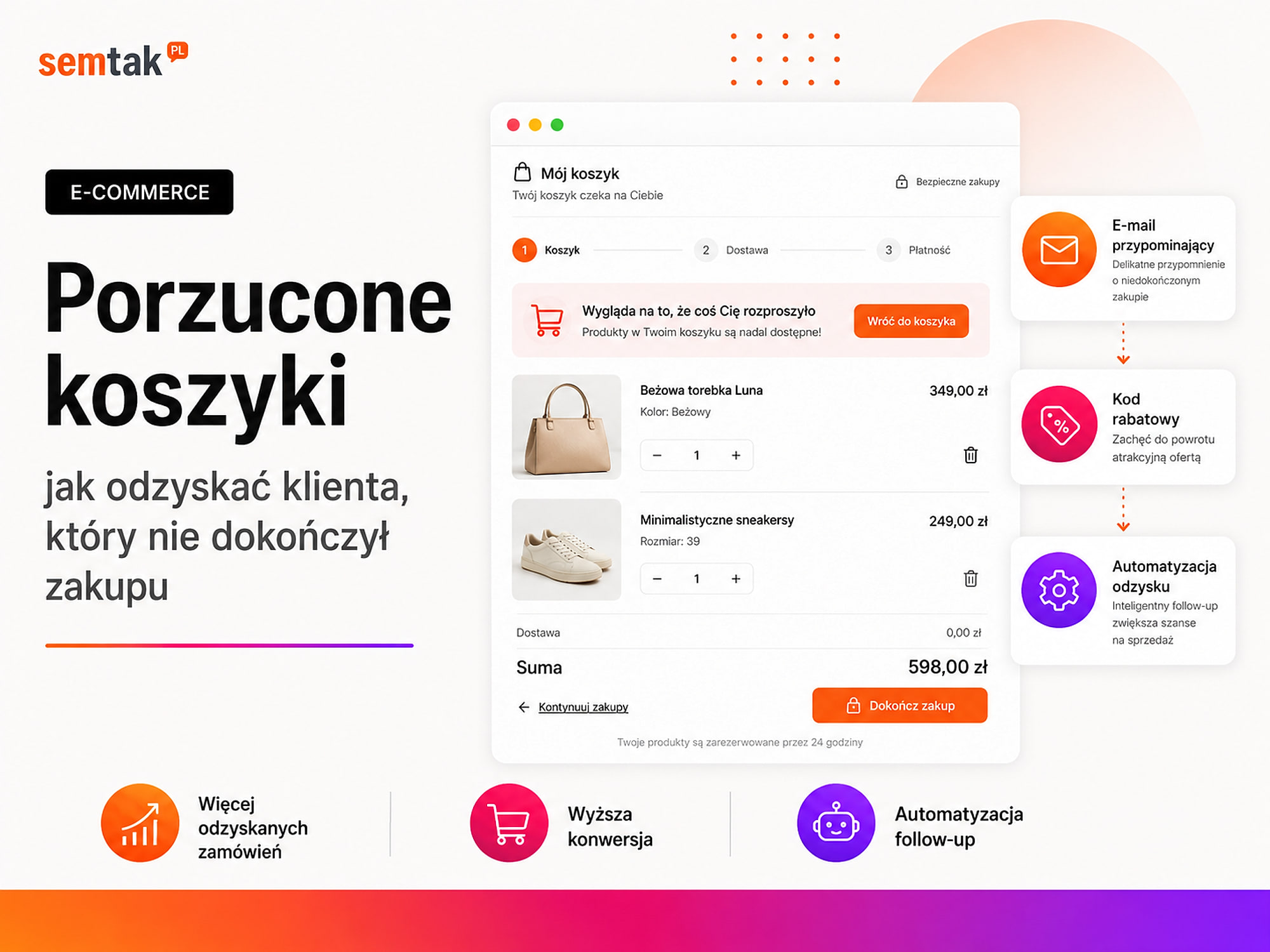
A customer found a product, added it to the cart, moved on to the order… and disappeared. That doesn't necessarily mean they gave up on the purchase. Perhaps they saw an unexpected delivery cost, couldn't find a convenient payment method, or the form stopped working on their phone.
Abandoned carts are therefore not only a marketing problem. They often show that something isn't working in the store itself: the checkout is too long, delivery was configured incorrectly, payment returns an error, or the customer doesn't trust the site.
In this guide we'll show how to find the point where customers abandon their purchase, what to improve in WooCommerce, and when to launch automated reminders about a saved cart.
In short: don't start with a discount code
To win a customer back, first check: whether the checkout works on a phone, whether delivery costs are shown early enough, whether the customer can pay with a convenient method, whether the form is free of unnecessary fields, and whether your analytics correctly shows where people drop off. Only then launch an automated message that saves the cart contents, doesn't reach the customer after they've bought, and leads straight to the restored order.
In short (TL;DR)
- An abandoned cart doesn't always mean a lack of interest. The reason can be a technical error, the delivery cost or an inconvenient checkout.
- Remove the obstacles in the buying process first, and only then start sending reminder messages.
- Measure separately: adding a product to the cart, starting checkout, choosing delivery, choosing payment and purchasing.
- To send a reminder you need an email address, a phone number or an earlier link between the cart and the customer.
- The link in the message should restore the entire cart, even on another device.
- Treat a discount as an additional tool, not the primary way of rescuing every order.
What is an abandoned cart?
An abandoned cart occurs when a customer adds a product to the cart but doesn't complete the purchase.
An abandoned cart is not the same as an abandoned checkout
When an anonymous user adds a product and closes the page, WooCommerce may remember their cart in the browser — but the store doesn't know their email address and usually can't send a reminder. Contact details appear only once the customer logs into an account, provides an email while placing an order, has bought before, saves a cart/wishlist, or supplies details in a quote form. A recovery system therefore has to not only detect an unfinished purchase, but also know who the cart belongs to and whether you're allowed to message that person.
| Situation | What did the customer do? | Can a reminder be sent? |
|---|---|---|
| Abandoned cart | Added a product and left the store | Usually not, if they gave no details |
| Abandoned checkout | Started placing an order and gave e.g. an email | Often yes, if the store saved the details |
Why do customers abandon carts?
An abandoned cart is one symptom of a wider sales problem — in the checkout it's usually worth checking the areas below. We cover the remaining causes in our guide on why an online store doesn't sell.
Unexpected delivery cost. The customer sees the product price, but only at the last step finds out that shipping costs much more than they assumed. Example: a product costs £79, the customer expects a parcel locker for a few pounds, and at the checkout they only see a courier for £39 — the total price stops being attractive. Delivery costs don't need to be hidden until the last step — show them on the product page, in the mini-cart or in a clear delivery table. We describe carrier configuration in our guide to shipping in WooCommerce.
There's no convenient payment method. The customer wants to pay with an instant transfer, but the store only offers a bank transfer; another person picks a fast payment but after the redirect sees an error. It's not enough to check whether the button appears at checkout — place test orders and also check the status change, an interrupted payment and a retried transaction. More in our guide to payments in WooCommerce — Przelewy24, PayU and Tpay.
The order form is too long. For a simple product the customer shouldn't have to fill in a form resembling a bank application. Common offenders: a mandatory company name on a private purchase, redundant address fields, a forced account creation, unclear consents, manually re-typing the same data, and fields required even when there's no need. The point isn't to remove all fields — the store has to collect data for delivery, payment and the sales document — but it's worth asking: what exactly is each field for?
The store forces account creation. The customer wants to buy a single product, but before ordering they have to create an account, invent a password and confirm an email. An account is useful for repeat purchases, but it shouldn't block the first order — in many stores a guest purchase works better, with the option to create an account after placing the order.
The checkout works badly on a phone. On a computer the form looks fine, but on a phone the payment button is hidden behind a cookie banner, the pickup-point map won't open, or the keyboard makes it hard to type the postcode. Such a problem goes unnoticed for a long time, because the owner tests the site on a laptop. The checkout must be checked on a real phone, not just by narrowing the browser window.
The store is too slow. The cart and checkout use payments, deliveries, coupons, pickup points and integrations all at once — each function can slow the page down or cause a conflict. The customer may decide the button didn't work, click it several times, or close the tab. If the problem also affects other parts of the store, check how to speed up a WooCommerce store.
The customer doesn't trust the store. A purchase may be interrupted by someone who couldn't find answers to basic questions: when the product will be shipped, whether it can be returned, how to contact the store, what happens after payment, whether the company details are genuine, and whether the payment is secure. Instead of flooding the checkout with random icons, show specific information: shipping time, returns policy, company details and contact options.
The discount code field distracts attention. A visible "Coupon code" field can suggest a discount exists somewhere — the customer leaves the checkout, starts searching for a code on Google, lands on other sites and doesn't come back. The field can be hidden behind a "I have a discount code" link, or the discount can be applied automatically after arriving from a specific campaign.
The customer is only comparing offers. Not every cart means readiness to buy immediately — some people use the cart as a product list, a cost calculator, a place to compare variants, a way to check the delivery price, or a working quote to approve. You can't eliminate this, but you can make returning easier through a saved cart, a wishlist, or the option to send the cart to a colleague. This matters especially in B2B sales, where a purchase may need approval from several people.
How to find the point where customers give up?
The sheer number of unfinished orders explains little — you have to establish at which stage the problem appears.
The basic purchase funnel: product view → add to cart → view cart → start checkout → choose delivery → choose payment → place order → purchase confirmation. In e-commerce analytics these correspond to the events view_item, add_to_cart, view_cart, begin_checkout, add_shipping_info, add_payment_info and purchase. The event names aren't enough — you have to check that each fires at the right moment and only once.
An example of faulty measurement. The purchase event fires after every refresh of the thank-you page — the customer refreshes three times, so analytics records three transactions. The report looks good, but doesn't show the real sales. The opposite can also happen: an order appears in WooCommerce but doesn't reach analytics, because the script was blocked or didn't manage to fire. That's why it's worth comparing GA4 data with orders in WooCommerce and at the payment provider.
Fix the checkout first, recover carts second
Automated messages won't fix a broken store — if payment doesn't work, three reminders will only make the customer see the same error three times.
| Symptom | Possible cause | What to check? | First response |
|---|---|---|---|
| Drop-offs right after entering checkout | A long form or a mobile problem | Test on several phones | Simplify fields and fix the view |
| Drop-offs when choosing delivery | A high cost or no convenient option | Price lists and courier integrations | Show costs earlier |
| Drop-offs at payment | A provider error or a missing popular method | Test transactions | Fix the payment integration |
| Many orders "awaiting payment" | No correct status information | Provider messages and order statuses | Link to retry the payment |
| A problem only on phones | An interface or script conflict | Manual test and session recordings | Fix the mobile version |
| Lots of shipping questions | No clear date or price | Product page and checkout | Show information before purchase |
| Customers leave the checkout at the coupon | A too-prominent discount field | Session recordings and user behaviour | Hide the field behind a link |
Not sure at which stage you lose customers? As part of WordPress and WooCommerce technical maintenance we can check the checkout, payment methods, shipping and order measurement — the goal isn't to install more plugins, but to establish where the problem really arises.
How to recover abandoned carts step by step?
Step 1. Establish when a cart is genuinely abandoned. Don't send a message a few minutes after a product is added — the customer may still be reading the description, comparing variants or waiting for a colleague's reply. The moment a cart counts as abandoned depends on the type of store: in a cosmetics store the decision is often quick; with expensive business equipment the customer may come back after several hours or days. As a test, the first message can be sent after about 30–60 minutes — this isn't a universal rule.
Step 2. Save the cart contents. The system should remember the products, chosen variants, quantities, prices, applied coupons, the data needed to link the cart to the customer, and the time of last activity. The cart should be restorable even after opening the link on another device. Example: the customer started buying on a phone but opened the message on a computer — after clicking they should see the saved products, not an empty cart.
Step 3. Collect the email at the right moment. If the email address is only at the end of the form, the store won't recognise many abandoned checkouts. Possible solutions: putting the email at the start of the checkout, splitting the form into logical steps, a saved cart for a logged-in user, a wishlist, a form to send the cart by email, or a quote cart for a B2B customer. But don't make the purchase harder just to get the data — the form should still be simple.
Step 4. Create a link that restores the cart. The most important element of the message is a button leading straight to the saved cart or checkout. Don't send the customer to the home page, to a general category, to the account panel with no explanation, or to the page of just one of several products — after clicking, the products and variants should be restored automatically.
Step 5. Stop the messages after a purchase
Before every send, the system should check: whether the customer has already placed an order, whether payment has started, whether the cart still exists, whether the user hasn't been excluded from communication, and whether another message about this cart hasn't already been sent. Each cart should have its own identifier — that way the system won't confuse several different purchase attempts by the same person, and won't send a reminder to someone who has just bought.
Step 6. Prepare a short sequence. Not every store needs four or five reminders — often two well-prepared messages are enough.
| Moment | Goal | Sample content |
|---|---|---|
| After 30–60 minutes | Reminder | The products are still waiting in the cart |
| After 12–24 hours | Removing doubts | Information about delivery, payment and returns |
| After 24–48 hours | Final contact | Return to the cart or a justified incentive |
The timing and number of messages must be matched to the length of the buying decision.
Step 7. Check that the messages arrive. A message won't recover an order if it lands in spam. SPF, DKIM and DMARC are domain settings that help mail servers confirm a message really was sent by your store and not by someone impersonating the company. Check whether the store sends from a company domain, whether you can reply to the sender address, whether invalid addresses are removed, whether transactional messages don't land in spam, and whether marketing doesn't overload the mailbox used for confirmations. With a larger volume of emails, separate transactional from marketing sending and check deliverability regularly.
Step 8. Tag the links and measure purchases. Add campaign parameters to the links so you can recognise visits from individual messages — you can separate the first reminder, the second reminder, the message with a discount, email, SMS and remarketing ads. But don't attribute all later sales to the automation just because the customer received a message — some people would have come back on their own.
How to write an abandoned-cart message?
The message shouldn't sound like a demand for payment — the customer isn't obliged to finish the purchase.
A good message shows the saved products (photos, names, variants), has one clear button leading to the restored cart, gives a way to get in touch, looks good on a phone and creates no artificial pressure.
First message. Subject: "Your products are still waiting in your cart". Body: "You left products in your cart. We've saved them so you don't have to look for them again." Button: "Back to my cart". Below: "Have a question about the product, payment or delivery? Reply to this message — we'll help".
Second message. Subject: "Can we help you finish the order?". Body: "Your cart is still saved. If you stopped because of a problem with payment, delivery or the form, write to us." Button: "Finish the order". Below the button you can briefly remind people of the available payment methods, the expected shipping time, the returns policy and contact details.
Last reminder. Subject: "Last reminder about your saved cart". Body: "The products are still in your cart. You can return to the order below." Button: "Open my cart". If the offer really is expiring or the product is reserved only for a set time, you can say so clearly — but don't create a fake counter or artificial pressure.
Should you give a discount for returning to the cart?
Not always.
An automatic discount teaches customers to wait for a code
If a discount appears with every abandoned cart, customers quickly learn a simple pattern: add products → close the page → wait for a code → buy cheaper. The store then cuts its own margin. A discount can make sense when the customer is new, the margin allows for a reduction, the incentive appears only in a later message, it applies to selected products, or a test shows a rise in the number of profitable orders.
Instead of a discount, you can offer free delivery, a product sample, help choosing a variant, reserving the product, the option of deferred payment, or a pre-purchase consultation. In B2B sales a more effective approach is often the question: "Shall we prepare a quote for your company or help you choose the right quantity?".
Email, SMS or remarketing?
Each channel has different strengths — it's best to match them to the product and the way you obtained the contact.
Email lets you show products, answer doubts and add a button that restores the cart; it works well when the customer gave a correct address and the store has well-configured sending. SMS can work for short and urgent purchase processes, but it's easy to overdo the frequency — the message should be short and lead to the cart; you also have to account for how the number was obtained and the basis for sending. Remarketing ads can remind people of a product, but won't always restore a specific cart — it's an additional channel, not a substitute for a working checkout; it's worth considering the product campaigns described in our guide to Google Shopping and Performance Max in practice. Personal contact suits expensive products, wholesale orders and B2B sales — it's sometimes worth passing the cart to a salesperson when the customer asked for a quote, gave company details, built a large cart, spoke to support earlier or expressed interest in contact. This doesn't mean phoning everyone who added a product to the cart.
Are you allowed to send an abandoned-cart message?
Don't assume that every saved email address can automatically be used for any communication.
What matters is how the address was obtained, the content of the message, the consents given, the market the store operates in, the data retention period, and whether the message is a technical reminder or a marketing offer. Simply calling a message a "reminder" isn't enough if its main content is an ad and a discount code. Before implementing, it's worth consulting the process with the person responsible for data protection or legal support — especially when the automation uses several tools, records the behaviour of logged-out users, or combines email, SMS and ads.
How to implement cart recovery in WooCommerce?
You can use a ready-made plugin, an external marketing-automation system, or a dedicated integration.
Whichever method you choose, check whether the system handles logged-in customers and guest purchases, saving of products and variants, restoring the cart from a link, stopping messages after a purchase, delays between sends, discount codes with limits, link tagging, reporting of recovered orders, deleting or masking customer data, and integration with the payment gateway you use.
A ready-made plugin is the simplest solution for a store with a standard checkout. Before installing, check whether it's updated regularly, works with the current WooCommerce version, supports the payments and deliveries you use, doesn't cause errors in the checkout, where it stores data, and whether it stops messages after a purchase.
A marketing-automation system can combine abandoned carts with a newsletter, segmentation and other campaigns. You have to make sure the system quickly receives information about an order being placed and paid — otherwise the customer may get a reminder after buying.
A dedicated integration makes sense for an unusual checkout, configurable products, B2B sales, or connecting WooCommerce with an ERP, CRM and marketing system. You then have to decide which system is the main source of information about the cart, customer and order — without this, one person can receive several messages from several tools. If the buying process needs a bigger rebuild, the scope can be combined with a store modernisation or the services described in the websites and online stores section.
A quick list of mistakes to catch before launch
Before switching the automation on, check a few more traps that are easy to miss.
- Are product prices and availability updated in the saved cart?
- What happens to a product that has sold out in the meantime?
- Does the coupon have a limited validity period and can't be used endlessly?
- Do several abandoned carts from one person not trigger several sequences?
- Does the system recognise a purchase made on another device?
- Does the report distinguish revenue from margin after a discount and free delivery?
- Can the customer easily opt out of further messages?
How to measure the effectiveness of cart recovery?
Don't limit the report to opens and clicks.
| Metric | What it shows? |
|---|---|
| Started checkouts | How many people began placing an order |
| Completed purchases | How many checkouts ended in a purchase |
| Restored carts | How many people returned via the link |
| Recovered orders | How many purchases were attributed to the automation |
| Revenue from recovered orders | Sales value before costs |
| Margin after discounts | Whether the recovered orders are profitable |
| Communication opt-outs | Whether the sequence isn't too aggressive |
| Bounced messages | Whether addresses and configuration are correct |
| Spam complaints | Whether the communication doesn't harm the domain |
| Control-group result | How many people would buy without a reminder |
Honest analysis: compare with a control group
The store sent messages to 200 people who had started checkout; after the message 20 people placed an order. That doesn't mean the automation recovered all 20 purchases — some customers would have come back on their own. If in a comparable group with no message 8% of customers complete the purchase, and in the group with a message 10% do, the real uplift is about 2 percentage points. Only this additional result is worth comparing with the cost of the tool, the value of the discounts, the cost of free shipping, the product margin and the number of returns.
What can you check yourself?
You'll learn the most by going through the whole purchase process yourself — as a customer, on a phone.
- Place an order on a phone — go through the entire process all the way to payment.
- Check the delivery cost before checkout — judge whether the customer learns it early enough.
- Test every payment method — a successful, an interrupted and a retried one.
- Make a guest purchase — make sure the customer doesn't have to register.
- Count the form fields — check whether each one is needed.
- Enter incorrect data — the message should clearly indicate what to fix.
- Interrupt the purchase after entering your email — check whether and when a message arrives.
- Finish the purchase before the next reminder — further messages should no longer be sent.
- Open the link on another device — the cart should be restored together with the variants.
- Reply to the message — the reply should reach the store's real support.
- Compare GA4 with WooCommerce — the number of transactions, revenue and order identifiers.
- Check the spam folder — whether reminders and order confirmations arrive.
When is it worth handing this to a specialist?
Technical help is advisable when it's unclear whether the problem lies with the customers, the analytics or the checkout itself.
It's worth commissioning an analysis if many people start checkout but few finish, if payments sometimes work and sometimes return an error, if the analytics data doesn't match WooCommerce, if customers get reminders after a purchase, if the restored cart loses variants or coupons, if the problem only occurs on some phones, if the store uses several marketing systems, if messages land in spam, if the checkout has been heavily modified, if the store is after a migration or a major update, if there are conflicts between payments/shipping/plugins, or if integration with a CRM or ERP is needed. In that case you have to analyse the whole process: from adding a product to the cart, through payment, to the order status change and the reminder being sent. Simply installing more plugins can increase the number of conflicts.
Frequently asked questions
After how long is a cart considered abandoned?
There's no single time for every store. As a starting point you can test the first message after about 30–60 minutes, and then adjust the timing to the type of products and the length of the buying decision.
Does WooCommerce save abandoned carts?
WooCommerce keeps the cart within the customer's session. Full cart recovery, user identification and sending messages usually require an additional plugin or integration, however.
Is WooCommerce alone enough for cart recovery?
For simply storing the current cart, often yes. For automated messages, restoring the cart on another device and reporting, an additional system is usually needed.
Can you recover an anonymous customer's cart?
You can restore it in the same browser if the session is still active. Sending a reminder, however, requires contact details or an earlier link between the user and an account.
How many abandoned-cart messages should you send?
It's best to start with one or two. Further messages should follow from tests, not from the assumption that more contact always means more sales.
Should the first message include a discount?
Usually not. The first message can simply remind people of the cart and help solve a problem. A discount is worth testing later, taking its impact on margin into account.
Why does the customer see an empty cart after clicking the email?
The link may be tied to an expired session or work only in a specific browser. The system should save the products and restore them based on a secure cart identifier.
Will remarketing replace the abandoned-cart email?
No. An ad can remind people of a product, but won't always restore a specific cart. It's best to treat remarketing as an additional channel.
Fix the process first, then send reminders
An abandoned cart shows that the customer became interested in the offer, but something stopped them before buying — the delivery cost, no convenient payment, a long form, a problem on the phone, an integration failure, or the need to calmly compare offers.
That's why cart recovery should consist of two parts: removing the obstacles in the buying process, and a reasonable reminder about the saved products. Check the checkout, payments, deliveries and analytics first — and only then launch the automation, so you don't send customers back to a place that didn't work before.
If you want to find out why customers abandon purchases in your store, we can analyse the checkout, payments, shipping and how the automated messages work:
- WordPress and WooCommerce technical maintenance — analysis of the checkout, payments, shipping and measurement.
- Why an online store doesn't sell and payments in WooCommerce — related causes and fixes.
- Shipping in WooCommerce and how to speed up your store — common sources of checkout drop-off.