A B2B Store on WooCommerce — Wholesale, Net Prices and Group Discounts

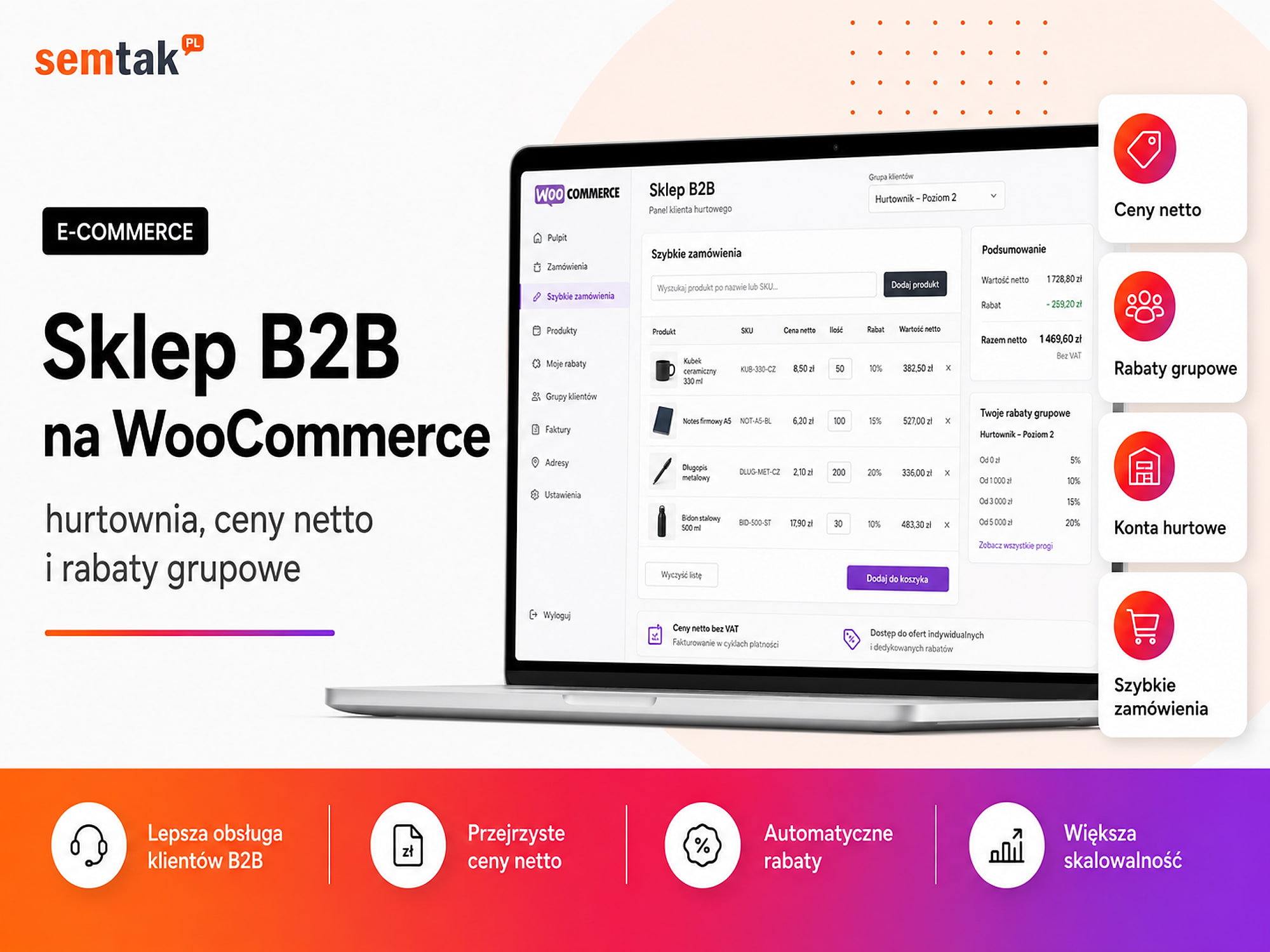
A B2B store is not an ordinary online shop with prices shown excluding VAT. A wholesale customer may have their own price list, payment terms, a credit limit, a minimum order value and access to only a selected part of the product range. A credit limit is the maximum value of unpaid orders a customer may have at any given moment.
On top of that come individual payment methods, delivery rules, orders placed by several employees of a single company, and integration with an ERP system or warehouse.
WooCommerce lets you build such a system, but most typically wholesale features are not available straight after installation. They have to be designed, connected and tested as a single process.
In this guide we show how a B2B store on WooCommerce can work, how to set up net prices and group discounts, what to watch out for during integration, and when an off-the-shelf plugin stops being enough.
In short
A B2B store on WooCommerce is not an ordinary shop with net prices — a wholesale customer needs their own price list, group discounts, a credit limit, payment terms, a logistics minimum and access to only part of the product range. WooCommerce will handle this with B2B plugins (customer roles, per-group prices, hiding prices before login) and integration with an ERP. The key is to first establish the commercial rules and only then choose the plugins.
In a nutshell (TL;DR)
- WooCommerce can run a B2B wholesale operation, but it usually requires extensions or custom features.
- A business customer can see net prices, an individual price list and products unavailable to other groups.
- Discounts can be applied as a percentage, by quantity, by category or based on fixed prices.
- The store should support order minimums, bulk packaging, deferred payments and quick reordering.
- For higher sales volumes you need integration with an ERP, a WMS, accounting software or BaseLinker.
- The biggest risk is price inconsistency between the product page, the cart, the order, the ERP and the invoice.
What is a B2B store on WooCommerce?
A B2B store on WooCommerce is a sales platform for companies, in which the offer, prices, payments and ordering rules can depend on a specific customer or group of customers.
B2B stands for business-to-business, that is selling between companies. The buyer is not a consumer ordering a single unit of a product, but a business, a retail shop, an installer, a contractor or a distributor.
WooCommerce in its basic version provides, among other things, products and variants, a cart, orders, customer accounts, payments, shipping, taxes, coupons and basic stock management. For typical B2B handling you usually need to add:
- company registration and account verification,
- customer roles and groups,
- net prices and group discounts,
- individual price lists and quantity thresholds,
- minimum orders and selling in bulk packaging,
- deferred payments and credit limits,
- a catalogue available after logging in,
- integration with the company's systems.
The single most important rule in all of B2B
The price shown on the product page must be the same as the price in the cart, in the order, in the ERP and on the sales document. Price inconsistency between these points is the most common and most costly mistake in wholesale stores — a product sold below margin, or an invoice that differs from the order summary. Every decision in this guide is meant to protect that consistency.
How does a B2B store differ from an ordinary B2C store?
A B2C store usually sells on similar terms to all customers, whereas a B2B store has to take into account the individual commercial terms of particular companies. B2C means a company selling to a consumer.
| Area | B2C store | B2B store |
|---|---|---|
| Prices | Usually the same for everyone | Depend on the group or company |
| How they are presented | Mainly gross prices | Often net prices and a VAT breakdown |
| Registration | Optional | Often mandatory and verified |
| Order size | Single units | Cartons, packs, pallets |
| Discounts | Coupons and promotions | Pricing tiers and commercial terms |
| Payment | Usually immediate | Bank transfer with a payment term possible |
| Offer | Usually shared | May depend on the customer |
| Delivery | Standard price list | Often pallet pricing or individual quotes |
| Ordering | Browsing products | Shopping lists, SKUs, quick reordering |
| Integrations | Useful | Usually essential |
A single WooCommerce installation can serve both retail and wholesale customers. However, you must clearly separate prices, the catalogue, payments and messaging for the two groups.
Is WooCommerce suitable for an online wholesale operation?
Yes — WooCommerce is suitable for B2B selling, provided the catalogue, price lists, integrations and infrastructure are tailored to the way the wholesaler works.
WooCommerce is a good choice when a company wants control over its store and data, already runs a site on WordPress, combines B2B sales with content and SEO, needs an individual ordering process, wants to integrate the store with its own systems, plans to develop features in stages and does not want to be limited by the fixed model of a subscription platform.
It may be a weaker choice when a company expects a full B2B system working straight after installation and does not plan a budget for configuration, testing and maintenance. WooCommerce will not, on its own, tidy up inconsistent product codes, several competing price lists, out-of-date stock, manually granted discounts, unclear credit-limit rules or a disorganised customer database. You first have to describe the sales process and only then mirror it in the system.
How to plan a B2B store before choosing plugins?
Before installing extensions you need to map out the customer groups, data sources, pricing rules and the full order flow.
Who can create an account. Decide: whether anyone can register, whether an account requires approval, whether a tax ID is needed, whether the company has to submit documents, whether the data is to be checked automatically and who approves a new customer.
Who can see the offer. Possible models: (1) products and prices are public; (2) products are public but only logged-in users see prices; (3) a guest sees only selected categories; (4) the whole catalogue becomes available only after account approval; (5) individual companies see different products.
Where prices come from. Prices can be managed directly in WooCommerce, in an ERP, in a warehouse system, in BaseLinker, in a separate commercial system or in an imported file. For prices, stock, limits and customer data you have to designate a master system.
How the customer's price is formed. It may result from the base price, the customer group, a percentage discount, the product category, the number of units ordered, an individual price list, a time-limited promotion or the value of the whole cart. The more rules there are, the more important it is to establish their order.
What happens after an order is placed. Map out: where the order goes, when stock is reserved, who checks the credit limit, when the sales document is created, where the shipment number is taken from, which system changes the status, what the customer sees in their account and what happens when an item is out of stock. Only then can you choose extensions and plan the integration.
How does company registration work in WooCommerce B2B?
B2B registration should collect the data needed to verify the company and assign it the right commercial terms.
The standard WooCommerce form is usually too simple for a wholesaler. You can add fields such as: company name, tax ID, registered address, delivery address, country of operation, EU VAT number, contact person, phone number, industry, expected purchase value, acceptance of the B2B terms and conditions, and documents for verification. The tax ID identifies the business for tax purposes, while the EU VAT number is used to identify a business in transactions within the European Union.
Open registration. The account is activated automatically. This is a quick solution, but it gives less control over granting wholesale prices.
Registration with approval. A new account is given a pending status. The process: the company sends the form → the system creates a pending account → a sales rep checks the data → the customer is assigned a pricing group → the account is activated → the system sends login instructions. This is a safer model when terms depend on negotiation, turnover or the type of business.
Automatic company verification. The form can be connected to an external register to check the tax ID format, pull basic data, fill in the address, reduce typos and verify tax status. Correct data in the register should not, however, automatically mean that a high discount or deferred payment is granted.
How to set up net prices in WooCommerce?
WooCommerce can store prices excluding tax and add VAT according to the store's configuration, but how prices are presented must be decided before you start selling.
The most important decision is:
In the product panel, do we enter the net price or the price including tax?
For a wholesaler it is often more convenient to enter net prices, because commercial price lists are kept net, discounts are calculated from the net price, the ERP stores net prices, and a business customer compares costs excluding VAT. The configuration should, however, match the accounting and the way data is exchanged with other systems.
How to show prices to the customer. A popular model: a guest sees the gross price or no price at all, a B2C customer sees the gross price, a logged-in B2B customer sees the net price, the cart shows net + VAT + the gross amount, and the order and the document contain the same values.
| Item | Value |
|---|---|
| Net product price | £100.00 |
| Customer discount | 15% |
| Net price after discount | £85.00 |
| Tax | As configured |
| Final amount | Calculated in the cart |
Watch out for VAT rounding
Differences arise when the store rounds each line separately and the accounting system only rounds the total; when the discount is calculated at a different moment; when the cart contains different tax rates; or when an external system sends prices with a different precision. Before going live, compare sample orders with documents issued by accounting. When selling abroad, do not assume "foreign company = no VAT" — how tax is charged depends on the customer's country, the type of transaction, the customer's status, the place of delivery and the regulations; the scenarios should be confirmed by accounting or a tax adviser. If you plan to sell in other countries, see how to build a multilingual WooCommerce store.
How do customer groups and B2B discounts work?
A customer can be assigned to a group that determines prices, discounts, products, payments and ordering rules.
Example groups: retailer, partner, installer, distributor, premium partner, retail chain, foreign customer, employee, customer with an individual price list. Do not create dozens of groups without a clear need — each additional one increases the number of rules to test and maintain.
Percentage discount for a group. The advantage is simplicity — changing the base price automatically changes the prices for all groups. The drawback is that a single percentage may not suit products with different margins.
| Group | Discount | Net price at a base price of £100 |
|---|---|---|
| Standard | 5% | £95 |
| Partner | 15% | £85 |
| Premium | 22% | £78 |
Category-based discount. It reflects margin differences better, but requires more control.
| Customer group | Category A | Category B | Category C |
|---|---|---|---|
| Partner | 15% | 10% | 5% |
| Premium | 22% | 18% | 10% |
Fixed prices for a group. Instead of a percentage you can assign a specific price (public price £100, Partner £83, Premium £74.50). These work well when the price list is set commercially or sent from the ERP.
Individual price list. The most important customers can have prices assigned directly to their account. With a few customers you can manage these in WooCommerce; with hundreds of individual price lists, the source of prices should usually be the ERP or a commercial system.
How to establish the order in which discounts are applied?
You have to decide which rule takes precedence when a customer meets several conditions at once.
Example: a customer belongs to the Partner group (15% discount), orders a quantity covered by a 20% discount and holds a 5% coupon. The system can apply only the highest discount, combine selected discounts, replace the group discount with the quantity one, disable coupons in B2B or apply the coupon after the other reductions. Without clear rules, a product may be sold below the minimum margin.
| Rule | Does it combine with others? | Priority |
|---|---|---|
| Individual price | No | 1 |
| Group price | Not with a group discount | 2 |
| Quantity discount | Depends on the category | 3 |
| Time-limited promotion | To be decided | 4 |
| Coupon | Usually restricted | 5 |
Tests should cover the least favourable combination of discounts, not just a typical order.
How to set up quantity discounts?
Quantity discounts lower the unit price once a defined number of units or order value is exceeded.
| Number of units | Net price per unit |
|---|---|
| 1–9 | £100 |
| 10–24 | £94 |
| 25–49 | £88 |
| 50 and more | £82 |
Thresholds can apply to a single product, all variants, a category, a brand, the number of products in the cart or the cart value.
Threshold for a product or a category. A customer can buy 10 units of one product or 2 units each of five products from the same category. In the first case the threshold is reached; in the second it depends on whether the system sums quantities within the category.
Show the discount on the product page itself — the customer should not discover the price only after going to the cart:
| Order at least | You pay |
|---|---|
| 10 units | £94 net/unit |
| 25 units | £88 net/unit |
| 50 units | £82 net/unit |
How to handle the order minimum and bulk packaging?
A B2B store should enforce the minimum value, minimum number of units and the packaging multiples that apply in the wholesale operation.
Typical rules: a minimum order value of £500 net, a minimum of 6 units of a product, selling only in batches of 12, a full carton of 24 units, a minimum number of pallets, a different minimum for each group.
Packaging multiple. If a carton contains 12 units, the customer can order 12, 24, 36 or 48 units — but not 13, if the warehouse does not unpack cartons.
Sales unit vs warehouse unit. You have to establish whether a product in WooCommerce means a single unit or a single carton, whether the customer enters units and the system converts them into cartons, and whether the ERP stores stock in units or in packages. Example: stock of 240 units, a package of 12 units → availability for the customer is 20 cartons. An incorrect conversion can lead to selling more products than are actually in the warehouse.
Can prices and products be hidden from non-logged-in visitors?
Yes — WooCommerce can act as a closed catalogue in which prices and the ability to buy appear only after logging in.
Public catalogue and prices. Everyone sees the offer; an account is needed to buy on B2B terms.
Public products, hidden prices. A guest sees the catalogue but, instead of a price, gets a message "Log in to see wholesale prices". This is often a good compromise between SEO and protecting the price list.
Closed catalogue. Products available only to approved customers — this protects the offer but limits acquiring traffic from Google for categories and products.
Different catalogues for groups. An installer sees technical parts, a retail shop sees finished products, a distributor sees the full offer, and a foreign customer sees the range available on their market.
B2B and B2C store together or separately?
A single WooCommerce installation can serve both retail and wholesale customers, but a shared store only makes sense when the catalogue and processes are similar.
One store for B2B and B2C. Advantages: one catalogue, one panel, shared stock, one domain, one content source, fewer integrations. Disadvantages: more complex prices, different net/gross rules, different payments and minimums, more testing, the risk of showing the wrong price.
A separate B2B store. Advantages: a separate sales process, simpler messaging, a separate catalogue, independent promotions, a lower risk of mixing up rules. Disadvantages: two systems to maintain, additional synchronisation, separate updates, higher cost, possible content duplication.
A single store is usually a good choice when the products and stock are shared and only the prices, minimums and payments differ.
How to make ordering easier for wholesale customers?
A B2B customer should be able to place a large, repeat order faster than a retail customer browsing the catalogue.
Useful features: a product table, search by SKU, quick quantity entry, adding several products at once, importing an order from a file, reordering, shopping lists, favourite products, purchase history. An SKU is an internal product code used in the store, the warehouse and the ERP.
| SKU | Quantity |
|---|---|
| KRZ-CZ-L | 24 |
| STO-DAB-160 | 6 |
| LAM-BIA-01 | 12 |
The system recognises the products, checks availability, converts packages and adds the items to the cart.
How to handle individual payment methods?
Payment methods can depend on the customer group, the history of cooperation, the order value and the granted credit limit.
A new customer can use a fast bank transfer, a card or prepayment. A verified partner can additionally be offered a traditional bank transfer, payment on collection, a bank transfer with a payment term or an individual settlement method. We describe payment methods in detail in our guide on payments in WooCommerce.
Deferred payment. A bank transfer with a 7-, 14- or 30-day term should not be available automatically for every account. You have to establish who can use deferral, what their term and limit are, who approves a change to the limit, what happens when it is exceeded, whether the store takes unpaid documents into account and which system the limit is pulled from.
Example of a credit limit
A customer limit of £20,000, unpaid documents of £14,000, a new order of £8,000 — the total exposure would be £22,000. The store can then block the order, require prepayment, pass it for approval or notify a sales rep. If the limit is kept in the ERP, WooCommerce should pull its current value rather than maintain a separate manual copy.
Can several employees of one company use a B2B account?
Yes, but it is better to create separate user accounts than to share a single password.
Example roles: account owner, buyer, manager, accounting, branch employee, approver. Possible rules: the buyer prepares the cart, the manager approves the order, accounting downloads documents, the owner manages users, and a branch sees only its own orders. A shared account such as purchasing@company.com makes it hard to establish who placed an order or changed the data.
How to connect a B2B store with an ERP?
Integration with an ERP allows you to automatically exchange products, prices, stock, customers, orders and documents.
An ERP is a system for managing a company, covering, among other things, the warehouse, invoices, price lists, orders, customers, finances and product records. A typical flow: the ERP passes prices and stock to WooCommerce → the customer places an order → the order goes to the ERP → the ERP reserves the goods → a sales document is created → the warehouse fulfils the order → the shipment number returns to WooCommerce → the customer sees the current status.
Most often the following are synchronised: SKU, stock, base prices, group prices, individual price lists, units and packaging, customer data, orders, statuses, document numbers, shipment numbers and credit limits. Not all data has to be sent in both directions. The technical mechanism for the exchange can be the WooCommerce REST API.
Which system should be the source of truth?
For each type of data you have to designate a single master system, so that WooCommerce, the ERP and the warehouse do not overwrite each other's information.
| Data | Master system |
|---|---|
| Base price | ERP |
| Group discount | ERP or WooCommerce |
| Individual price list | ERP |
| Stock level | WMS or ERP |
| Marketing description | WooCommerce |
| Images | WooCommerce |
| Credit limit | ERP |
| Shipment status | Logistics system |
| Online order history | WooCommerce and ERP |
A WMS is a system for managing the warehouse, product locations, picking and dispatch. The worst model is manually editing the same data in several systems without an established priority.
Integration with BaseLinker or directly with the ERP?
BaseLinker can act as an operations hub, but it should not always be the main source of price lists, limits and commercial data.
BaseLinker can handle pulling orders, passing on statuses, dispatch, marketplace synchronisation, operational automation, and documents and labels. Direct integration with the ERP can be better when price lists are complex, limits have to be up to date, the company has several warehouses, customers are synchronised, there are unusual units, or orders require approval. More in our guide on integrating WooCommerce with accounting and Base.
How to handle B2B invoices and documents?
Documents should be created on the basis of the same data that the customer accepted in the cart and that was passed to the accounting system.
Possible documents: pro forma invoice, VAT invoice, advance-payment invoice, correction, goods-issue note, order confirmation, warehouse document. You have to establish which system issues the document, when it is created, where it is stored, whether the customer downloads it from their account, how corrections are handled and how the document is linked to the order. It is not worth issuing independent invoices simultaneously in WooCommerce and the ERP — this can lead to different numbers and amounts.
What does delivery look like in a WooCommerce wholesale operation?
B2B delivery often requires different rules than the standard shipping of a single courier parcel.
Possible scenarios: a courier parcel, several parcels, a pallet, own transport, collection from the warehouse, an individual quote, free delivery once a threshold is exceeded. The cost can depend on weight, the number of cartons, the number of pallets, volume, postcode, zone, order value and customer group. If WooCommerce does not have all the logistics data, the cost can be calculated in the ERP, the WMS or a transport system. We describe delivery configuration in our guide on shipping in WooCommerce.
How to take care of the performance of a WooCommerce wholesale store?
The performance of a B2B store depends mainly on the number of pricing rules, variants, integrations and operations performed for each customer.
A store can slow down when it calculates many discounts for every product, pulls prices from the ERP on every visit, has thousands of variants, filters the catalogue by user, uses several pricing plugins, runs a full import every few minutes, recalculates many warehouses or queues a lot of background jobs.
Do not pull the price from the ERP every time a page is opened
A safer model: the ERP sends prices to WooCommerce → WooCommerce stores them locally → the customer sees the price without waiting for the ERP → the integration sends only changes. Thanks to this, an ERP outage does not block the catalogue from displaying. Instead of sending the whole catalogue, synchronise incrementally — only the changed prices, stock, new customers and modified price lists; an incremental import is faster and easier to monitor.
Caching and individual prices
A cache is a stored version of a page or data that speeds up subsequent displays. In a B2B store you have to be careful that a customer does not see another group's price, receive someone else's price list, see an out-of-date limit or someone else's cart contents. The cache configuration must take logged-in users and dynamic prices into account — otherwise the first price list saved in the cache will reach everyone.
How to take care of the security of a B2B store?
A B2B store holds commercial terms, company data and order history, so accesses and integrations must be limited and monitored.
The basics: regular updates, off-site backups, strong passwords, two-factor authentication, limited permissions, HTTPS, monitoring, a firewall, separate employee accounts and secure storage of API keys. An API is the way systems communicate with each other, for example WooCommerce and the ERP. An integration that pulls orders should not have the right to delete products and customers. You will find more rules in our guide on WooCommerce store security.
An off-the-shelf B2B plugin or a custom implementation?
An off-the-shelf plugin works well for standard pricing groups and company registration. A custom solution is needed for individual commercial rules and integrations.
When an off-the-shelf plugin is enough. When you need a few customer groups, percentage discounts, hiding prices, manual account approval, a minimum order value, simple quantity thresholds and basic company fields.
When modifications are needed. When there are individual price lists from the ERP, several warehouses, credit limits, multi-stage order approval, several users from one company, unusual sales units, custom delivery algorithms, B2B and B2C in one store, external configurators or a quoting process before the order.
Watch out for several plugins doing the same thing
A common problem: one plugin shows net prices, a second applies discounts, a third hides the catalogue, a fourth enforces the minimum, a fifth changes payments. Together they may calculate prices in a different order, show different values on the product page and in the cart, cause conflicts, make updates harder and burden the store. It is better to choose one main B2B solution and extend it with the missing features.
How to implement a B2B store on WooCommerce step by step?
Run the implementation from describing customer groups and data, through the price matrix and integrations, to scenario testing and monitoring.
Step 1: describe the customer groups. For each one, note who falls into it, what price list it has, what products it sees, what minimum it has, what payments it uses and whether it has a credit limit.
Step 2: tidy up the catalogue. Check SKUs, variants, units, bulk packaging, categories, stock and price sources.
Step 3: choose the data sources. Establish where products, prices, discounts, stock, customers, limits and documents are managed.
Step 4: design the registration. Define the required fields, the verification method, the approval process, the messages to the customer, the default role and the access before approval.
Step 5: prepare the price matrix.
| Group | Category | Price type | Discount | Minimum |
|---|---|---|---|---|
| Standard | All | Base | 5% | £500 |
| Partner | Furniture | Group | 15% | £1,000 |
| Premium | Furniture | Fixed | Per price list | £2,000 |
Step 6: set the rule priority — order: (1) individual price, (2) group price, (3) quantity discount, (4) promotion, (5) coupon.
Step 7: configure payments and delivery. Take into account prepayment, online payments, a bank transfer with a term, the credit limit, pallets, collection in person and individual deliveries.
Step 8: carry out the integrations. Connect product data, commercial data, orders, documents and statuses in line with the previously agreed map of systems.
Step 9: test the scenarios. Check registration, account approval, every pricing group, quantity thresholds, out-of-stock items, the order minimum, deferred payment, exceeding the limit and an integration error.
Step 10: launch monitoring. Keep an eye on synchronisation errors, orders that were not sent, discrepancies in prices and stock, the store's response time, background jobs and undelivered messages.
The most common mistakes in B2B WooCommerce stores
The most problems are caused by the lack of a single source of truth, double discounts, a price mismatch between the product page and the cart, and no handling of integration failures.
No single master system. The price is changed in the ERP, in WooCommerce and in a spreadsheet, and successive imports overwrite earlier values.
Discounts are applied twice. The customer receives a group discount, a quantity discount, a promotion and a coupon, even though some rules were supposed to exclude each other.
A different price on the product and in the cart. One plugin changes the display, while another only calculates the correct price in the cart.
Incorrect presentation of net and gross. The customer does not know whether the price includes VAT, or the document differs from the order summary.
No testing of variants. A rule works for a simple product but does not cover its variants.
Shared accounts. Several employees use one password, so it is unclear who placed an order.
No handling of integration failures. The ERP does not respond, the order is not sent, and the system does not send an alert.
Full catalogue synchronisation. Every change triggers the processing of thousands of products and burdens the store.
Hiding the catalogue without an SEO analysis. After access is closed, Google stops seeing the pages that previously generated traffic.
What can you check yourself?
Before commissioning an implementation, you can prepare the basic commercial rules and check the quality of the data.
1. List the customer groups. Note the differences in prices, payments and catalogue.
2. Prepare a sample price list. Show prices for a few products for each group.
3. Check the SKUs. Every product and variant should have an unambiguous code.
4. List the bulk packaging. Define minimums, multiples and units.
5. Designate the master system. Establish where prices, stock and limits are managed.
6. Map out the company registration. Decide what data is needed and who approves the account.
7. List the payment methods. Separate the rules for new and trusted customers.
8. Check invoicing. Establish which system issues the document.
9. Review the integrations. Take into account the ERP, accounting, BaseLinker, the warehouse and couriers.
10. Prepare the edge cases. A return, an out-of-stock item, a price change, exceeding the limit and a synchronisation error.
When is it worth commissioning a B2B store from a specialist?
A specialist's help is needed when the store is to handle more than a simple discount for a single customer group.
It is worth commissioning the implementation when prices come from the ERP, there are individual price lists, several warehouses operate, the customer has a credit limit, orders require approval, one company has several users, the store combines B2B and B2C, the catalogue depends on the customer, there are different sales units, two-way integration is needed or a pricing error could cause a large loss.
Before programming, a document should be created describing: the customer groups, the pricing rules, the order of discounts, the catalogue and visibility, the registration, the minimums and units, the payments, the delivery, the integrations and the error scenarios. If the store is only just being created, it is best to take these requirements into account already at the stage of building a WooCommerce store. If the process requires a separate customer panel, multi-stage approvals or non-standard logic, the solution may also be a web application for your company.
Frequently asked questions
Is WooCommerce suitable for a wholesale operation?
Yes. It can handle net prices, customer groups, quantity discounts, a hidden catalogue, order minimums and integrations. The B2B features, however, require extensions or a custom implementation.
How to show net prices only to business customers?
B2B customers are assigned an appropriate role. The system can then show them net prices, while guests and retail customers see gross prices.
Can you set different prices for each customer?
Yes. You can use group prices or individual price lists assigned to a specific account. With a large number of price lists, it is best to synchronise them with the ERP.
Can prices be hidden from non-logged-in visitors?
Yes. Products can be public, with prices and the cart available only after logging in. You can also hide the whole catalogue or selected categories.
How to set a minimum order in WooCommerce?
You can define a minimum cart value, a minimum number of units of a product and selling in packaging multiples.
Does WooCommerce support deferred payments?
You can make a bank transfer with a payment term available to selected customers. Controlling the credit limit and outstanding amounts may require integration with the ERP.
Can orders go automatically to the ERP?
Yes. WooCommerce can exchange data with the ERP via an off-the-shelf module, BaseLinker or a dedicated API integration.
Is it better to run B2B and B2C in one store?
A single store makes sense when the catalogue and stock are shared and only the prices and payments differ. With completely different processes, two separate stores may be better.
A B2B store has to mirror real commercial rules
WooCommerce offers a lot of flexibility, but simply installing a wholesale plugin does not create an efficient B2B system. First you have to establish who you sell to, what prices the customer sees, how discounts are applied, where stock comes from, who grants the payment term, how the order reaches the warehouse and what happens when an error occurs. Only then can you choose the extensions, integrations and infrastructure.
If you are planning an online wholesale operation, we can analyse the catalogue, price lists, customer groups and the order-fulfilment process, and then indicate which elements can be implemented with off-the-shelf solutions and which require an individual integration or WooCommerce features:
- WooCommerce store development — implementing a wholesale operation from scratch.
- E-commerce integrations and systems integration — connecting the store with an ERP, warehouse and accounting.
- Web applications for companies — when you need a dedicated B2B panel and non-standard logic.
- Integrating WooCommerce with accounting and Base and business process automation — how to organise the data flow.