WooCommerce vs Shopify? A comparison for an online store (2026)

WooCommerce or Shopify? Both platforms let you run a professional online store, but they work on completely different principles.
Shopify is a ready-made subscription service. Hosting, system updates and the platform's technical back end are provided by the supplier. You can relatively quickly choose a theme, add products, set up payments and start selling.
WooCommerce runs on WordPress and a server of your choosing. It requires more decisions and technical care, but it gives you greater control over the code, integrations, SEO, data and future development.
There is no single best platform for everyone. Shopify may be better for a simple store that needs to launch quickly. WooCommerce more often proves its worth when a store is meant to be developed over the years, connected to company systems or tailored to an unusual sales process.
In this comparison we look at costs, payments, delivery, SEO, speed, security and integrations from the perspective of a store owner.
In short
For most stores that prioritise SEO and full control, WooCommerce is the better choice; Shopify wins when what matters most to you is a quick launch without any technical back end. Shopify is a ready-made subscription — hosting, updates and the technical side are provided by the supplier, you start fast, but you pay monthly, have less control and face commissions on some gateways. WooCommerce is a free plugin on WordPress — full control, the best SEO and integration with content, but you take care of hosting, updates and security yourself. We also compare WooCommerce with other engines: Magento, PrestaShop and Shoper.
TL;DR
- Choose Shopify if you care about a quick launch, simpler operation and limiting your technical obligations.
- Choose WooCommerce if you need more control over the store, the code, the server, SEO and integrations.
- WooCommerce requires no subscription for the core itself, but you do have to pay for hosting, implementation and maintenance.
- Shopify has a fixed subscription, and additional apps can increase the monthly cost.
- Shopify is usually easier to launch. WooCommerce is easier to tailor to an unusual way of selling.
- For a simple D2C store or testing a new brand, Shopify may be more convenient.
- For a store with an ERP, BaseLinker, B2B, configurators or extensive SEO, we would more often choose WooCommerce.
- Compare the total cost and capabilities over at least two years, not just the starting price.
WooCommerce or Shopify — the quick verdict
Shopify wins on simplicity and speed of launch, whereas WooCommerce wins on control, flexibility and the ability to tailor the store to company processes.
The simplest way to choose looks like this:
| Your situation | Better starting point |
|---|---|
| You want to quickly test selling a few products | Shopify |
| You have no technical back end or regular contractor | Shopify |
| You don't want to deal with the server and system updates | Shopify |
| You sell in a simple D2C model | Shopify |
| The store is to be heavily developed for SEO and content | WooCommerce |
| You need an ERP, BaseLinker or your own API | WooCommerce |
| You sell products with unusual variants | WooCommerce |
| You need a product configurator | WooCommerce |
| You're building a B2B wholesale store with individual pricing | Usually WooCommerce |
| You want to choose the server yourself and have database access | WooCommerce |
The table does not replace an analysis of a specific business. A large brand can operate effectively on Shopify, and a small store can do well on WooCommerce. The decision should follow from the sales model, integrations, budget and development plan, not solely from the platform's popularity.
What actually makes WooCommerce and Shopify different?
WooCommerce is open-source software run on your own hosting, whereas Shopify is a ready-made store service available on subscription.
This is the most important difference. Most of the others stem precisely from it.
WooCommerce — a store on your own WordPress. WooCommerce is e-commerce software that works as an extension of WordPress. The store owner chooses the hosting, theme, contractor, additional plugins, payment provider, backup method, security measures, integrations and the scope of code changes. You can change practically any element of the store — but at the same time you have to make sure that all the elements work together correctly. You'll find a fuller explanation in our guide on what WooCommerce is.
Shopify — a store as a ready-made service. Shopify works in the SaaS model, that is software provided as a service. As part of the subscription you receive, among other things, the store panel, hosting, an SSL certificate, platform updates, technical infrastructure, a ready-made checkout process, access to themes and apps, and Shopify technical support. You don't have to install a system or choose a server yourself. The store does, however, operate within the capabilities and rules set by Shopify.
Key terms in one place
SaaS — a ready-made system provided on subscription that you don't install on your own server.
Open source — software with available code that you can run and modify on your own hosting.
TCO — the total cost of owning a store: subscription or hosting, implementation, apps, plugins, maintenance and development.
API — a way of connecting the store to other systems, for example an ERP, a warehouse or an app.
D2C — selling directly from the brand to the customer, without wholesalers or other intermediaries.
CDN — a network of servers delivering images and other files from a location closer to the user.
Shopify Functions — a mechanism that lets you modify selected rules of how Shopify behaves, for example discounts or payment rules.
WooCommerce vs Shopify — the most important differences
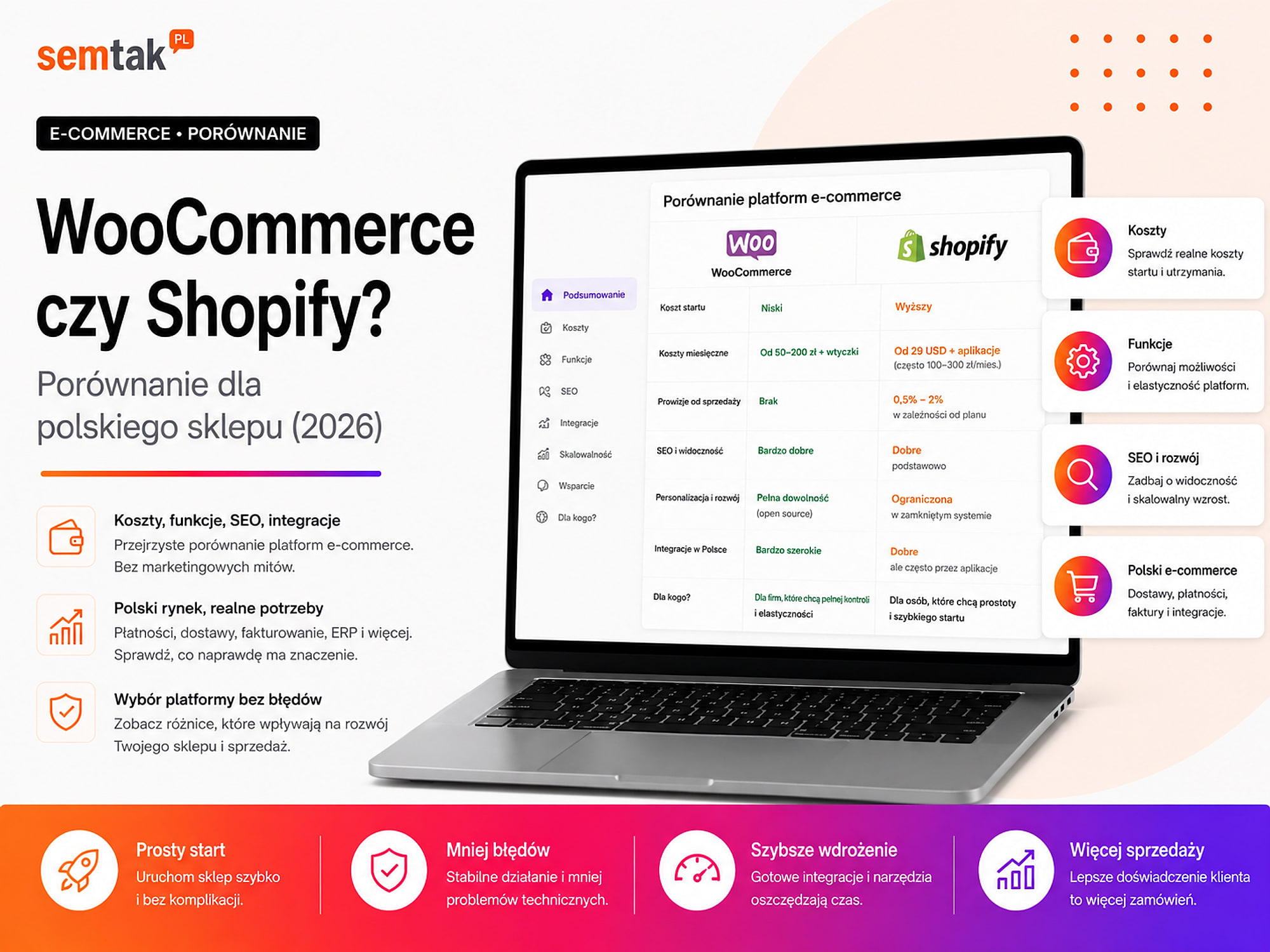
| Area | WooCommerce | Shopify |
|---|---|---|
| Model | Open source on WordPress | SaaS platform |
| Hosting | You choose and pay for it yourself | Included in the subscription |
| Core fee | None | Fixed subscription |
| Platform commission | No WooCommerce commission | Possible with an external gateway |
| System updates | On the owner's or caretaker's side | Mainly on Shopify's side |
| Access to the code | Very broad | Limited by the platform's architecture |
| Control over the server | Yes | No |
| Speed of launch | Depends on the implementation | Usually faster |
| Technical requirements | Higher | Lower |
| Unusual integrations | Very large scope | Apps, API and Shopify functions |
| Technical SEO | Very high control | Good foundations, less freedom |
| Infrastructure security | On the owner's or caretaker's side | Mainly on Shopify's side |
| Checkout modifications | A lot of freedom | Scope depends on architecture and plan |
| B2B | Plugins or a custom build | Shopify functions and apps |
| Blog and content | Full-featured WordPress | A simpler content system |
How much does WooCommerce cost, and how much Shopify?
You shouldn't compare the price of a Shopify subscription with the fact that the WooCommerce core is free. You have to calculate the full cost of launching and maintaining the store.
Shopify prices in 2026. According to the current Shopify pricing, the following plans are available on annual billing:
| Shopify plan | Effective monthly price on annual billing |
|---|---|
| Basic | from around $29 |
| Grow | from around $79 |
| Advanced | from around $299 |
| Plus | from around $2,300 |
On annual billing, the fee for the whole year is charged up front. The monthly price shown in the table reflects the effective cost of a single month.
Prices change
Shopify's prices, promotions and plan names may change. Before making a decision, confirm them in the platform's current pricing. The subscription itself is not always the full cost either — the theme, apps and payment handling are added on top of the price.
On top of the Shopify price you may have: a paid theme, a delivery app, an invoicing integration, advanced filters, a reviews system, a product configurator, a warehouse integration, implementation by a contractor, theme modifications and payment handling fees. Apps can be billed monthly, as a one-off or based on usage. Several small subscriptions can over time cost more than the basic store plan.
WooCommerce costs. The basic WooCommerce core is free. The store owner does, however, usually have to pay for a domain, hosting or a server, the design and build of the store, a theme or a bespoke design, additional plugins, integrations, backups, monitoring, updates and technical care. WooCommerce has no single monthly price — a simple store with a few dozen products and an extensive B2B system have completely different requirements. We described detailed cost levels in our guide on how much an online store on WooCommerce costs.
How to compare costs? Calculate the full cost over at least 24 months:
Shopify: subscription + apps + theme + implementation + payment handling + development
WooCommerce: hosting + domain + implementation + plugins + maintenance + payment handling + development
Don't automatically assume that WooCommerce will always be cheaper. If it requires a bespoke system, a high-performance server and ongoing support, the cost may be higher than a simple Shopify. Shopify doesn't have to be cheap after expansion either — each additional app can increase the fixed monthly cost.
The most important cost rule
Compare the TCO (total cost of ownership) over 2–3 years, not the price on the first pricing screen. A simple store to start with tends to be cheaper on Shopify; an extensive system with bespoke features more often gives greater control over cost on WooCommerce. With many paid apps, the difference quickly narrows.
Does WooCommerce or Shopify charge a sales commission?
WooCommerce does not charge its own platform commission on orders. On Shopify, an additional fee depends, among other things, on the payment provider you use.
You have to distinguish the provider's commission for handling a payment from the platform's additional fee for using an external provider.
WooCommerce. WooCommerce does not add its own percentage to the order value. You still pay the payment provider, for example Stripe, PayPal, Przelewy24, PayU or Tpay. This is the cost of handling the transaction, not a WooCommerce commission.
Shopify. If you use Shopify Payments, you pay the rate appropriate for the payment method and the plan you've chosen. If you choose an external provider instead of Shopify Payments, Shopify may charge an additional fee:
| Plan | Third-party transaction fee |
|---|---|
| Basic | 2% |
| Grow | 1% |
| Advanced | 0.6% |
An external provider may charge its own commission at the same time. This means that when choosing a gateway you have to calculate both levels of cost, not just the provider's own offer.
Which platform handles payments better?
Both platforms can handle popular payment methods for customers. Shopify provides integrated Shopify Payments, while WooCommerce offers a wider choice of independent providers.
Payments in Shopify. Shopify Payments is available for online sales in many markets. Among the supported methods you'll find local options where Shopify Payments operates. Handling payments directly within the Shopify system can simplify configuration, payout control, refund handling, order analysis and contact with technical support. Before launching, you have to check the rates for the plan you use, the business eligibility conditions, the payout timing, refund rules and supported currencies.
Payments in WooCommerce. WooCommerce lets you choose a provider independently of the platform's maker. You can implement, among others, Stripe, PayPal, Przelewy24, PayU, Tpay, Autopay, bank transfer, cash on delivery as well as instalments and deferred payments. If the terms of your current provider stop being favourable, you can change the integration without migrating the whole store. You'll find more information in our guide on payments in WooCommerce — Przelewy24, PayU and Tpay.
The verdict on payments. Shopify offers simpler handling within a single ecosystem; WooCommerce gives a wider choice of providers and the freedom to switch supplier. In both cases, check the full commission, payouts, refunds and how payments work on a phone.
WooCommerce or Shopify — delivery
In both systems you can implement parcel lockers and couriers. WooCommerce draws on a broad ecosystem of local plugins, whereas Shopify most often relies on apps and integrators.
An online store may need: parcel lockers, courier services, pickup points, pallet shipments, in-store collection, a free-delivery threshold and automatic labels.
Delivery in WooCommerce. WooCommerce can be connected to carrier plugins, courier systems, BaseLinker, shipping integrators and your own API. You can create unusual rules, for example:
- different delivery for furniture,
- pallet shipping for heavy products,
- exclusions by postal code,
- separate conditions for B2B customers,
- different free-delivery thresholds,
- a cost dependent on category or size.
We covered the details in our guide on shipping in WooCommerce — InPost, DPD and parcel lockers.
Delivery in Shopify. In Shopify, delivery is implemented through carrier apps, partner apps, logistics integrators and the order-handling system. For a simple store a ready-made app may be enough. With unusual sizes, multiple warehouses or made-to-order products, you have to check the whole scope of the integration. Don't just ask whether an app "supports a given carrier". Also check whether it:
- shows a map of pickup points,
- saves the pickup point in the order,
- creates a label,
- sends a tracking number,
- supports cash on delivery,
- takes sizes into account,
- syncs statuses,
- splits shipments,
- requires an additional subscription.
The verdict on delivery. For a simple store with a typical parcel, both platforms may be enough; with unusual sizes and logistics rules, WooCommerce usually gives more freedom. Before choosing, test the whole process from selecting a pickup point to creating a label.
Which system is easier to launch?
Shopify usually lets you start faster, because it doesn't require choosing hosting, installing a system and configuring a server yourself.
Starting on Shopify. The basic process looks like this:
- You create an account.
- You choose a plan.
- You choose a theme.
- You add products.
- You connect a domain.
- You configure payments.
- You add delivery.
- You test an order.
- You publish the store.
A professional store still requires preparing the category structure, photos, descriptions, terms and conditions, analytics, product data, the mobile version and the returns process. The technical entry threshold is, however, lower than in WooCommerce.
Starting on WooCommerce. In WooCommerce you additionally have to choose hosting, install WordPress, configure SSL, set up backups, pick a theme and plugins, secure the panel, check extension compatibility, configure caching and prepare a test environment. A well-built WooCommerce requires more decisions at the beginning — in return, later development is less constrained by the platform supplier.
The verdict on launching. A simple sales test — Shopify. The store as the company's main sales system — WooCommerce is worth serious consideration. You already have an extensive WordPress site — WooCommerce can be a natural extension.
Which platform is easier in day-to-day operation?
Shopify is usually simpler for a company that doesn't want to deal with the technical back end of the store.
In Shopify, many elements sit in one panel: products, orders, payments, apps, customers, discounts and basic analytics. Updating the platform core and maintaining the server is not the owner's responsibility.
WooCommerce can also be simple in everyday work. Adding products, fulfilling orders and changing prices don't require programming. The difference appears in technical maintenance — someone has to keep an eye on updates to WordPress, WooCommerce, the theme and plugins, backups, performance, security and integration errors. If the store has a regular caretaker, the owner doesn't have to do this work themselves.
Which platform gives more control?
WooCommerce gives more control over the code, the server, the database and the sales process. Shopify limits some of the control but takes on more of the technical responsibility.
Control in WooCommerce. You can create your own plugins, modify the checkout, change how prices are calculated, choose the server, manage caching, get direct database access, move the whole store to different hosting, build your own integrations and tailor the panel for staff. Freedom doesn't always mean an advantage — badly written code or a random set of plugins can make further development harder.
Control in Shopify. You can modify the theme, install apps, use the API and Shopify Functions. You don't, however, get access to the server or the entire platform code. Part of the sales process works according to Shopify's architecture, and advanced modifications may require additional tools or a higher plan. For a simple store this doesn't have to be a problem — limitations also reduce the risk of damaging the most important elements of the system.
Data and platform dependency. In Shopify you can export products, customers and some other data, but you don't export the whole platform along with its technical back end. In WooCommerce the database, files and store code sit on a server of your choosing — you can move the whole system to a different hosting company.
WooCommerce or Shopify for SEO?
Shopify provides good SEO foundations, but WooCommerce gives more freedom to work on the structure, content and technical elements of a large store.
SEO in Shopify. Shopify provides, among other things, an SSL certificate, an XML sitemap, a basic robots.txt file, canonicals, editing of titles and descriptions, redirects and responsive themes. For many stores this is a sufficient starting point. Limitations may appear when you want to control the URL structure very precisely, the indexing of filters, unusual structured data, the technical behaviour of categories, an extensive content architecture or how the server behaves. Some changes require editing the theme or an additional app.
SEO in WooCommerce. WooCommerce and WordPress let you broadly manage categories, URLs, canonicals, redirects, sitemaps, internal linking, structured data, the indexing of filters as well as product and category descriptions. WordPress also has very extensive content-publishing capabilities. This matters when a store's strategy is built on buying guides, rankings, a blog, manufacturer pages, extensive categories and content that answers long-tail queries. It doesn't mean that every WooCommerce store automatically has good SEO — badly set up filters, duplicates and a slow server can cause serious problems.
The SEO verdict. Simple SEO and a quick launch — Shopify usually suffices. An extensive content strategy and a lot of technical control — WooCommerce has the advantage. In both systems the platform alone does not guarantee rankings. If Google is to be an important channel for acquiring customers, plan your online store SEO before you build the category structure.
Which platform is faster?
Shopify more easily guarantees a stable technical level without server configuration, but a well-built WooCommerce can run just as fast.
You can't honestly state that one platform is always faster.
Shopify speed. Shopify provides managed hosting, a CDN, an SSL certificate, infrastructure updates and scaling of the core platform. Speed problems can be caused by a heavy theme, a large number of apps, marketing scripts, extensive widgets and unprepared images.
WooCommerce speed. In WooCommerce, performance depends on the hosting, the version and configuration of PHP (the language WordPress runs on), the database, caching, the theme, plugins, images, integrations and the number of concurrent users. You can match the server to the store and remove unnecessary elements — but you can also run the store on weak hosting and overload it with random extensions. You'll find more information in our guide on hosting for WooCommerce — how to choose.
The verdict on speed. You don't want to manage infrastructure — Shopify. You need control over performance and have a technical back end — WooCommerce. In both cases, keep an eye on images, the theme, apps and marketing scripts.
Security and updates
Shopify takes on a larger part of the responsibility for the infrastructure, whereas WooCommerce security depends on the hosting, configuration and regular care.
Shopify security. Shopify is responsible for, among other things, the servers, core updates, basic platform protection, the SSL certificate and the technical availability of the service. The owner is still responsible for strong passwords, staff access, securing email, app permissions, correct data handling and choosing trusted extensions.
WooCommerce security. In WooCommerce you have to take care of updates, backups, login protection, monitoring, a firewall, SSL, a current PHP version, plugin security and an incident response plan. This is greater responsibility but also greater control. A well-maintained WooCommerce doesn't have to be less secure than a subscription system — the problem starts when no one updates the store and no one checks the backups.
Integrations with BaseLinker, ERP and marketplaces
WooCommerce usually gives more freedom with non-standard integrations, whereas Shopify bases most of its extensions on apps and its API.
WooCommerce integrations. Connections are available with BaseLinker, marketplaces, invoicing systems, ERP, couriers, wholesalers, Google Merchant Center and sales channels. If a ready-made integration isn't enough, you can prepare your own plugin or an API connection.
Shopify integrations. Shopify has an extensive App Store and its own API. It works well with many global tools and sales channels. With local systems, check:
- whether a ready-made app exists,
- who develops it,
- how often it is updated,
- how much it costs,
- what data it synchronises,
- whether it works both ways,
- how it handles variants,
- who is responsible for errors.
A BaseLinker, ERP or courier logo on the app page alone doesn't guarantee that the integration will handle the company's entire process.
An example of an ERP integration
A store needs a connection to an ERP: the ERP sends prices and stock levels, the store passes on orders, the ERP issues the sales document, the shipment number returns to the store, and different customer groups see different prices. In both systems such a process may be possible — WooCommerce, however, usually gives the contractor more freedom to modify the way data is exchanged.
Shopify or WooCommerce for a B2B store?
For simple B2B both platforms may be enough, but with individual pricing, unusual rules and a local ERP, WooCommerce often gives more freedom.
A B2B store may need net prices, individual discounts, customer groups, minimum quantities, bulk packaging, deferred payments, trade credit limits, hidden prices, approval of company accounts and ERP integration. WooCommerce delivers such features through B2B plugins or a bespoke build. Shopify also has B2B features, but their scope depends on the plan, apps and how the store is designed.
The B2B verdict. A simple wholesale catalogue — both platforms may be enough. Advanced pricing and processes — WooCommerce is more often easier to tailor. A large Shopify build — check whether the features you need don't require Shopify Plus. You'll find more examples in our guide on a B2B store on WooCommerce.
Shopify or WooCommerce for selling abroad?
Shopify provides a convenient base for quickly launching international sales, whereas WooCommerce gives more freedom with unusual rules for individual countries.
Shopify can be a good choice for a D2C brand that has a relatively simple catalogue, wants to open new markets quickly, uses global apps, acquires customers from ads and social media, and has no unusual order process.
WooCommerce can be more advantageous when you have many language versions, individual countries require different rules, you need local integrations, SEO content matters a great deal, the store has to connect to your own back end, or you need bespoke taxes or delivery.
The verdict on selling abroad. A quick entry with a simple D2C model — Shopify. Unusual localisations, integrations and extensive SEO — WooCommerce. Before choosing, check the specific countries, currencies, taxes, delivery and payments.
When to choose Shopify?
Shopify will be a good choice when simplicity and a quick launch matter more than full technical control.
Consider Shopify if:
- you're launching your first store,
- you're testing a new brand,
- you have a simple catalogue,
- you don't need unusual integrations,
- you don't want to manage hosting,
- you don't have a technical person,
- you accept a subscription,
- you want to use mainly ready-made apps,
- you sell in a simple international model.
Example scenario. A brand sells 15 clothing models in several sizes. Production is outsourced, orders are handled by a small team, and the main traffic channels are Instagram and Meta ads. The company wants to test demand quickly. It doesn't need an ERP, extensive B2B or a configurator. Shopify may be a sensible choice in this situation.
When to choose WooCommerce?
WooCommerce will be the better choice when the store is to be tailored to company processes and developed as your own sales system.
Consider WooCommerce if:
- the store is to be the main sales channel,
- you care about extensive SEO,
- you run a blog and guides,
- you need BaseLinker or an ERP,
- you have unusual variants,
- you need a configurator,
- you run B2B sales,
- you want to choose your own server,
- you need your own modules,
- you plan automations.
Example scenario. A furniture manufacturer sells products in many sizes, colours and fabrics. The price depends on the configuration. Orders have to reach the production system, and stock levels and lead times are updated automatically. The company is also developing extensive categories and guides for SEO. WooCommerce gives more freedom in this situation to tailor the store to the company's process.
Already know what your store needs? Take a look at WooCommerce store development. We start with the sales model, integrations and development plans, and only then choose the technology.
The most common mistakes when choosing a platform
The biggest mistake is choosing a platform based on price alone, the look of a template or one person's opinion.
Myth: "WooCommerce is free, so it costs nothing." The core is free. You still need a server, implementation, integrations and maintenance. Compare the full cost over two or three years.
Myth: "The Shopify plan price is the whole cost." The subscription is only one of the elements. Also check the theme, apps, payments, implementation and development.
Myth: "Shopify isn't suitable for a local store." Shopify is increasingly well adapted to selling in different markets. You do, however, have to separately verify delivery, invoices, accounting and all the integrations you need.
Myth: "WooCommerce is always better for SEO." WooCommerce gives more control, but it can be badly configured. Shopify has sufficient foundations for many simpler projects.
Myth: "Shopify doesn't require a specialist." A simple store can be configured yourself. An extensive theme, migration, analytics and integrations may still require a developer or agency.
Myth: "Migration is always simple." Changing platform can affect URLs, Google rankings, customers, orders, variants, images, integrations and analytics.
Before changing platform
Migrating a store can wipe out Google rankings if you ignore redirects. Before changing system, prepare a map of the data and redirects from the old addresses. Our store migration checklist without losing rankings will help.
What can you check yourself?
1. Write down the features you need at launch. Split them into three groups: mandatory for launch, needed within a year, and possible to implement later.
| Feature | Timing |
|---|---|
| Local payments and pickup points | At launch |
| BaseLinker | At launch |
| Loyalty programme | Second stage |
| B2B panel | Within a year |
| Configurator | After checking sales |
Don't build an advanced system if at the start you need a simple catalogue, payments and delivery.
2. Calculate the cost over at least two years. Include the subscription or hosting, apps or plugins, implementation, updates, technical care, payments, development and a possible migration. The first month rarely shows the true cost of a platform.
3. Check every important integration. Ask whether a ready-made integration exists, who develops it, how much it costs, whether it works both ways, what data it sends, how it handles errors, whether it has documentation and who provides support.
4. Test the panel. Set up a Shopify trial or a test WooCommerce installation. Try adding a product with variants, changing a price, accepting an order, processing a refund, creating a coupon, checking stock and adding a member of staff. The panel should be convenient for the people who will use it every day.
5. Test a purchase on a phone. Check the category, filters, product page, variants, cart, delivery and payment. Don't judge a platform solely on the basis of the theme's demo page.
6. Establish technical responsibility. In Shopify, the platform takes on some of the duties, but someone still has to look after the apps, data and configuration. In WooCommerce, you have to name a person responsible for updates, backups, the server, security, testing and incidents. The lack of a responsible person can be a bigger problem than the choice of system itself.
When is it worth handing the platform choice to a specialist?
A specialist's help is needed when the decision depends on integrations, migration, a large catalogue or an unusual sales process.
It's worth consulting on the choice when:
- you're moving a working store,
- you have traffic and visibility in Google,
- the store connects to an ERP,
- you run multi-channel sales,
- you have several warehouses,
- products have many variants,
- you need B2B,
- prices are calculated individually,
- you plan to sell in several countries,
- the team has its own order-fulfilment procedures,
- a wrong decision means a costly migration a year from now.
A specialist should first ask what you sell, how many products and variants you have, where prices and stock levels come from, how you handle orders, which systems have to be connected, where customers will come from and how the store is to work two years from now. Only then should they recommend the technology.
Frequently asked questions
Which is better: WooCommerce or Shopify?
It depends on the sales model. Shopify is simpler to launch and maintain, while WooCommerce gives more control over the code, integrations, SEO and the server.
Which is cheaper: Shopify or WooCommerce?
There's no single answer. Shopify has a subscription and app costs. WooCommerce requires hosting, implementation, plugins and technical maintenance.
Does Shopify support local payment methods?
Yes. Shopify Payments supports local payment methods in the markets where it operates. Confirm the conditions and rates before launching the store.
Does WooCommerce charge a sales commission?
WooCommerce does not charge its own platform commission on orders. You still pay a commission to your chosen payment provider.
Does Shopify charge a sales commission?
Shopify Payments charges a fee for handling payments. With an external provider, Shopify may add an additional transaction fee that depends on the plan.
Which is better for SEO?
Both platforms can achieve good rankings. WooCommerce gives more control over technical SEO and content publishing, while Shopify provides correct foundations without extensive configuration.
Is Shopify faster than WooCommerce?
Not always. Shopify provides managed infrastructure, whereas WooCommerce speed depends on the server, theme, plugins and quality of the implementation.
Can you move a store from Shopify to WooCommerce?
Yes. You have to move products, customers, orders and images, and prepare redirects from the old addresses. Not every feature transfers automatically one to one.
Still not sure which platform to choose?
Shopify will be a sensible choice if you want to launch a simple store quickly and limit your technical duties. WooCommerce will be better when the store is to be tailored to the company, developed for SEO, connected to an ERP or extended with unusual features. If you're considering WooCommerce, we'll start with the sales model, integrations and development plans, and only then choose the technology:
- WooCommerce store development — a store built for the sales process, not for a template.
- What WooCommerce is — the basics of the platform in plain language.
- How much an online store costs — real cost levels.
- Store migration without losing rankings — when you move a store from another platform.