Google Product Ads for Your Shop: Shopping and Performance Max in Practice

If you run an online shop, you probably want your products to appear in Google exactly when a customer is already looking for a specific thing: shoes, a lamp, dog food, an armchair, a car part or a cosmetic.
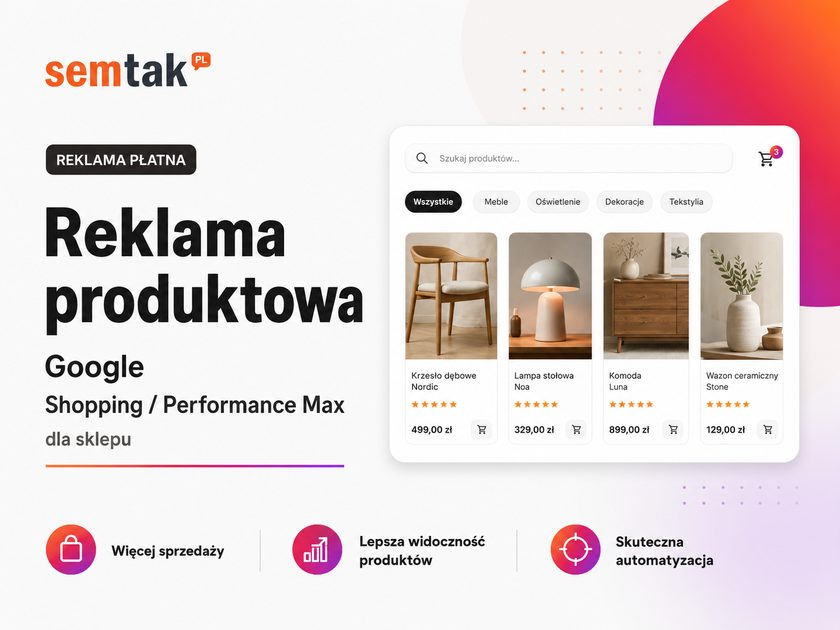
That is what Google product advertising is for — most often associated with Google Shopping and Performance Max campaigns. These are ads in which the user sees the product, a photo, the price, the shop name and frequently additional information, before they even visit the website.
The problem is that the campaign itself is only the tail end of the process. If your shop has incorrect prices, weak product titles, a poorly prepared feed, problems in Merchant Center or badly measured conversions, the ads can spend budget without bringing in sales.
If you want to treat this channel as a sales channel rather than a test, it is worth properly preparing your Google Shopping campaigns for your shop and only then scaling the budget. In this article I will show you how Google product advertising works, how Shopping differs from Performance Max, what you need to prepare in your shop and where product campaigns most often break.
In short
Google product advertising (Google Shopping and Performance Max) shows the customer a product with a photo, price and shop name precisely when they are looking for a specific item — which is why, for e-commerce, it usually converts better than text advertising. The foundation is not the campaign itself but a correct feed in Merchant Center. Shopping gives you more control; Performance Max offers automation and reach across many channels — and they often work best together.
In a nutshell (TL;DR)
- Google product advertising shows specific products from your shop: a photo, the price, the product name and the shop name.
- To make it work you need a correctly configured Google Merchant Center and product data.
- Google Shopping uses product data from Merchant Center rather than classic keywords.
- Performance Max can use products from the feed and display ads across many Google channels (Search, YouTube, Display, Discover, Gmail, Maps).
- In WooCommerce the things that matter most are: product titles, photos, prices, availability, GTIN/EAN, categories and a correct feed.
- Before you increase the budget, check Merchant Center, the feed, conversion measurement and product profitability.
What is Google product advertising?
Google product advertising is an ad format for online shops in which Google shows specific products from your range. Such an ad can contain:
- a product photo,
- the product name,
- the price,
- the shop name,
- promotion information,
- availability,
- the delivery cost,
- additional labels, if they are correctly passed to Google.
In practice it looks like this: a customer types into Google, for example, "black oak metal coffee table" and sees products from various shops. They do not yet need to know your brand — they are comparing photos, prices and product names. For a shop this is a great opportunity, because the ad reaches someone who is often already close to a purchasing decision.
Google Shopping vs Performance Max — what's the difference?
Shop owners often use these names interchangeably, but they are not exactly the same thing.
Google Shopping means product ads based on data from your shop passed to Merchant Center. Google takes the information from the product feed and uses it to decide when to show a given product. In standard Shopping campaigns you usually have more control over product structure, campaign segmentation and bids than in Performance Max. The feed, however, is still the foundation.
Performance Max is a goal-based campaign type in Google Ads, aimed at an objective such as sales. It can use products from Merchant Center and display ads across various Google channels — as a goal-based campaign that lets you tap into Google's advertising inventory from a single campaign. For a shop this means one thing: Performance Max is not just "product advertising in Google". It is more of an automated sales campaign that can use the product feed, images, text, audience signals and conversion data.
A simple comparison:
| Area | Google Shopping | Performance Max |
|---|---|---|
| Main role | Product ads | Multi-channel sales campaign |
| Foundation | Product feed | Feed + ad assets + conversion data |
| Control | Usually greater | Usually lower, more automation |
| Best for | Shops that want to control product structure | Shops with correct measurement and data |
| Risk | A weak feed limits results | A weak feed and poor measurement can badly burn through budget |
When Shopping, and when Performance Max?
There is no single right answer for every shop. The choice depends on your data, budget, number of products and the control you need.
| Situation | Better direction |
|---|---|
| You want more control over product structure | Standard Shopping |
| You want to test specific product groups | Standard Shopping |
| You have a clean feed, good measurement and sales data | Performance Max |
| You want multi-channel automation | Performance Max |
| You are only just sorting out Merchant Center and the feed | First tidy up the data, then run the campaign |
| You have thousands of products and varying margins | Product segmentation before scaling |
Put simply: if you want more control, start with a well-organised Shopping setup. If you have a clean feed, correct conversion measurement and you want to use Google's automation, Performance Max may make sense.
What determines the effectiveness of product ads?
In short: data. Product advertising does not begin in Google Ads — it begins in the online shop and in the product feed.
The product feed is a file or connection through which the shop passes information about products to Google: name, price, availability, photo, link, brand, category and other data. Google uses the data from Merchant Center to match products to user queries. That is why a campaign can be set up correctly and still perform poorly if the product data is not refined.
The most important elements of the product feed — in a WooCommerce shop you especially need to watch out for:
- the product name and description,
- the price and the sale price,
- availability,
- the main photo,
- the product category and brand,
- GTIN/EAN (the global product number from the barcode),
- the product identifier and URL,
- variants (sizes, colours),
- delivery costs,
- consistency of the data in the shop and in Merchant Center.
Warning: if the price in the shop is £199 but the feed still says £249, Google may reject the product or limit its serving. Google explicitly requires the price in the product data to match the price on the landing page and at checkout.
What does launching a product ad look like?
- Preparing the shop. First check whether the products have sensible data. A weak title:
Lamp 123 black. A better title:Black 3-light loft pendant lamp for the living room— it describes the product better and makes it easier for Google to match it to a query. - Configuring Google Merchant Center. This is where Google stores and checks product data. Check: whether the domain is verified, the company details are correct, delivery and returns information is clear, the products are approved, and Merchant Center is free of errors.
- Preparing the product feed. An XML feed generated by a WooCommerce plugin, an automatic integration or a connection via the Content API. Google describes two basic formats: a tab-delimited sheet and XML. Practical settings: Google Merchant Center for WooCommerce — the feed step by step.
- Connecting Merchant Center to Google Ads. Without this the campaign has nowhere to pull products from.
- Setting up the campaign. Objective, budget, bidding strategy, countries of sale, products/groups, ad assets, audience signals, schedule, exclusions and conversion measurement.
- Conversion measurement. The most frequently skipped stage. If Google Ads does not know which clicks end in a purchase, the campaign runs blind (Performance Max in particular relies heavily on data). In WooCommerce, check the measurement: purchase, order value, currency, transaction ID, cookie consent, traffic source and duplicate conversions. GA4 and GTM configuration for your shop helps with this.
The most common mistakes in product campaigns
1. All products dumped into one campaign
A common scenario: a shop has 3,000 products, someone launches a single Performance Max campaign and throws everything in together. The problem? Not every product has the same margin, availability, price, seasonality and sales potential.
| Product type | Problem |
|---|---|
| Bestseller | May deserve a larger budget |
| Low-margin product | May generate sales but no profit |
| Seasonal product | May only work for a few months |
| Out-of-stock product | Should not be drawing budget |
| Product with a poor photo | May have a low CTR |
A better solution is to split products by business logic, not just by the categories in the shop.
2. No control over profitability
ROAS looks good, but the shop still isn't making money? That's possible. If a product has a low margin, expensive shipping, frequent returns or costly servicing, the sales value alone is not enough. High ROAS ≠ profit.
| Item | Value |
|---|---|
| Revenue from ads | £10,000 |
| Ad cost | £1,500 |
| Product margin | 12% |
| Margin in pounds | £1,200 |
| Result after ad cost | −£300 |
On paper the campaign looks good (ROAS ~666%), but the product margin is £1,200 and the ad cost is £1,500 — the result after advertising is −£300, which means the shop is in the red. That is why, in product campaigns, you have to look not only at revenue but also at margin, delivery cost, returns and servicing cost.
3. Disapproved products in Merchant Center
Products can be disapproved or restricted for various reasons. The most common are: a price mismatch between the shop and the feed, missing required data, incorrect availability, poor or disallowed photos, domain problems, errors in variants, inconsistent delivery data or breaches of Google's policies. Google has a separate product data specification for Merchant Center — if the data does not meet it, products may have serving problems.
4. Weak product titles
The product title in the feed matters a great deal. It is not the place for a random name from the warehouse.
- Weak:
Chair K-44→ Better:Beige upholstered dining chair K-44 - Weak:
Shoes model 981→ Better:Women's white running trainers model 981
A good title helps the customer understand more quickly what they are looking at, and it helps Google match the product to real queries.
5. Incorrect product variants
Variants in WooCommerce can cause real mess. Example: a T-shirt has 5 sizes and 4 colours — that makes 20 variants. If each variant has a wrong identifier, no colour, no size or a shared photo, Merchant Center may misunderstand the offer. For shops in fashion, footwear, furniture, parts or technical products this is a very important topic.
6. No exclusion of products that should not be promoted
Not every product should go into the campaign. Sometimes it is worth excluding products with a very low margin, temporarily out of stock, with a high return rate, test products, those with incorrect photos, those you cannot ship quickly or those with an uncompetitive price. Product advertising should not work on the principle of "we promote everything that's in the shop".
Product advertising in WooCommerce — what to watch out for?
WooCommerce gives you a lot of flexibility, but with product ads you have to mind the details.
A feed plugin is not a strategy. Many people install a feed-generation plugin and consider the matter closed. Technically the feed may generate — but that does not mean it is good. After installing, check whether the data in Merchant Center is the same as in the shop, whether the variants are recognised correctly and whether the products have no warnings. This is where a WooCommerce audit comes in handy.
The data in the shop must be consistent with the data in the feed. If the customer sees a price of £149 in the ad but £179 after landing on the page, the problem is serious — it undermines trust and can cause disapprovals in Merchant Center. The same goes for availability: a product marked as in stock should actually be buyable.
Shop speed matters too. A click on the ad leads to a product page — if it loads slowly, the campaign loses sales. It is worth checking the load time of product pages, how the basket works, the order process, payment errors, the mobile version and Core Web Vitals. Advertising can deliver traffic, but it will not fix a slow shop — speeding up the shop and WooCommerce shop maintenance help here.
Performance Max for a shop — when does it make sense?
Performance Max makes sense when the shop has its foundations in place. The point is not to "fire up a campaign and see" — with a small budget and weak data you can spend money very quickly with no clear conclusions. It is worth considering when:
- Merchant Center is correctly configured and the products are approved,
- the feed is clean and conversions work correctly,
- the shop has a sensible offer and sales data,
- you know which products are profitable,
- the budget allows you to gather data,
- the product pages are refined.
When can Performance Max work badly? Most often when: the campaign has too little data, conversions are measured poorly, the budget is too low relative to the catalogue, products are dumped in without segmentation, the feed has errors, the shop has a problem with prices or availability, the ads lead to weak product pages, or the account has a history of random tests and changes. Performance Max can work very well, but it is not a magic sales button.
How to split products across campaigns?
A good split depends on the shop, but you can start with simple groups.
Splitting by margin — high-margin products can follow a different strategy from very low-margin ones:
| Group | Example decision |
|---|---|
| High margin | You can fight more aggressively for sales |
| Medium margin | Control ROAS and acquisition cost |
| Low margin | Be careful with budget, or exclude |
Splitting by bestsellers — it is often worth separating out bestsellers, because they have a greater chance of converting. Note: an organic bestseller is not always a bestseller in advertising (ads add a customer acquisition cost).
Splitting by seasonality — you run a campaign for garden furniture differently in May than in November; you advertise gifts differently before the holidays than after the season.
Splitting by category — the simplest, but not always the best. A category tells you where the product sits in the structure, not whether it is profitable and good to advertise.
What to measure in product advertising?
It is not enough to look at the number of clicks. In product campaigns you need to analyse:
- cost, revenue, ROAS, number of transactions, cost per purchase,
- the share of products in sales,
- products with no clicks, and products with clicks but no sales,
- disapproved products,
- the share of new customers,
- margin, returns and conversion errors.
A mini-scenario. You have a shop with 2,000 products. After a month of the campaign you see: 80% of the budget goes to 120 products, 30 products generate sales, 15 generate most of the revenue, some products have lots of clicks and zero purchases, and Merchant Center shows warnings on 400 products. The conclusion: you do not increase the budget straight away — first you check the feed, the products wasting budget, the profitability of bestsellers and the errors in Merchant Center.
What can you check yourself?
Before you commission an audit or campaign setup, run a few simple checks (a checklist for the shop owner):
- Go into Google Merchant Center and check whether the products are approved.
- Check whether Merchant Center shows errors or warnings.
- Compare a few products: price in the shop vs price in Merchant Center.
- Check that out-of-stock products are not being promoted.
- Open the product feed and see whether the product titles are clear.
- In Google Ads, check whether purchase conversions have a transaction value.
- Check that a single transaction is not counted several times.
- See which products spend budget but do not sell.
- Check that the campaign is not promoting low-margin products.
- Walk the purchase path on your phone: ad → product → basket → payment.
If chaos appears at any stage, the campaign may be losing money not because Google Ads is bad, but because the foundations are inconsistent.
When is it worth bringing in a specialist?
A specialist is needed when the problem is not just about the click in Google Ads. It is worth commissioning help if:
- Merchant Center shows lots of errors and products are disapproved with no clear reason,
- the feed generates bad data,
- the campaign spends budget but there are no sales,
- ROAS looks good but the shop is not earning,
- you do not know whether conversions are measured correctly,
- you have many product variants or several thousand products,
- you want to split campaigns by margin, seasonality or category,
- WooCommerce runs slowly after a click from ads, and the checkout has errors,
- you need to connect Google Ads, GA4, GTM and Merchant Center.
At SEMTAK we look at product advertising not only from the campaign level. We also check WooCommerce, the product feed, Merchant Center, analytics, shop speed and the purchase path — an approach closer to the work of a "WooCommerce Engineer" than a mere ad-clicker. A natural complement may be a shop SEO audit, online shop positioning, WooCommerce shop maintenance or Google Ads for an online shop — depending on where the problem actually lies.
Frequently asked questions
Are Google Shopping and Performance Max the same thing?
No. Google Shopping means product ads based on data from Merchant Center. Performance Max is a campaign type that can use the product feed and run across many Google channels.
Do I need Merchant Center for product advertising?
Yes. The shop has to pass product data to Google Merchant Center — that is where Google checks prices, availability, photos and other product data.
Is WooCommerce suitable for Google Shopping?
Yes, but you have to prepare the product feed well. Simply installing a plugin is not enough if the products have weak names, incorrect variants, wrong prices or missing data.
Why are my products disapproved in Merchant Center?
Most often because of price discrepancies, missing required data, bad photos, availability problems, incorrect variants or a breach of Google's policies.
Is it worth advertising every product in the shop?
Not always. Products with a low margin, poor availability, weak photos or a large number of returns can waste budget.
What budget should I set for product advertising?
It depends on the industry, the competition, the number of products, the margin and the campaign objective. It is better to start with a budget that lets you gather data than to throw in the whole catalogue at once without control.
Is Performance Max suitable for a small shop?
It can be, provided the feed, conversion measurement and offer are sound. With very little data, the campaign may need more time to learn.
What is more important: the campaign or the product feed?
Both elements matter, but a weak feed can limit the whole campaign. If Google receives incorrect data about the products, even a good campaign setup will not fix it.
Is it better to run product campaigns yourself or to commission them?
With a small catalogue, a clean feed and simple measurement you can start on your own. With thousands of products, many variants, Merchant Center problems or uncertain conversion measurement, it is better to run an audit and organise the campaign before increasing the budget.
Summary
Google product advertising can be one of the best sales channels for an online shop — but only when the shop has its data in order. First you have to take care of Merchant Center, the product feed, conversions, prices, availability and product pages. Only then is it worth increasing the budget and scaling the campaigns.
Want to know whether your product campaigns are built on healthy foundations? In a product advertising audit we check the feed, Merchant Center and Shopping/PMax campaigns as well as conversion measurement in GA4/GTM, product segmentation and margin-based profitability — and you get a list of fixes, starting with the ones that stop budget waste the fastest.