Free Google Advertising for Your Business — What You Can Really Get for Free

Can you promote a business on Google with no budget? Yes — but one thing needs clearing up straight away: in most cases it will not be advertising in the strict sense, but rather a free presence in Google's services.
A business can appear in Maps, organic search results, free product listings and on YouTube without paying for clicks. There is, however, no guarantee that it will take the top spot or start winning customers right away.
"Free" therefore means no invoice from Google for serving an ad. You still need time, materials, correct configuration, up-to-date information and ongoing work on your website.
In this guide we show what you can genuinely do without an advertising budget, where the free options end, and when it makes sense to add paid Google Ads campaigns.
In short
You can promote a business on Google without paying for clicks primarily through:
| Free channel | Who is it for? | What can it deliver? |
|---|---|---|
| Google Business Profile | Local businesses and those serving customers in person | Visibility in Maps, contact details, reviews, calls and directions |
| Google organic results | Businesses with a website | Visits from search with no cost per click |
| Free product listings | Online stores | Products in selected Google surfaces, including Search, Shopping and Google Images |
| Free local listings | Brick-and-mortar shops | Information about products available in a specific location |
| YouTube | Businesses with expertise, products or projects to show | Free video publishing and the chance to earn organic views |
| Google Ad Grants | Eligible non-profit organisations | A budget to spend on text ads in search |
| Search Console | Website owners | Data on visibility, clicks, indexing and errors |
| Google Analytics | Website and store owners | Traffic measurement and user behaviour insights |
An important distinction: free presence — Google may show your business or product without charging for the click; Google Ads — the business buys visibility and spends its own advertising budget. A Business Profile, SEO and free product listings do not guarantee rankings. Google Ads does not guarantee sales either, but it gives you more control over budget, reach, enquiries and the moment your ad is shown.
Key takeaways (TL;DR)
- Google Business Profile is free, but it is intended for businesses that deal with customers in person.
- Appearing in Google Maps does not require paying for clicks, but your position depends on factors such as relevance, distance and the prominence of your business.
- Clicks from organic results are free, but preparing the website, content and SEO takes work.
- Online stores can enable free product listings in Google Merchant Center.
- You can publish videos on YouTube with no media budget, but simply uploading a video does not guarantee views.
- Search Console and Google Analytics are measurement tools — they do not advertise your business on their own.
- A Google Ads promotional credit does not mean permanently free advertising and usually requires meeting specific conditions.
- Eligible non-profit organisations can use the Google Ad Grants programme.
- You cannot legally buy or guarantee the first position in organic results or in Maps.
- "Free" most often means that instead of paying for clicks, you pay with time, knowledge and work.
Does free Google advertising really exist?
In everyday language, anything that puts a business in front of a customer gets called "advertising". With Google, however, you need to separate two different areas.
Paid Google Ads. These are results labelled as sponsored, which can appear above organic results, in Maps, next to products, on YouTube, in Gmail, on websites and in apps. The business sets a budget and pays for impressions, clicks, views or other actions — depending on the campaign type.
Free presence on Google. A business can appear without buying ads: in organic results, in Maps, via its Business Profile, in free product results, in Google Images and on YouTube. You do not pay Google for each click, but you cannot set a bid, choose an exact position or guarantee a number of visits. The more honest way to put it is: you can build free visibility for your business on Google, but you cannot run standard Google Ads campaigns without a budget.
What does "free" actually mean?
A free channel can still generate costs. Example: Google Business Profile has no subscription fee, but you need to pass verification, fill in your details, take photos, respond to reviews, update opening hours, add services and products, and keep your data consistent. SEO works the same way — Google does not charge for a visit from an organic result, but someone has to build the website, write the content, improve speed, fix indexing issues, keep information current and build brand recognition.
| Type of cost | Paid channels | Free channels |
|---|---|---|
| Fee per click or impression | Yes | No |
| Time needed for setup | Yes | Yes |
| Preparing content and materials | Yes | Yes |
| Technical maintenance | Often | Often |
| Guaranteed first position | No | No |
| Ability to scale reach quickly | Greater | Limited |
| Effect after switching off the budget | Usually fades quickly | Can last longer |
| Control over the audience | Greater | Smaller |
A free channel is therefore not a cost-free channel. It is a channel with no direct advertising fee.
1. Google Business Profile — a free listing in Search and Maps
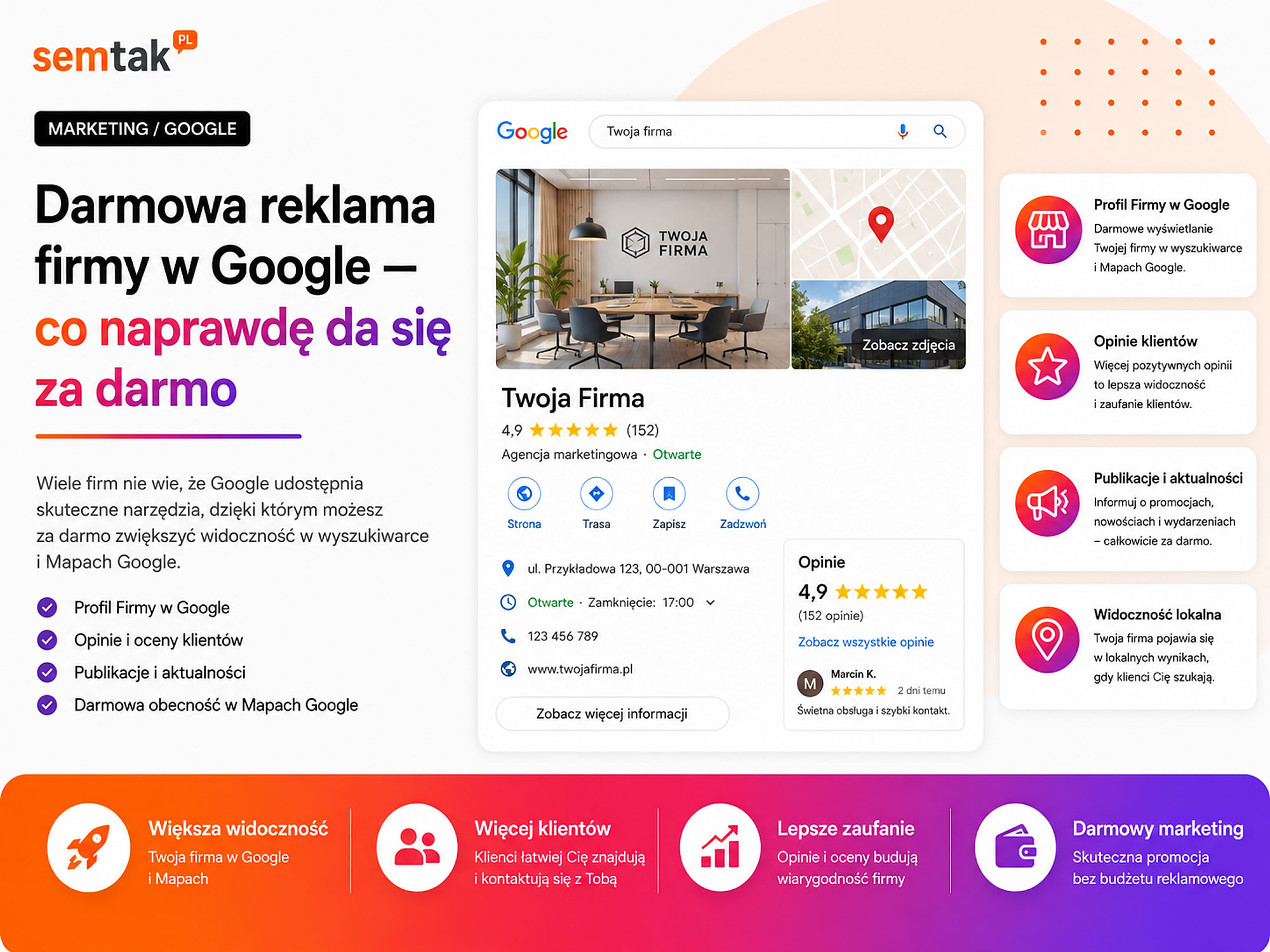
Google Business Profile lets you manage the information that can appear in Search and Google Maps. Free of charge, you can add your business name, business category, address or service area, phone number, website address, opening hours, business description, services, products, photos and videos, a booking link, plus updates and offers. Customers can also call you, get directions, visit your website, read reviews, leave reviews and browse photos.
Who can have a Google Business Profile? The profile is intended primarily for brick-and-mortar shops, restaurants, clinics, garages, hotels, service points, businesses that travel to customers and companies that meet customers in person. A business operating exclusively online, which neither receives customers nor visits them, generally does not qualify for a Business Profile. For example: a plumber who travels to customers can use a profile as a service-area business, a physical shop can show a location customers can visit, while an agency working entirely remotely from a private flat (with no in-person customer service) should not create a fictitious location.
Does creating a profile guarantee a high position? No. The mere existence of a profile does not mean the business will instantly appear in the local three-pack. Google primarily considers how relevant your business is to the query, the distance from the user or the specified location, and the prominence and recognition of your business. You cannot pay Google for a higher organic profile position. What you can do is improve the quality of the profile: choosing the right category, listing your services, keeping contact details consistent, adding genuine photos, replying to reviews, updating opening hours, publishing updates and building a good website. We describe the full process in our guide to Google Maps SEO — how to get into the local pack.
What not to do with your business name. Do not stuff your official name with keywords just to boost visibility. Instead of "Plumber London 24h Cheap Installation Repairs Smith", the profile should use the name the business actually trades under. Artificially padding the name can lead to rejected edits, profile suspension, verification problems and reports from users or competitors.
Reviews are free, but they cannot be bought. A customer can leave a review for free and the business can respond to it. After completing a job it is worth sending the customer a review link, but you should not buy fake reviews, post reviews from employee accounts, make perks conditional on a five-star rating or commission bulk reviews. It is better to have fewer genuine reviews than an inflated profile that looks artificial and may get reported.
Posts and updates in your Business Profile. You can publish news, events, changes to opening hours, promotions, new services and photos of completed work. A post does not, however, guarantee a higher position or a specific number of impressions — its main role is to give current information to someone who has already found your profile.
2. Google Maps — free local visibility
Google Maps does not require a separate campaign for your business to appear in local results. The foundation is a verified Business Profile. A user might search for "mechanic near me", "restaurant Brighton", "hairdresser open now", "furniture shop Leeds" or "air conditioning service Manchester", and Google may display a map, the local pack, contact details, reviews, photos, opening hours and directions.
What increases your chances of visibility in Maps? The business owner should take care of:
- The correct primary category.
- Completed additional categories.
- An up-to-date phone number.
- A correct address or service area.
- Consistent opening hours.
- Described services.
- Authentic photos.
- Replies to reviews.
- A good website linked to the local offer.
- Consistent business data across the web.
You have no full control over how far away the user is. What you can improve is the relevance of your information and the credibility of your profile.
3. Google organic results — clicks with no advertising fee
Organic results are the standard pages Google displays outside paid ads. The business does not pay Google for the page appearing, for a user's click, for a visit to an article, for landing on a service page or for opening a product page from an organic result. To earn this traffic, the site must be accessible to Google, correctly indexed, technically sound, matched to user intent, useful, trustworthy and regularly updated.
SEO is not a free trick. A common mistake is the belief that "I'll launch a website and Google will start advertising it on its own" — publishing a site alone does not create visibility. If a business wants to rank for "accounting for e-commerce", it should build a page that clearly explains who the service is for, what problem it solves, what it includes, how it differs from standard accounting, what working together looks like and how to get in touch. You also need to handle the technical side, linking, speed, indexing and domain reputation. You do not pay for an SEO click — but you do pay with your own work or with the cost of the people who prepare the site and the content.
What can you do yourself? To begin with, you can flesh out the pages for your key services, add the locations you genuinely serve, prepare answers to customer questions, improve page titles, expand your contact details, add case studies, connect the site to Search Console and check which pages Google is indexing. If you want to grow this channel systematically, take a look at the scope of our website SEO services.
4. Google Search Console — free data, but not free promotion
Google Search Console is a free tool that helps you check how Google sees your site. In it you can view the queries your site appears for, the number of impressions, clicks, average position, indexing problems, structured data errors, submitted sitemaps, links pointing to your site and security issues. Search Console does not raise your rankings automatically — adding your site to the tool is not a form of advertising, but it lets you see what is working and what needs fixing.
Example: a business sees in Search Console that its site appears 2,000 times a month for queries related to its service, but almost nobody clicks. Possible causes: a weak title, an unclear description, a low position, mismatched content or the wrong landing page. Search Console shows the problem — you still have to solve it yourself.
5. Free product listings in Google Merchant Center
Online stores can send product data to Google Merchant Center and use free listings — free product entries. A product can be eligible to appear in Google Search, Google Maps, the Shopping tab, Google Images, Google Lens, YouTube and Gemini, among other places. You do not pay for the click, but Google alone decides which product to show, for which query, in which placement, how often and at what position.
What do you need? The store should send correct data: product name, description, price, availability, image, brand, GTIN or MPN (where they exist), variant, product page URL, delivery information and returns policy. The data must match the website. An example of a problem:
| Source | Price |
|---|---|
| Product page | £59 |
| Merchant Center feed | £49 |
| Basket | £59 |
A discrepancy like this can limit visibility or get the product disapproved.
Do free listings replace Google Shopping? Not entirely. Free listings give your product an extra chance to appear, but they do not provide the control a paid campaign offers. In Google Ads you can set a budget, split products into groups, increase or limit delivery, optimise the campaign for sales, analyse cost per conversion and promote selected categories. The best setup is usually a single correct feed used simultaneously for free listings, Shopping campaigns and Performance Max campaigns. We describe the setup process in our guide to Google Merchant Center for WooCommerce — a step-by-step product feed.
6. Free local listings for brick-and-mortar shops
A shop with a physical location can also share information about its local stock. This lets a customer check whether a specific product is available in a nearby store. Example: for the query "where to buy a coffee machine near me?", Google can show the shop, its location, product availability, price and pick-up information. This solution requires a more advanced setup than a standard Business Profile — you need to connect Merchant Center, your Business Profile, product data and the inventory data of specific locations. Free delivery does not mean a "one-click" configuration.
7. YouTube — free video publishing
A business can create a YouTube channel for free and publish tutorials, product presentations, how-to guides, webinars, answers to questions, completed projects, case studies, expert interviews and behind-the-scenes material. Videos can earn views without paid advertising and can appear in YouTube search results, in recommendations, in regular Google results and on the pages where they are embedded.
What works for a business? For a service business: "How do I prepare my home for air conditioning installation?", "How long does a heat pump installation take?", "What should I check before signing a contract with a contractor?". For an online store: comparing two models, showing variants, product assembly, answering questions, "before and after" material. For a B2B company: walking through a process, presenting a system, analysing common mistakes, a case study, an expert webinar.
Why is YouTube not entirely cost-free? You do not pay to publish, but you need to prepare a script, the recording, the audio, the editing, a thumbnail, a title, a description and replies to comments. A simple, specific video shot on a phone can beat an expensive production with no useful content. But do not expect every video to automatically rack up thousands of views.
8. Google Ad Grants — a free budget for some organisations
Google Ad Grants is a special case. Eligible non-profit organisations can receive up to $10,000 per month as a budget to spend exclusively on text ads in search. These funds cannot be withdrawn or used for anything else. It is not an option for a regular commercial business.
The organisation must meet the programme's requirements, hold the appropriate status, have a working website, follow the account rules and manage campaigns regularly. The programme can help promote fundraising, community initiatives, volunteering, events, support for beneficiaries, education and awareness campaigns. It is the closest thing to literally "free Google Ads advertising" — but only for organisations that meet the programme's requirements.
9. Free Google tools are not advertising channels
Google provides tools that can support your marketing with no fees for their core features. That does not mean they automatically promote your business.
- Google Search Console — shows your site's visibility and problems.
- Google Analytics 4 — helps you check where users come from, which pages they view, what actions they take, whether they place orders and where they abandon the purchase process.
- Google Trends — lets you compare interest in topics and track search seasonality.
- Google Merchant Center — stores product data and can power free listings as well as paid product campaigns.
- Google Business Profile — lets you manage your business presence in Search and Maps.
A tool helps you make a decision or improve your data. It does not replace your website, content, offer, customer service, campaigns or the work on your visibility.
Does a free Google Ads coupon mean free advertising?
No. Google Ads promotions are advertising credits granted to selected advertisers after meeting specific conditions. The conditions may involve a new account, adding a payment method, spending a certain amount, launching a campaign within a set period or meeting the criteria of a particular offer. The typical mechanism looks like this:
- The business activates the offer.
- It spends its own money.
- It meets the promotion's conditions.
- Google checks eligibility.
- The credit is applied to future advertising costs.
The coupon is not a cash payout, does not refund earlier costs, does not cover the amount required to earn the promotion, may have an expiry date, is not available to every account and does not turn Google Ads into a free channel. Do not plan a campaign solely because a promotion appeared — first check whether customers are searching for your offer, whether your website is ready, whether conversions are being measured and what budget you will need once the credit is used up. You can read more about the real costs in our guide to how much Google Ads costs. The available formats and their uses are covered in types of Google Ads — campaign types and when to choose which.
What can you not get on Google for free?
A sponsored spot in the results. Ads labelled as sponsored require a Google Ads budget.
A guaranteed first organic position. You cannot pay Google for the top spot in SEO. Nor can an agency honestly guarantee a specific position for any given keyword.
A guaranteed first place in Maps. You cannot pay for organic priority in local results. You can run paid local ads, but they are labelled separately.
Unlimited clicks from a coupon. Promotional credit comes with conditions and limits.
Genuine customer reviews to order. You can ask customers for reviews. You should not buy fake reviews or write them yourself.
SEO without work. Organic clicks are free, but preparing the site and content takes resources.
Permanent visibility without updates. Outdated opening hours, wrong prices, unavailable products and stale information can undermine the usefulness of free channels.
Free visibility vs Google Ads — which should you choose?
You do not have to pick just one.
| Situation | Free channels | Google Ads |
|---|---|---|
| The business is just starting and has no budget | Yes | Optionally later |
| Enquiries are needed immediately | Limited options | Yes |
| Local business | Profile and Maps | Search and local ads |
| Online store | SEO and free product listings | Shopping and Performance Max |
| New offer with no existing demand | Content and YouTube | Demand Gen and Video |
| The business wants long-term visibility | Yes | As a supplement |
| The offer needs testing quickly | Slower | Often better |
| The advertising budget has been switched off | Visibility can remain | Delivery stops |
Most often it pays to build a free foundation and use advertising where you need speed, more control, offer testing, the promotion of a specific product, larger scale or reaching a particular audience. We cover the differences in more depth in SEO or Google Ads — which to choose and when.
A plan for promoting your business on Google for free
Step 1. Tidy up your basic data. Check your business name, phone number, address, opening hours, service area, website address, product availability, and your store's terms and contact details. The data should be consistent across your website, your Business Profile and other services.
Step 2. Choose the channels that fit your business. Not every business needs every tool.
| Type of business | Priority free activities |
|---|---|
| Local service business | Business Profile, Maps, reviews, local service pages, Search Console |
| Online store | Category and product SEO, Merchant Center, free product listings, Google Images, YouTube |
| B2B company | Pages for specific services, expert articles, case studies, webinars, Search Console |
| Non-profit organisation | Website, SEO, Business Profile, YouTube and checking eligibility for Ad Grants |
Do not set up every available tool just because it is free. Every channel should have someone responsible for keeping its data up to date.
Step 3. Build pages that answer customer needs. A renovation company does not just need a single "Services" page — it should split out its key areas, e.g. bathroom renovation, flat refurbishment, kitchen renovation, painting and the area it serves. A store, in turn, should take care of its categories, products, variants, photos, prices, availability and descriptions.
Step 4. Collect real customer questions. Topics can come from phone calls, forms, emails, reviews, pre-purchase questions, complaints and search queries. Every recurring question can become an FAQ section, an article, a video, an addition to your offer or a new page.
Step 5. Measure the results. Track impressions in Search Console, clicks, enquiries, phone calls, direction requests, product page visits, sales and your most popular videos. Do not judge a channel by impressions alone — visibility should lead to an action that matters to the business.
You have a Business Profile, a website and Merchant Center, but no idea whether it all works together?
As part of our Google Ads campaign management we can first check the foundations: measurement, the website, the feed and your free visibility. A paid campaign is worth launching only once you know what it should promote and how to measure the result.
Quick recap: four mistakes with "free advertising"
1. Creating a fictitious location. An online-only business sets up a profile at a private address even though it serves no customers there. This can end in verification problems or profile suspension.
2. Buying reviews or stuffing keywords into the business name. These tactics may briefly improve the look of a profile, but they expose the business to reports, lost trust and visibility problems.
3. Nobody responsible for updates. The business sets up a Profile, Merchant Center and a YouTube channel, but afterwards nobody keeps an eye on hours, prices, availability, photos, review replies and product errors. A free tool with outdated data can do more harm than good.
4. Launching Google Ads just for the coupon. The business spends money without a ready website, measurement or goal, simply to claim the promotional credit. A coupon should support a sensible campaign, not be the reason for launching it.
What can you check yourself?
Business Profile: whether the business qualifies for a profile, whether the profile is verified, whether the name matches the actual business name, whether the primary category is correct, whether the phone/address/hours are current, whether the photos show the real business and whether you reply to reviews.
Website: whether Google indexes your key pages, whether each service has its own specific page, whether your business details are easy to find, whether the forms work, whether the site is readable on a phone and whether the content answers customer questions.
Search Console: which queries your site appears for, which pages get impressions but few clicks, whether Google reports indexing problems, whether the sitemap has been submitted and whether there are any security issues.
Merchant Center: whether free listings are active, whether products are approved, whether prices and availability match the store, whether variants have the right identifiers, whether images meet the requirements and whether links lead to the correct product pages.
YouTube: whether your videos answer specific questions, whether the titles clearly describe the topic, whether the thumbnails are legible, whether the description links to the right page and whether the material includes a specific call to action.
When is it worth bringing in a specialist?
Help is justified when your Business Profile has been suspended, your site is not being indexed or your free traffic is not generating enquiries.
Consider support when your Business Profile has been suspended, the business does not appear for important local queries, the site is not being indexed, Search Console shows many errors, the store has thousands of products, Merchant Center rejects a large part of the catalogue, prices and availability regularly drift apart, the business does not know which pages to develop, free traffic is not producing enquiries, you need to connect SEO, Merchant Center and Google Ads, or you need accurate sales or lead measurement.
A specialist should not promise a "free first position". What they should do is review the current state, identify errors, define the possible channels, set priorities, separate one-off tasks from ongoing ones, show what you can do yourself and recommend paid activities only where they are justified.
Frequently asked questions
Can you advertise a business on Google completely for free?
You can build visibility without paying for clicks through a Business Profile, Maps, SEO, free product listings and YouTube. You still need to invest time or pay for setup, content and management.
Is Google Business Profile free?
Yes. Creating and running an eligible Business Profile requires no subscription. The business does, however, need to meet the requirements and pass verification.
Can an online-only business have a Business Profile?
Generally no, if it does not receive customers at a location and does not serve them in person on site. The profile is intended for businesses that deal with customers face to face.
Is appearing in Google Maps paid?
An organic presence in Maps is free. A business can also buy local ads, but they are labelled separately and require a budget.
Are clicks from SEO free?
Google does not charge for a click on an organic result. The costs lie in preparing the site, the content, the technical work and the ongoing effort on visibility.
Does Merchant Center let you advertise products for free?
Merchant Center enables free product listings. Google, however, decides whether and where to show them. Paid Shopping campaigns give you more control over delivery.
Does a Google Ads coupon mean free advertising?
No. The advertising credit usually requires meeting conditions, such as spending a certain amount. It is a one-off promotion, not a permanent free budget.
Can you get a free Google Ads budget?
Eligible non-profit organisations can apply for Google Ad Grants. The programme is not intended for regular commercial businesses.
Which is better: free visibility or Google Ads?
Free channels build a long-term presence but take time. Google Ads delivers faster, more controlled traffic but requires a budget. Combining both approaches usually works best.
Free foundations first, paid scale later
Free Google advertising for your business is possible only in a specific sense. Without paying for clicks, you can use a Business Profile, Google Maps, organic results, free product listings, free local listings, YouTube, Search Console and basic analytics tools. That does not, however, mean a guaranteed position, instant traffic, free content production, automatic sales or unlimited delivery of sponsored ads.
The best model usually looks like this: tidy up the free basics, take care of your website and measurement, enable Merchant Center if you run a store, develop your content and organic visibility, and add Google Ads where you need a faster or more controlled result.
If you would like to find out what your business can use for free — and where a paid campaign makes economic sense — we can review your Business Profile, website, Merchant Center, SEO and current measurement. As part of our Google Ads campaign management we first establish whether your advertising has a solid foundation — only then do we recommend a budget and campaign type.