What Is Headless Commerce? When It Pays Off in E-commerce

Headless commerce is often presented as a way to build a very fast and flexible store. It sounds good, but simply separating the storefront from WooCommerce does not automatically solve problems with performance, SEO or sales.
In this architecture the customer uses a separate application, while the products, prices and orders are handled by a system running in the background. This gives more freedom, but it also means more integrations, testing and development work.
For a large B2B platform, an extensive configurator or a store operating across several channels, headless can be justified. For a store with a standard catalogue and a typical checkout it will often be an unnecessary cost.
In this guide we explain what headless commerce is, how it can cooperate with WooCommerce and how to tell whether such an investment makes sense for your e-commerce.
In short
Headless commerce is an architecture in which the layer shown to the customer (the frontend) is separated from the store engine, e.g. WooCommerce, with an API connecting the data. It gives more freedom and potentially higher performance, but it does not automatically fix SEO, speed or sales, and it raises the cost and complexity of implementation. It pays off at large scale, with an unusual frontend or with multiple sales channels — not for a typical store.
In a nutshell (TL;DR)
- Headless commerce separates the storefront from the system that manages products, customers and orders.
- WooCommerce can still work as the sales engine, but the look of the store is created by a separate application.
- The solution gives more control over UX, performance and integrations, but it does not guarantee a fast store or one that is well visible in Google.
- Most customer-facing features have to be connected to the backend through an API.
- Headless mainly makes sense with an unusual sales process, multiple channels or a large-scale project.
- For most small and medium stores, classic or hybrid WooCommerce will be simpler to maintain.
What is headless commerce?
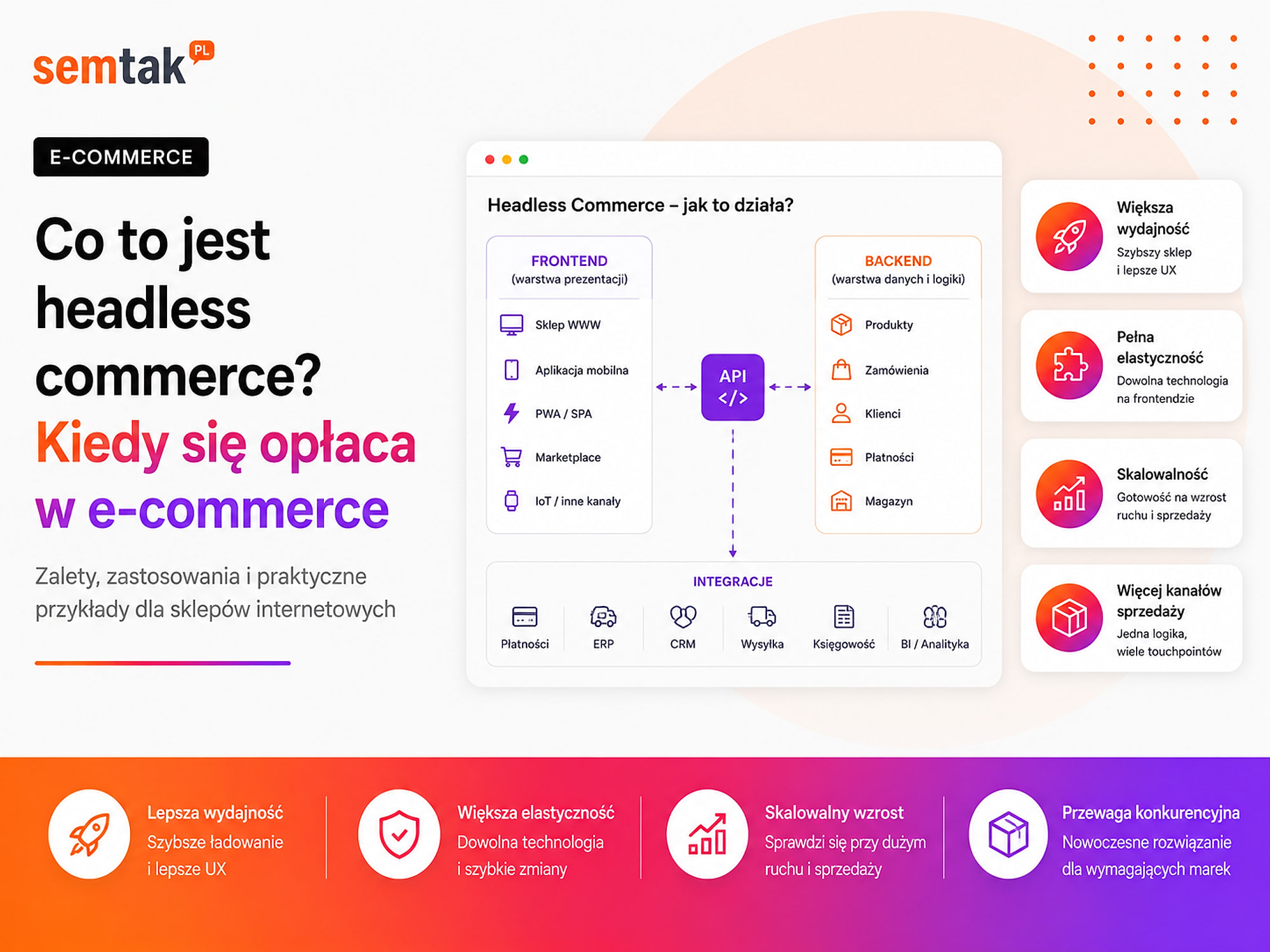
Headless commerce is an architecture in which the look of the store and the part visible to the customer are separated from the system that handles sales.
Put simply:
- the frontend is the part visible to the customer, for example categories, the product page and the cart;
- the backend is the system that manages products, prices, orders and customers;
- the API enables the exchange of data between the frontend and the backend.
In classic WooCommerce, WordPress is responsible at the same time for the admin panel, the store logic and the generation of the pages visible to the customer. In a headless store, WooCommerce can still store products and handle orders, but the page for the customer is a separate application. It can be built, for example, in Next.js, Astro or Nuxt — these are frameworks, that is sets of tools used by developers to create fast web applications.
A simple comparison: a restaurant
The backend is the kitchen — that is where the products, prices, recipes and the order-handling system are. The frontend is the dining room, the menu and the waiter, that is what the customer sees. In a classic store the kitchen and the dining room are part of one solution. In headless you can completely rebuild the dining room or open an additional service point, while keeping the same kitchen. The problem appears when communication between the dining room and the kitchen stops working — in a store this means an out-of-date price, an incorrect stock level or a cart that does not work.
How does a headless store work in practice?
The customer uses a separate frontend that pulls data from WooCommerce and other systems via an API.
A simplified schema looks like this: Customer → frontend → API → WooCommerce → payments, stock and integrations.
The customer opens a product page. The frontend sends a request to WooCommerce and pulls the product name, description, images, price, variants and availability. When the customer adds a product to the cart, the frontend passes this information to the store engine. WooCommerce can then recalculate the discount, tax, delivery cost and order value.
WooCommerce can be responsible for the product database, variants and attributes, prices and promotions, stock levels, discount coupons, taxes, customers, orders, part of the payment and delivery logic, and integrations with external systems.
A separate frontend can handle the home page, the menu, categories, the product page, the search, filtering, the cart, the checkout, the customer account and the content visible to Google. In practice the boundary does not always run in exactly the same place — some companies leave the checkout in classic WooCommerce and build only the product catalogue and the presentation layer separately.
Technical shortcuts in one place
| Acronym or term | What it means in practice |
|---|---|
| ERP | A system for managing a company, e.g. prices, stock, invoices and orders |
| PIM | A database of product information, such as descriptions, parameters and images |
| CMS | A system for managing content, e.g. pages and articles |
| CRM | A system storing information about customers and business contacts |
| Endpoint | A specific API address from which the application pulls or sends data |
| Framework | A set of tools used to build a web application |
| Composable commerce | A store built from several independent and interchangeable systems |
You do not need to know these tools technically. What matters is understanding that in a larger e-commerce the product, price and stock level can come from different places.
Classic store, headless or a hybrid solution?
There are three main models to choose from: a classic store, full headless and a hybrid solution.
| Model | How it works | When it makes sense |
|---|---|---|
| Classic store | One system handles the panel, sales and the look | A standard B2C or B2B store |
| Headless | The backend and frontend are separate applications | Unusual UX, large scale, multiple channels |
| Hybrid | Only part of the store works as headless | A gradual rebuild or carving out a single feature |
Classic WooCommerce does not have to be slow or difficult to develop. A lightweight theme, a proven set of plugins, a good server and a correct cache configuration can be enough even in an extensive store. The biggest advantage is the ready-made ecosystem — you install a payment, delivery or variants plugin and you usually get both the logic and the customer-facing elements.
Full headless. In full headless the entire frontend is a separate application. WordPress and WooCommerce can run under a different address and remain invisible to the buyer. This gives the most freedom, but it requires you to handle the cart, the customer session, the checkout, payments, the user account, analytics, SEO, API errors and the publishing process on your own.
A hybrid solution. You do not always have to separate the whole store at once. You can, for example:
- create a separate product configurator;
- rebuild only the catalogue;
- keep the classic WooCommerce checkout;
- launch a mobile application that uses the same product database;
- prepare a separate B2B panel;
- keep the blog and information pages in WordPress.
Start with the smallest scope
A hybrid approach lets you limit the scope of the project and first test the most risky element — instead of rewriting the whole store at once. This is usually a cheaper and safer path to headless than "everything at once".
What does headless WooCommerce look like?
WooCommerce can remain the store engine, while a separate frontend pulls data from it and passes orders back.
The store owner can still add products in WordPress, change prices, review orders, manage coupons, update stock levels and use selected integrations.
The frontend communicates with WooCommerce using several kinds of API:
- WooCommerce REST API — used, among other things, to work with products, orders and customers;
- WooCommerce Store API — handles shopping-related features such as products, the cart and the checkout;
- WordPress REST API — exposes posts, pages, media and other content from WordPress;
- custom endpoints — used when the store has non-standard data or processes.
The technical details, the authorisation method and examples of communication are better discussed separately. We develop them in the guide WooCommerce API — what it is and what it is for.
A plugin will not always work on a separate frontend
This is one of the most important issues to check before implementation. In classic WooCommerce a plugin automatically adds a parcel-locker selection field, a payment method, a list of variants, a configurator or additional checkout fields to the page. In headless the plugin logic may still work in the backend, but the ready-made interface does not have to appear in the separate application.
An example. You install a pickup-point selection module. In a regular WooCommerce the map appears automatically in the checkout. In headless it may turn out that:
- the plugin saves the data in WooCommerce;
- it does not expose it in the appropriate API;
- there is no ready-made component for the new frontend;
- the map and validation have to be built on your own.
That is why, before pricing a project, you need to inventory all of the store's features, not just the number of subpages.
What benefits does headless commerce bring?
Headless gives more control over the frontend, the way products are presented and the connection of several sales systems.
More control over performance. A separate frontend can prepare selected pages in advance, store them in cache and deliver them to the user from infrastructure located close to their location. Thanks to this, not every visit has to trigger the full process of generating a page by WordPress. This is not, however, an automatic guarantee of speed — heavy JavaScript, oversized images or a slow API can still make a headless store perform poorly.
More freedom in designing UX. Headless works well when a standard theme or block system limits the design. You can prepare, for example, an extensive configurator, a 3D product visualisation, an unusual variant-selection process, an interactive product page, a personalised B2B catalogue, an ordering process that depends on earlier answers, your own search engine or an application resembling a mobile program. Such features can also be created in classic WooCommerce, but a separate frontend gives developers more independence from the theme structure.
One backend for several channels. The same product database can power a B2C store, a B2B panel, a mobile application, a panel for sales reps, a screen in the showroom, a configurator for partners and several regional versions. A change of price or description can be passed to all channels, provided the data sources and synchronisation are designed correctly.
Independent development of the frontend and the backend. The frontend team can develop the store interface without directly interfering with the order system. You can also change the backend or part of the integrations without rebuilding the entire layer visible to the customer. This advantage has real value mainly in companies that regularly develop the product and have a permanent technical team.
Combining data from several systems. In a larger e-commerce the data is often scattered — WooCommerce handles orders, the ERP stores prices and stock, the PIM contains product descriptions and parameters, the CMS is responsible for guides, and an external search engine handles filtering. The frontend can gather this information and show it to the customer as one coherent store. This approach is sometimes referred to as composable commerce, that is building e-commerce from independent services that can be swapped out when needed.
What are the disadvantages of headless commerce?
The biggest disadvantage of headless is the increase in complexity: you have to maintain several systems and watch over the communication between them.
You maintain several applications. In a classic store you update WordPress, WooCommerce, the theme and the plugins. In headless you also get, among other things, a separate frontend, its libraries and dependencies, the deployment platform, API integrations, an additional cache, monitoring and the process of publishing a new version. A failure can occur at many levels:
- the frontend works, but it does not pull products;
- the product page shows an old price;
- the cart does not keep its contents;
- the API stops working after an update;
- the customer pays, but does not see a confirmation;
- the panel shows the order, but analytics does not record it.
Monitoring should therefore check the entire purchasing process, not just the availability of the home page.
Greater dependence on developers. In classic WordPress the store owner can often change a banner, add a block, fix the page layout, enable a plugin, add a form field or launch a promotion on their own. In a separate frontend some of these changes may require a developer's work and the publishing of a new version of the application. It is possible to prepare a convenient content panel and ready-made components, but they have to be designed in advance.
Harder error diagnostics. If the customer sees an incorrect price, the problem may be in WooCommerce, the ERP, an integration, the cache, the API, the frontend logic or the synchronisation schedule. Without logs and monitoring, the team may take a long time to determine which system returned the wrong data.
The cart and checkout require a lot of work. Displaying a list of products is relatively simple. The hardest elements usually begin at the cart and the order finalisation. You have to handle, among other things, the customer session, changing product quantities, recalculating the price, discounts, taxes, coupons, delivery costs, pickup points, invoice data, form validation, redirection to payment, the return from the gateway, an interrupted payment and the order confirmation. Each of these elements needs to be tested in different browsers, on phones and on a slower connection.
Does headless commerce improve SEO?
Headless can make it easier to create a fast and well-built store, but rendering or indexing errors can also worsen SEO.
Google can process JavaScript, but a store should not rely solely on the search engine's robot running all the scripts and pulling data from several systems. The most important information should be available in the page code as early as possible. This concerns, among other things, the product name, price, availability, description, images, the H1 heading, internal links, structured data, the canonical, the meta title and the meta description.
What needs to be checked before launch?
- Content rendering — Google should receive the correct name, description and price of the product.
- URLs — every important category and every product should have a separate, directly accessible address.
- Meta data — the title, description, canonical and robots must be generated for the specific address.
- Structured data — the price, availability and reviews must be consistent with what the customer sees.
- Internal linking — the robot should be able to move between categories, products and guides.
- XML sitemap — it should contain the addresses of the new frontend, not the technical addresses of the backend.
- Handling deleted products — a non-existent product should return the correct error code or a redirect.
- Variants and filters — you need to decide which combinations are to be indexed.
- 301 redirects — when addresses change, you need to preserve the traffic and SEO signals from the old store.
- Post-launch tests — you should check indexing, errors and data in Google Search Console.
When migrating a working store, it is worth carrying out a store SEO audit before development. The audit here is a diagnostic stage that protects visibility before the new frontend is launched.
Does headless automatically improve Core Web Vitals?
No. Headless gives more technical control, but it does not guarantee good Core Web Vitals results.
Even a separate frontend can load too much JavaScript, pull unnecessarily large images, run many advertising scripts, wait for a slow API, shift elements during loading or react with a delay to clicks. Good technology will not replace a correct design, testing and monitoring. You will find more about performance metrics in the guide Core Web Vitals in a WooCommerce store.
When does headless commerce pay off?
Headless pays off when it solves a specific problem that cannot reasonably be handled in a standard store.
1. The store has an unusual sales process. An example might be a product configured step by step: the customer chooses a base model, sets the parameters, looks at a preview, adds their own files, receives an individual price and places an order or sends an enquiry. In such a case the frontend is an extensive application, not just a typical product page.
2. One backend is to handle several channels. Headless is worth considering when the same products and prices are to be used by a B2C store, a B2B panel, a mobile application, sales reps, partners and sales kiosks.
3. The company has its own technical team. Headless requires maintenance after launch: you have to update dependencies, test the API, monitor errors, develop components and react to changes in payments and integrations. Permanent access to developers is therefore an important condition.
4. The store regularly implements custom features. A separate frontend may make sense when the company regularly tests personalisation, configurators, recommendations, new purchasing processes, UX experiments and features for specific customer groups.
5. The current system genuinely blocks growth. The decision should stem from a business goal, not from the name of the technology itself:
A good reason: We cannot implement a common purchasing process for the B2C store, the B2B panel and the mobile application.
A weak reason: We want headless because this technology is popular right now.
When is headless overkill?
Headless usually does not make sense when the store has a standard catalogue, a simple checkout and does not have a permanent technical team.
This most often concerns stores that:
- have standard products;
- use popular payments and deliveries;
- do not need a mobile application;
- do not run several sales channels;
- rarely implement new features;
- do not have their own developers;
- have a limited maintenance budget;
- are only just validating their business model.
If a store has a few hundred products and a standard purchasing process, it is worth first checking the state of the current WooCommerce. Sometimes the problem is solved by a lighter theme, better hosting, a correct cache configuration, swapping out a few plugins, tidying up the database or rebuilding selected elements. We describe more practical actions in the article how to speed up a WooCommerce store — 9 proven steps.
Headless commerce — a profitability test
The more "yes" answers, the greater the chance that a separate frontend is justified.
| Question | Yes | No |
|---|---|---|
| Does the current frontend block an important sales feature? | +1 | 0 |
| Is one backend supposed to handle several channels? | +1 | 0 |
| Does the store require an unusual configurator? | +1 | 0 |
| Does the company have permanent access to developers? | +1 | 0 |
| Have the problems been confirmed by a technical analysis? | +1 | 0 |
| Does the company have a budget to maintain several applications? | +1 | 0 |
| Is the implementation meant to bring a measurable business effect? | +1 | 0 |
Interpretation:
- 0–2 points — full headless is probably not needed;
- 3–4 points — it is worth analysing a hybrid solution;
- 5–7 points — headless may be justified, but it requires an architecture analysis.
This is not an automatic decision calculator. It is meant to help structure the conversation with the contractor.
What does the cost of a headless implementation depend on?
The cost depends above all on the number of features, integrations and processes that have to be recreated in the separate frontend.
| Element | What increases the scope of work? |
|---|---|
| Frontend | The number of views, components, animations and language versions |
| Catalogue | Variants, bundles, configurators, multiple price lists |
| Cart | Coupons, discounts, quantity rules and taxes |
| Checkout | Additional fields, invoices, pickup points and several markets |
| Payments | The number of operators and the way returns are handled |
| Deliveries | Couriers, parcel lockers and oversized shipments |
| Customer account | Orders, returns, documents and subscriptions |
| Integrations | ERP, PIM, CRM, BaseLinker and marketplaces |
| SEO | Address migration, structured data and filters |
| Analytics | GA4, Google Ads, consent mode and custom events |
| Infrastructure | Hosting of the frontend, the backend, cache and monitoring |
| Maintenance | Updates, tests, errors and further development |
You should not compare headless solely with the price of building a WooCommerce theme. This is the construction of a separate application connected to the sales engine.
How to implement headless commerce safely?
A safe implementation begins with an analysis of the processes and integrations, not with the choice of a framework.
Step 1: define the business problem. Write down what the current store makes impossible, who is to use the new feature, what effect is to be achieved, how it will be measured and which features cannot be lost.
Step 2: inventory the current store. Prepare a list of plugins, payment methods, deliveries, product types, checkout fields, discounts, integrations, automations, analytics events and important SEO addresses.
Step 3: establish the data sources. For each piece of information choose one main system — for example the product description from the PIM, the price from the ERP, the order from WooCommerce, articles from WordPress, the stock level from the warehouse system. A lack of such rules leads to a situation in which two systems show a different price or availability.
Step 4: test the most difficult process
Do not start with the home page. First build a prototype of the most risky element — the checkout, the configurator, a variable product, B2B price calculation, the selection of a pickup point or payments. If this process does not work, the look of the home page will not save the project.
Step 5: prepare an SEO plan. Before publication establish the URLs, redirects, canonicals, indexing rules, the XML sitemap, structured data, linking and error handling. A technical WooCommerce SEO checklist will be helpful here.
Step 6: configure analytics. Check events such as product view, add to cart, begin checkout, delivery selection, payment selection, purchase, order value, currency and transaction identifier. Without correct measurement it is hard to tell whether the new store really performs better.
Step 7: launch in stages. A gradual rollout or starting with a hybrid model is safer. It lets you check speed, conversion, payments, errors, indexing, API load and user behaviour.
What can you check yourself?
1. Write down three problems with the current store. Do not use general phrases like "it is outdated" — write down specific limitations.
2. Check the most important page types. Examine the home page, a category, a product, the cart and the checkout.
3. Review the active plugins. Mark the ones that add customer-facing elements.
4. List all the integrations. Include payments, couriers, ERP, invoices, BaseLinker, CRM and marketing automation.
5. Establish the owner of each type of data. Check where prices, descriptions, stock levels and orders come from.
6. Determine who will maintain the frontend. Headless requires constant care, not just a one-off implementation.
7. Define a measurable goal. It could be handling a new channel, shortening the time to implement features or reducing purchasing errors.
When is it worth handing this to a specialist?
A specialist's analysis is needed when the store has extensive integrations, working SEO traffic or an unusual purchasing process.
This applies in particular when:
- prices come from several systems;
- the store operates in several markets;
- products are configurable;
- there are individual B2B price lists;
- the checkout has additional fields and rules;
- the store is connected to an ERP or PIM;
- it is unclear whether to choose classic, hybrid or full headless;
- the rebuild covers a working site with organic traffic.
A pre-implementation analysis should show what problem is to be solved, which features need to be rebuilt, what the risks are, what will require maintenance, and whether a simpler variant would not be more profitable. The main outcome should be a plan for the store's architecture and implementation — the SEO audit, in turn, is a stage that secures visibility before the migration.
Frequently asked questions
Is headless commerce a separate store platform?
No. It is a way of building a store in which the frontend is separated from the backend. The backend can be WooCommerce, Magento, Shopify or a custom system.
Can WooCommerce work as a headless backend?
Yes. WooCommerce can manage products, orders and customers, while a separate frontend communicates with it through an API.
Is headless faster than regular WooCommerce?
It can be, but it does not have to be. Speed depends on the way the frontend, the API, the images, the cache and external scripts are implemented.
Do all WooCommerce plugins work in headless?
No. A plugin may work in the backend, but its customer-facing elements may require separate programming.
Can you use BLIK and Polish payments in headless?
Yes, provided the payment operator and the integration support the chosen method of communication. You need to test the redirects, the statuses and the customer's return to the store.
Does headless improve positions in Google?
Not automatically. It can make it easier to create a fast frontend, but rendering, linking or structured-data errors can harm SEO.
Is headless commerce good for a small store?
It is usually not the first choice. A small store will most often gain more from a correct classic WooCommerce and from refining the purchasing process.
How does headless commerce differ from a headless CMS?
A headless CMS mainly manages content. Headless commerce also covers products, prices, the cart, payments and orders.
Does headless make sense in your store?
Headless commerce can solve specific problems of a large or unusual e-commerce. It should not, however, be chosen solely because it is associated with new technology and high speed scores. If you are planning to rebuild your store, we will analyse your current sales process, integrations and technical requirements, and then compare classic WooCommerce, a hybrid solution and full headless:
- WooCommerce store development — the main direction of implementation and expansion.
- SEO audit — securing visibility and URLs during migration.
- How to speed up a WooCommerce store — often a cheaper alternative to headless.
- WooCommerce API — how the frontend communicates with the store engine.