PLA Campaigns (Google Shopping) — What They Are and How They Work

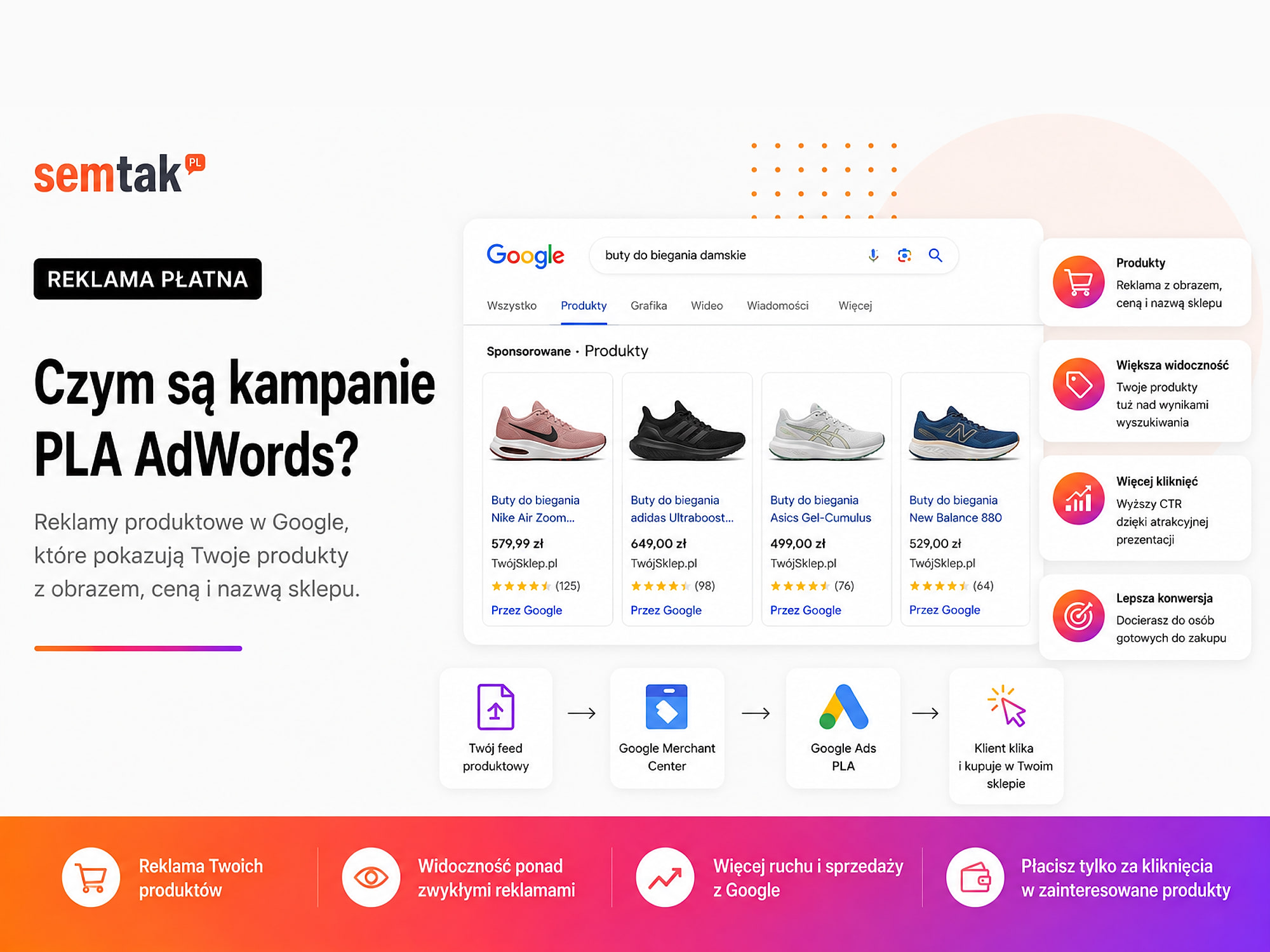
You type a product name into Google and see an ad with a photo, a price and the store's name? That is a product ad, which for years was called a PLA campaign, that is Product Listing Ads.
The phrase "PLA AdWords campaigns" still shows up in search and in conversations with store owners. The terminology has changed, though. AdWords is now Google Ads, and PLA ads are associated above all with Google Shopping.
The name itself is not the most important thing, however. In PLA campaigns Google relies mainly on the product information sent to Google Merchant Center. You do not create a separate ad and a list of keywords for every single product.
In this guide we explain what PLA campaigns are, how a product feed works, what you need before launching ads and which mistakes most often cause a store to pay for clicks without making money.
In short
PLA campaigns (Product Listing Ads), today known as Google Shopping, are product ads that show a photo, a price and the store's name directly in the Google results — at the moment a customer is looking for a specific product. You do not set keywords in them: Google matches products itself based on the feed from Google Merchant Center. That is why the foundation of an effective campaign is not the ad itself, but a correct, complete product feed.
In a nutshell (TL;DR)
- PLA stands for Product Listing Ads, the old name for Google product ads.
- AdWords changed its name to Google Ads, which is why the term "PLA AdWords" is now historical.
- The ad can include a product photo, the price, the store's name, delivery information and a rating.
- Google selects products mainly based on data from Merchant Center, not on a manually added list of keywords.
- To launch ads you need a working store, a product feed, Merchant Center, Google Ads and sales measurement.
- The outcome is decided not only by the campaign settings, but also by price, margin, photos, product data and how the cart works.
What are PLA campaigns?
PLA campaigns are the historical name for ads presenting specific products together with a photo, a price and the seller's name.
PLA stands for Product Listing Ads. In the ad a user can see, among other things:
- the product photo,
- the product name,
- the price,
- the store's name,
- the product rating,
- information about a promotion,
- delivery terms.
Today the following names are used more often:
- Google Shopping ads,
- product ads,
- Standard Shopping campaigns,
- Performance Max with a product feed.
The term PLA itself is still searched for, though. That is why it is worth knowing that it does not refer to a separate, new advertising system, but to an older name for Google product ads.
A simple example
You run a cosmetics store. A customer types into Google:
moisturising cream with ceramides 50 ml
Google may show several specific products from different stores. Before clicking, the user sees a photo of the cream, its name, the price and the seller. They do not have to open several pages to check the basic information. Even before entering the store they can judge whether the product matches their needs and budget.
PLA, Google Shopping and Performance Max — how do they differ?
PLA is the name of the ad format, Google Shopping refers to presenting product offers, and Performance Max is a separate type of campaign that uses many Google channels.
| Term | What it means |
|---|---|
| PLA | The historical name for product ads: Product Listing Ads |
| AdWords | The former name of the Google Ads system |
| Google Shopping | Presenting and advertising products using data from Merchant Center |
| Standard Shopping | A type of product campaign that gives more control over how products are divided |
| Performance Max | An automated campaign running across many Google channels that can use a product feed |
This article focuses on the meaning of the term PLA. You will find a broader comparison of the formats in the guide Google product ads — Shopping and Performance Max. If you are looking for help launching and running ads for your store, go to the Google Shopping campaigns service.
How does a Google product campaign work?
In short: Google selects products from the data sent to Merchant Center, not solely from manually entered keywords.
The process usually looks like this:
- The product is in your store.
- The product data goes into the feed.
- The feed is sent to Google Merchant Center.
- Google checks the data and the product's compliance with the requirements.
- Merchant Center is linked with Google Ads.
- The product is added to a Standard Shopping or Performance Max campaign.
- Google matches the offer to the query or the user.
- After clicking, the customer lands on the page of a specific product.
The foundation of how a campaign works is the product feed, that is an organised set of data about the store's assortment. Google officially states that product ads use the product attributes sent to Merchant Center, rather than basing delivery solely on keywords.
Keywords versus product campaigns
This does not work the same way as in a classic text campaign. In a Search campaign the advertiser chooses the keywords for which they want their ads to appear. In product campaigns Google analyses the product information found, among other places, in the feed and on the store's page.
The following matter in particular:
- the product title,
- the description,
- the category,
- the brand,
- the price,
- availability,
- the photo,
- colour and size,
- product identifiers.
The title "Cream 50 ml" conveys far less information than "Moisturising face cream with ceramides 50 ml — Brand X". The second title makes it quicker to understand which product is being advertised. It helps both the customer and the Google system.
Tip
Build the title using the pattern: brand + product type + key feature + parameter (capacity, size, colour). Such a title reads naturally and at the same time gives Google strong matching signals — without artificially stuffing in phrases.
What is a product feed?
A product feed is a file or connection through which a store passes current information about its products to Google.
Data can be sent to Merchant Center using:
- an XML file,
- a spreadsheet,
- a text file,
- a WooCommerce plugin,
- an integration with the store platform,
- an API.
In WooCommerce a plugin that generates the feed automatically is used most often. Installing the plugin does not mean, however, that the data is correct. If the store is missing a brand, variants have incorrect identifiers, the promotional price does not update, a product has no GTIN number or the availability is wrong — the plugin may pass those same gaps on to Google.
In plain terms: the plugin does not fix product data. If there are errors in WooCommerce, the feed will most often carry them over to Merchant Center, and Google may limit or reject the offer. We described the detailed configuration in the guide Google Merchant Center for WooCommerce — product feed step by step.
Acronyms in one place
GTIN — a global number identifying a product, most often corresponding to the EAN code on the packaging.
MPN — a catalogue number assigned to the product by the manufacturer, used among other things when a product has no GTIN.
ROAS — the ratio of revenue from an ad to the cost of the ad. Revenue of £5,000 at a cost of £1,000 means a ROAS of 500%.
What data should be in the feed?
The feed should contain information that lets Google unambiguously recognise the product, its price, availability and landing page.
| Data | Example |
|---|---|
| Product ID | CREAM-CERAMIDES-50 |
| Title | Moisturising cream with ceramides 50 ml |
| Description | Information about the use, composition and properties |
| Link | The address of the specific product page |
| Photo | The main product photo |
| Price | £14.99 |
| Availability | In stock |
| Brand | Brand X |
| GTIN or MPN | Product identifier |
| Condition | New |
| Category | Cosmetics and skincare |
Depending on the type of assortment you may also need: colour, size, material, gender, age group, the variant group identifier, and delivery costs and times. The exact requirements are described in Google's official product data specification.
The feed must match the store
If the ad shows a price of £19.99 but, after entering the store, the customer sees £23.99, the data is inconsistent. Such a difference can reduce customer trust, increase the number of exits from the store, cause the product to be rejected and limit how the ad is shown.
The price and availability should match across the feed, in Merchant Center, on the product page, in the product structured data, and in the cart and the payment process. With a dozen or so products you can still perform checks manually. With a few thousand products you need stable synchronisation.
Check before you start
The most common cause of rejections is a mismatch in price or availability between the feed, the product page and the cart — usually because of cache or an unsynchronised promotion. Verify a few products manually before you raise the budget.
What do you need to launch a PLA campaign?
You need a working store, a Merchant Center account, correct product data, a Google Ads account and purchase measurement.
1. A working online store. The product has to be purchasable without errors. Before the start, check at least the product page, the cart, delivery and payment on a phone. You will find a full list of problems that can block sales despite a working ad in the later section on the limitations of PLA campaigns.
2. A Google Merchant Center account. Merchant Center stores and checks product data. In the panel you will see, among other things, active products, rejected products, missing data, price problems, availability problems and account warnings.
3. A product feed. The feed should be current, correctly formatted and consistent with the information visible in the store. It is not enough that the file is generated — you have to check what it actually passes on.
4. A Google Ads account. In Google Ads you set, among other things, the campaign type, the budget, the country of sale, the campaign goal, the bidding strategy, the product split and conversions. If, alongside product ads, you also need search campaigns, remarketing or to get your measurement in order, check out Google Ads management.
5. Sales measurement. Google Ads should receive information about whether a purchase was made, what the order value was, in which currency the transaction took place and what the order ID was. Without this data you may see clicks and the campaign cost, but you will not be able to judge which products bring in sales.
6. Margin information. High revenue does not necessarily mean profit. A product at £100 may provide £40 of margin, while another product at the same price only £10. If both are advertised under the same rules, the system may spend a significant part of the budget on the less profitable product. Before launching the campaign it is worth knowing the products' margin, the average order value, the delivery cost borne by the store, payment fees, the frequency of returns and an acceptable cost of acquiring an order.
Standard Shopping or Performance Max?
Standard Shopping usually gives more control over products, whereas Performance Max uses more automation and can run across many Google channels.
| Area | Standard Shopping | Performance Max |
|---|---|---|
| Main use | Controlled product advertising | Sales across many Google channels |
| Basis | Product feed | Feed, conversion data and ad assets |
| Structure control | Usually greater | The system makes some of the decisions |
| Automation | Lower or moderate | High |
| Ad materials | Mainly product data | Products, text, images and videos |
| Good use case | Splitting by category, margin and priority | Scaling based on goals and data |
Standard Shopping can be a good direction when you want to control brands, product groups or different margin levels more precisely. Performance Max can make sense when the store has correct measurement, an organised feed and enough reliable data. You will find more information on the Performance Max page.
How much do PLA campaigns cost?
There is no single price list for PLA campaigns, because the cost depends on competition, the industry, the products, the budget and the store's effectiveness.
The spend is influenced by, among other things, the popularity of the products, the number of competing stores, the season, prices, the quality of the feed, the effectiveness of the product pages, the bidding strategy and the size of the budget.
A campaign should not be judged solely on the basis of the cost per click. More important are:
- the cost of a single order,
- the number of transactions,
- the value of sales,
- the conversion rate,
- ROAS,
- the margin after deducting the ad cost.
An example of campaign profitability
A store sells a product for £40. After deducting the cost of buying the goods, the payment cost, packaging and part of the delivery cost, £11 remains.
| Item | Value |
|---|---|
| Product price | £40 |
| Amount remaining before advertising | £11 |
| Cost of acquiring an order | £14 |
| Result before the company's other costs | −£3 |
The campaign generated a sale, but the store lost at least £3 on that order. If the cost of acquiring a purchase were £5, £6 would remain after advertising to cover the remaining costs and profit. That is why the sheer number of transactions or high revenue is not enough to judge a campaign.
Not sure whether the problem sits in the campaign, the feed, Merchant Center or on the product page? Check out Google Shopping campaigns — we analyse the feed, sales measurement and campaign structure, and then put together a list of concrete actions.
What are the advantages of PLA campaigns?
The biggest advantage of PLA ads is that the customer sees a specific product and price before even entering the store.
- The user sees the offer straight away. The photo, price and product name let them assess the offer in advance without opening the page.
- The ad leads to a specific product. The customer lands directly on the product page, not on the homepage or a general category.
- You can handle a large catalogue. A well-prepared feed lets you advertise hundreds or thousands of products without manually creating a separate ad for each item.
- Results can be analysed by product. You will check which products generate sales, use the most budget, have a high cost of purchase, receive clicks without transactions, and which should be paused or moved to another campaign.
- Data can update automatically. With correct integration, a change in price or availability in WooCommerce can be passed on to Merchant Center without manually editing the ad.
What are the limitations of PLA campaigns?
A PLA campaign can bring in an interested customer, but it will not fix a weak offer or technical problems with the store.
The ad will not solve the problem if:
- the product is clearly more expensive than the competition and has no added value,
- the photo is poor or unclear,
- the product page does not answer the customer's questions,
- the page loads very slowly,
- the cart does not work on a phone,
- the payment ends with an error,
- the availability is out of date,
- the delivery cost appears only at the end of the order,
- the store does not inspire trust.
Mini-scenario: a store has 2,000 products. The campaign brings users to the product pages, but on a phone the "Add to cart" button is obscured, and the BLIK payment sometimes fails to load. In the Google Ads panel you can see traffic. The problem, however, lies above all not in the ad — it lies in the store. Increasing the budget in such a situation would only mean bringing more customers into a broken purchase process.
Very important
Do not scale the budget until the purchase path works flawlessly on a phone. A bigger budget with a broken cart or payment means burning money faster, not more orders.
The most common mistakes in PLA campaigns
The most common mistakes concern product data, the structure of the assortment, margin and the consistency of information between the feed and the store.
1. All products go into one group. Bestsellers, seasonal products, low-margin goods and end-of-stock items then compete for the same budget. A better solution is to split products according to their business importance.
2. Product titles are too generic. Weak titles: Model 123, Premium Set, Cream 50 ml, Chair K-44. Clearer titles: Moisturising cream with ceramides 50 ml, Beige upholstered dining chair K-44, Women's running shoes — model 123. The title should not be artificially stuffed with phrases. It should clearly say what the product is.
3. The price or availability does not match the store. Google may reject a product when the data in the product source differs from the landing page or the checkout. Google's official help describes the reasons products are rejected and how to fix the data.
4. Variants are described incorrectly. A T-shirt available in five sizes and four colours can create 20 variants. If the variants have duplicate identifiers, no size, no colour, the wrong photos or out-of-date prices, Merchant Center may have trouble correctly recognising the offer.
5. The campaign ignores margin. The system may be keen to advertise a product that generates high revenue but very low profit. That is why the campaign structure should take into account not only the store's categories, but also the profitability of the products.
6. Settings are changed too often. Changing the budget, the ROAS target, the product structure and the bidding strategy every day makes it hard to assess the results. Changes should follow from data over a sufficiently long period, not from a single weaker day.
7. Paid ads are confused with free listings. Merchant Center can also make products available in Google's free placements. This does not mean, however, that an advertising campaign has been launched, nor that the product will be shown regularly.
Which stores do PLA campaigns make sense for?
PLA campaigns make sense above all for stores that sell specific products online and can measure the profitability of their sales.
Ads are worth considering when:
- the customer can buy the product directly in the store,
- the products are searched for in Google,
- the prices or other elements of the offer are competitive,
- the photos show the assortment well,
- the product data is organised,
- the store works correctly on a phone,
- the purchase and its value are measured,
- you know the margin of the main product groups.
It is worth getting the basics in order first if:
- products have random titles,
- variants are incomplete,
- prices do not synchronise with Merchant Center,
- the cart or payments work unreliably,
- the order value is not measured,
- you do not know which products are profitable.
How to launch a PLA campaign step by step?
First prepare the store and the product data, and only then link Merchant Center with Google Ads and launch the campaign.
- Check the purchase process — go through the entire path from product to payment on a computer and a phone.
- Get the product data in order — fill in titles, photos, prices, availability, brands, identifiers and variants.
- Configure Merchant Center — verify the domain, the company data, delivery, returns and the country-of-sale settings.
- Connect the feed — choose a plugin, file or integration suited to the number of products and the frequency of changes.
- Check rejected products — simply submitting a product does not mean it has been accepted and can be advertised.
- Link Merchant Center with Google Ads — thanks to the link, the products will be available during campaign setup.
- Set up sales measurement — verify the purchase, the order value, the currency and the transaction ID.
- Split the assortment — you do not have to advertise the whole catalogue. You can start with bestsellers, a specific category or products with the right margin.
- Choose the campaign type — decide whether you need the greater control of Standard Shopping or the broader automation of Performance Max.
- Analyse sales and margin — check not only clicks, but also the cost of purchase, the revenue and the amount remaining after deducting the ad cost.
What can you check yourself?
In Google Merchant Center
- Check the number of active and rejected products.
- Open the list of issues affecting products.
- Compare the prices of a few products with the prices in the store.
- Check the availability of selected variants.
- Verify the delivery and returns settings.
- Check whether the store's domain is correctly connected.
In Google Ads
- Check whether the campaign uses the right Merchant Center account.
- Verify the value of the purchase conversion.
- Compare the ad cost with the value of sales.
- Check the results by product.
- See whether a few unprofitable offers are not using up most of the budget.
- Check whether the campaign is not promoting unavailable products.
In WooCommerce
- Compare the product's price and availability with the state in Merchant Center.
- Open a few product pages on a phone.
- Check the variants and the main photos.
- Place one full test order.
- Verify whether the delivery and returns information is easy to find.
First check the products with the highest cost, the most clicks and those that generate a lot of traffic without purchases.
When is it worth handing this over to a specialist?
A specialist's help is needed when the problem spans the campaign, the feed, Merchant Center, measurement and how WooCommerce works all at once.
It is worth considering an audit or implementation when:
- a large share of products is being rejected,
- prices and availability do not update correctly,
- the store has thousands of products or many variants,
- the campaign generates sales, but its profitability is unknown,
- the purchase value is not recorded correctly,
- a few products use up most of the budget,
- Performance Max is hard to assess,
- products have stopped showing after a change of plugin or store,
- the Merchant Center account has received a warning or a suspension,
- the budget is growing while the number of orders stays the same.
A specialist should not limit themselves to reviewing the Google Ads panel. The source of the problem may be the feed, the WooCommerce integration, the product page, faulty measurement or an inconsistency in prices.
Frequently asked questions
Do PLA campaigns still exist?
PLA is still a name in use, but today people more often talk about Google Shopping product ads. The acronym itself stands for Product Listing Ads.
Are PLA and Google Shopping exactly the same thing?
No. PLA is the name for the product ad format, while Google Shopping is a broader system for presenting offers based on data from Merchant Center.
Do I need Merchant Center for a PLA campaign?
Yes. The product data used in the ads is passed on and checked by Google Merchant Center.
Can WooCommerce be connected with Merchant Center?
Yes. You can use a plugin, an XML file, an external feed management system or a connection via the API.
Do you choose keywords in PLA campaigns?
Not in the way you do in classic Search campaigns. Google matches products mainly based on the information found in the feed and on the product page.
How much does a PLA campaign cost?
The cost depends on competition, the industry, the assortment, the budget and the store's effectiveness. The most important thing is whether the cost of acquiring an order fits within the margin.
Why was a product rejected in Merchant Center?
The most common reasons are a mismatched price, incorrect availability, missing required data, an image problem, an incorrect variant or a breach of Google's policies.
Can products appear in Google without a paid campaign?
Yes. Merchant Center also supports free product listings. This does not, however, guarantee constant impressions or a particular position.
Want to check whether your PLA campaigns are correctly prepared?
Not sure whether the problem sits in the campaign, the feed, Merchant Center or on the product page? At the SEMTAK Marketing Agency we analyse the feed, sales measurement and campaign structure, and then put together a list of concrete actions:
- Google Shopping campaigns — configuration of Merchant Center, the feed and the product campaign.
- Performance Max — scaling sales across many Google channels.
- Google Ads — full management of advertising accounts for e-commerce.
- Google Merchant Center for WooCommerce — product feed step by step.