Meta Title and Description for a WooCommerce Store — Templates and CTR

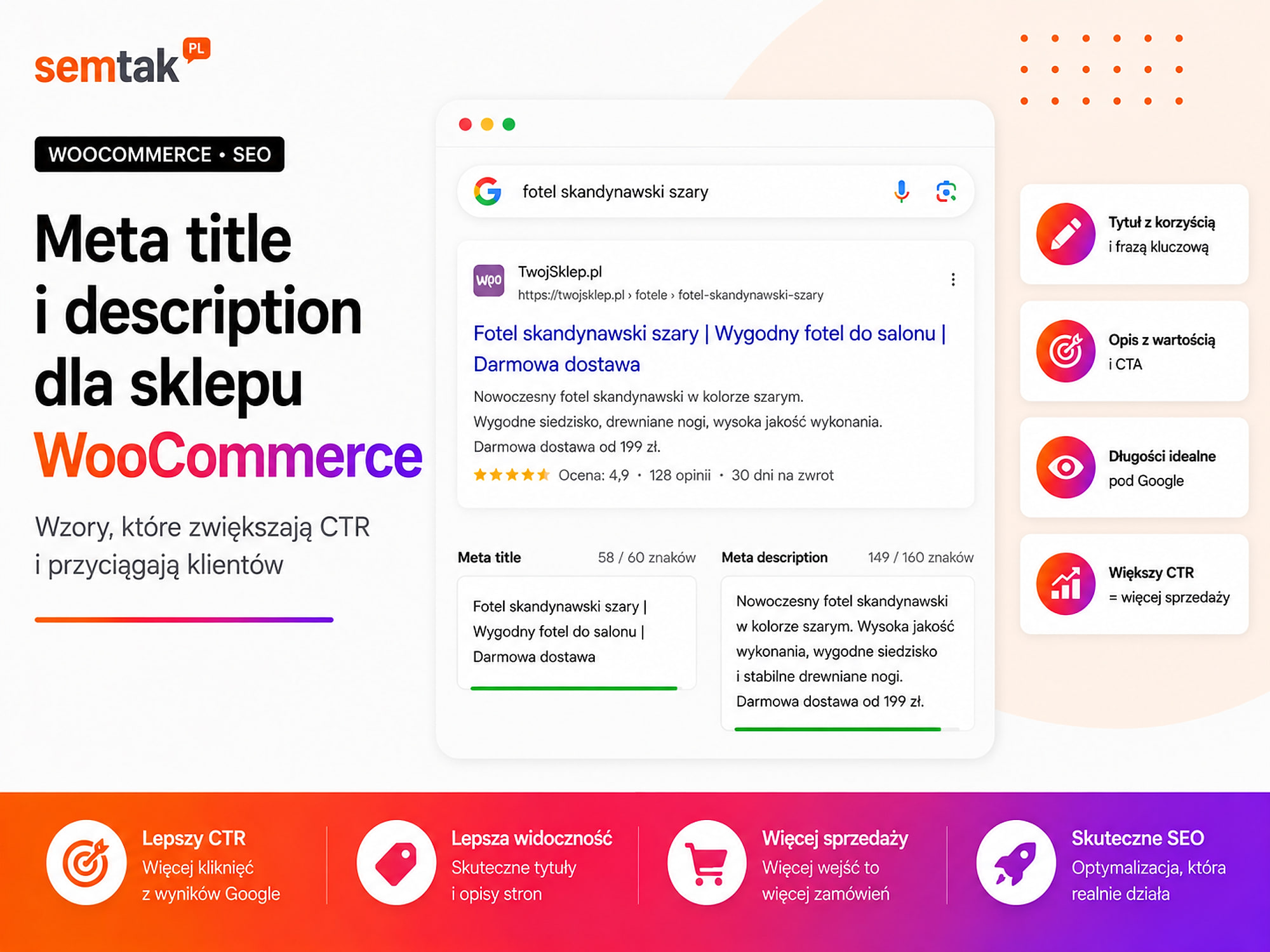
A store can appear high in Google and still receive few visits. The user sees the result but chooses a competitor, because their title matches the query better and their description shows the price, availability or a concrete advantage.
Meta title and meta description are the first elements of your offer that a customer can see before even entering the store. They should clearly say what is on the page and why it is worth opening.
The problem appears when all products use the same pattern — "Product name – Online store – Best quality" — or every category gets the description "We invite you to explore our wide range of products at attractive prices". Such meta data does not help to distinguish pages, does not show the most important features of the offer and is often changed by Google.
In this guide we show how to prepare meta title and description for the homepage, categories, products, brands and articles in WooCommerce. We also explain how to measure CTR in Google Search Console and how to scale meta data in a store with thousands of products.
In short
Write the meta title to about 60 characters and the meta description to about 155 characters — these are the first elements of your offer the customer sees in Google and they decide whether they click your result or a competitor's. A good title clearly says what is on the page and contains the keyword plus an advantage; the description adds price, availability or a benefit and encourages the click. A high position without a good CTR is wasted traffic — write for people, not for robots.
TL;DR
- Meta title is the document title saved in the page code. It can be used as the clickable title of the Google result.
- Meta description is a short summary of the page. Google may display it under the title, but it may also create its own snippet from the content.
- There is no fixed character limit imposed by Google. As a working range you can assume about 45–60 characters for the title and 130–160 characters for the description.
- It is worth placing the most important phrase near the beginning of the title, but without mechanically repeating it in every element.
- A category, a product and an article should have different meta data, because they answer different intents.
- With a large catalogue you can use templates, but it is worth correcting the most important categories and bestsellers manually.
- CTR shows what percentage of result impressions ended in a click. There is no single correct CTR for all positions and queries.
- Evaluate changes in Search Console, comparing similar periods, positions, devices and query types.
- Improving the title alone will not fix a bad position, a mismatched landing page or an uncompetitive offer.
What is a meta title?
A meta title is the text saved in the <title> element of the page. It tells the browser and the search engine what a given URL is about.
Technically it is a fragment of code that the customer does not see directly on the page:
<title>Vitamin C serum — facial cosmetics | Store X</title>In WordPress the meta title is usually set with an SEO plugin. It can be prepared manually for a specific page, automatically according to a template, or through a combination of both methods. The meta title can be used by Google as the clickable title of the search result.
You have no guarantee, however, that Google will show exactly the version you entered. The search engine may create its own title based on the <title> element, the H1 heading, the visible page name, other prominent texts, links pointing to the page or the site name. That is why the title, H1 and visible content should describe the same product or category.
What is a meta description?
A meta description is a short summary of the page content saved in the HTML code.
<meta name="description" content="Choose a vitamin C serum for different skin types. Compare concentrations, sizes and brands. Check available products and delivery.">The description may appear under the clickable title in Google. Its job is to clarify the page content, show the important features of the offer, match the message to the user's intent and encourage a visit without using clickbait. Google does not have to use the description you prepared — it may take a fragment of the visible content that better matches a particular query. The same page can therefore receive different descriptions for different searches.
Meta title, H1 and product name — how do they differ?
The meta title is prepared mainly for the search results, while the H1 is the main visible heading of the page. In WooCommerce the product H1 is usually its name.
| Element | Where it is located | Main job |
|---|---|---|
| Meta title | In the page code and potentially in Google | Naming the result and encouraging the click |
| H1 | On the page | Telling the user where they are |
| Product name | On the card and in the catalogue | Unambiguous product identification |
| Meta description | In the code and potentially in Google | Expanding the title and presenting the offer |
| Product description | On the product card | Helping with the purchase decision |
These elements do not have to be identical. An example for the same product:
- Product name and H1: C15 Glow Serum 30 ml
- Meta title: Vitamin C Serum 15% C15 Glow 30 ml | Store X
- Meta description: C15 Glow serum with 15% vitamin C for the care of dull skin. Check the composition, how to use it, availability and delivery.
Each element serves a different function, but they all describe the same product.
Do meta title and description affect the position?
A good meta title helps to clearly define the topic of the page, while the description should be treated above all as an element of presenting the result and encouraging the click.
Do not assume, however, that simply adding a phrase to the title will automatically move a category from position 20 to position 3. A page's visibility also depends on the match to intent, the quality of the content, the store structure, internal linking, external links, indexation, speed, competition and product availability. Meta data helps you make use of the visibility a page already has.
Example of CTR impact
A category has 20,000 impressions per month, a CTR of 2.1% and 420 clicks. If, with a similar number of impressions, the CTR rises to 3%, the page will gain 20,000 × 3% = 600 clicks — 180 more visits without increasing the number of impressions. This does not mean that every title change will bring such an effect, but it shows why it is worth working on pages that already appear in Google.
How many characters should a meta title have?
Google does not define a fixed character limit. The title is shortened depending on the available width, the device and the letters used.
The letter "W" takes up more space than "i", which is why two titles with an identical number of characters can be shown differently. As a practical working range you can assume about 45–60 characters including spaces — this is not an official limit nor a guarantee of full display. In the title it is most often worth fitting the main category or product name, an important feature or variant, and the brand of the product or store if space remains.
If the title is too long, first remove generalities, the repeated store name, unnecessary parent categories, terms such as "best" and "high quality" and several similar phrases written after commas. Place the most important information closer to the beginning:
- Better: Creams for dry skin — moisturising and protective
- Weaker: Store X — best cosmetics online — creams for dry skin
How many characters should a meta description have?
The meta description also has no fixed limit. Google shortens the result snippet depending on the device and the layout of the results page.
As a working range you can assume about 130–160 characters including spaces. There is no point in artificially lengthening the description just to reach a specific number. A good description may contain the type of product or category, important features, the use case, available variants, the conditions of the offer and a calm call to action. The description should expand the title, not repeat it word for word. Example:
Creams for dry skin: moisturising, protective and regenerating. Compare compositions, sizes and brands. Check availability and delivery.
CTR — what it means and how to interpret it
CTR shows what percentage of result impressions ended in a click. Formula: CTR = clicks ÷ impressions × 100%. Example: 1,000 impressions and 50 clicks give 50 ÷ 1,000 × 100% = 5%.
Is there a good CTR? There is no single correct result for all pages. CTR depends, among other things, on the position of the result, the type of query, brand recognition, the device, the presence of ads, product results, maps, images, featured snippets, price and availability, and competitors' titles. A page in position 2 and a page in position 12 should not be assessed by the same CTR. Likewise, a query containing the store name will behave differently from a general phrase such as "natural cosmetics". So instead of asking "is a 3% CTR good?", check "does this page have a lower CTR than similar pages occupying comparable positions for similar queries?".
When does a low CTR indicate a problem with meta data?
It is worth analysing the meta title and description when a page has a lot of impressions, occupies positions that give a real chance of a click, but users often choose other results.
A typical candidate for improvement has many impressions, appears for important queries, occupies relatively stable positions, has a lower CTR than similar pages, has a generic or automatic title and does not show an important feature of the offer. A low CTR does not always mean a problem with meta data, however. Possible causes: the page answers a different intent, the position is too low, a competitor shows a lower price, the result does not contain product data, the page appears for random queries, the brand is unknown, the product is unavailable or Google shows a different title than the one entered. First check the queries, only then change the text.
How to check CTR in Google Search Console?
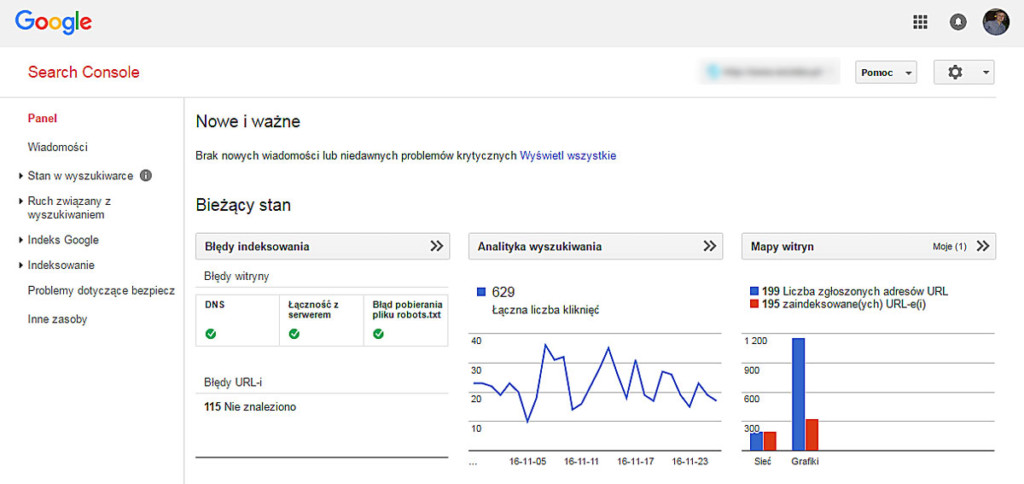
In the Performance report you will find clicks, impressions, CTR and the average position.
First select a specific page, then check its queries, devices and periods. The average CTR of the whole site alone will not tell you which categories or products need improvement. We describe the full procedure for selecting pages to improve below, in the section "How to find pages with potential for improving CTR?".
Why does Google change the meta title?
Google may prepare its own result title if it decides that the entered title does not describe the page well enough.
The most common reasons: the title is too generic, the same pattern appears on many pages, the text contains unnaturally repeated phrases, the title does not match the H1, it contains an outdated year or promotion, the page lacks a clear heading or the actual page name gets lost in a repetitive add-on. Such a repetitive add-on is called boilerplate — it can be, for example, "buy online, best price, fast shipping, secure payments, online store". If a similar fragment appears in thousands of titles, it takes up space but says little about a specific page.
Why does Google not show the meta description?
Google may use a fragment of the page instead of the description if it better matches a specific query.
This can happen when the description is too generic, does not match the query, is the same on many pages, contains a list of keywords, describes different content than the page, is outdated or was not prepared. Compare:
- Weak description: We invite you to our store. We offer high-quality products at attractive prices and provide fast shipping. (could apply to any product)
- Better: C15 Glow serum with 15% vitamin C, ferulic acid and vitamin E. Check the composition, how to use it, availability and delivery.
Google may still create a different snippet, but it receives a concrete proposal matched to the product.
How to write a meta title for the homepage?
The homepage should clearly present the brand and the main scope of the offer. Examples:
- Natural cosmetics for face and body | Natura Store
- Online furniture store – furniture for the home | IGA Furniture
- Bicycle accessories and parts online | Bike X
Do not try to put all categories in the homepage title. Bad: "Cosmetics store, creams, serums, shampoos, lotions, perfumes". The homepage should introduce the offer — detailed phrases belong to the categories. Templates for the homepage, categories, products and the remaining page types are in the tables further in the article.
How to write a meta title for WooCommerce categories?
A category title should answer a general query about a group of products and show its most important distinguishing feature. Examples:
- Vitamin C serum – different concentrations and brands
- Creams for dry skin – moisturising and protective
- Electric desks – height adjustment | Store X
- Chests of drawers for the living room – different sizes and colours
Do not add several variations of the same phrase to the title. Bad: "Chests, cheap chests, chests for the living room, modern chests". Better: "Chests of drawers for the living room – modern models and sizes". Categories answer broader needs than single products — it is worth organising their structure according to the guide categories in a WooCommerce store — architecture for SEO.
How to write a meta title for subcategories?
A subcategory should be more precise than the parent category and answer a narrower need.
Example structure: facial care → facial serum → vitamin C serum → vitamin C serum 15%. Example title: "Vitamin C serum 15% – for dull skin". You do not need to add the whole category path to the title — the user should immediately see how the subcategory differs from the parent page.
How to write a meta title for a product?
The full meta title and description templates for products are in this article. Preparing the whole card — descriptions, parameters, photos and selling arguments — we cover separately in the guide product descriptions for SEO.
A product title should unambiguously indicate the model and the parameter that distinguishes it from other variants. Examples:
- C15 Glow Serum 30 ml – vitamin C 15%
- Varius Desk 120 × 65 cm – natural oak
- Diana Chest of Drawers 150 cm – white, glossy fronts
- Marea G9 Wall Lamp – black, 2 light sources
The important parameters depend on the industry.
| Industry | Parameters useful in the title |
|---|---|
| Cosmetics | Brand, line, ingredient, concentration, size |
| Furniture | Model, width, material, colour |
| Electronics | Brand, model, memory, size |
| Clothing | Type, brand, collection, material |
| Lighting | Type, model, number of points, colour |
| Parts | Model, compatibility, manufacturer number |
Do not include all parameters at once. A product title is not a full specification.
How to write meta data for brand pages?
A brand page should show that the user can browse the offer of a specific manufacturer, not only read a company description. Examples:
- CeraVe – cosmetics for face and body | Store X
- Bosch – power tools and accessories | Store X
- Nowodvorski – lamps and lighting | Store X
Do not create a brand page if it contains a single product and adds nothing beyond the product card.
How to write meta data for filter pages and SEO landing pages?
Meta data only makes sense for filters that have been deliberately chosen as standalone pages answering real queries.
Examples of valuable pages: creams for dry skin, 120 cm electric desks, white 150 cm chests of drawers, black loft lamps. Not every filter combination should be indexed — a random address such as "creams + brand X + size 50 ml + price £14–18 + promotion" may have a few products or quickly become empty. A valuable landing page should have a permanent address, its own H1, suitable products, useful content, internal links, a correct canonical and a place in the store architecture. Simply adding a title does not turn a technical filter into a valuable SEO page.
How to write meta data for promotions and seasonal pages?
A promotion title should clearly define the scope and period, but it cannot promise a discount that the user will not find on the page. Examples:
- Black Friday — cosmetics promotions | Store X
- Garden furniture for summer — available sets
- Mother's Day gifts — cosmetics and sets
Do not add "up to –70%" if most products have a 5% discount, "free delivery" if it applies only to part of the orders, nor "last pieces" if the stock is not actually limited. If you add a year to the title, remember to update the whole page at the next edit of the campaign.
How to write meta data for blog articles?
An article title should clearly show the question or problem that the content solves. Examples:
- How to speed up WooCommerce? 9 proven steps
- WooCommerce or Shopify? A comparison for an online store
- How to choose a cream for dry skin? A practical guide
An article description should say what the reader will learn. Good: "See how to choose a cream for dry skin: how to read the composition, which substances to look for and how to match the formula to your routine". Weak: "In this article we discuss the topic of creams for dry skin".
Ready-made meta title templates for WooCommerce
| Page type | Template |
|---|---|
| Homepage | [brand] – [main offer or distinguishing feature] |
| Category | [category] – [important choice or feature] | [store] |
| Subcategory | [precise category] – [use case] |
| Product | [type + model] – [variant or parameter] | [store] |
| Brand | [brand] – [product group] | [store] |
| Filter landing | [product + feature] – [additional distinguishing feature] |
| Promotion | [campaign or season] – [product group] | [store] |
| Guide | [question or problem] — [scope of the answer] |
Treat these templates as a starting point, not a mandatory formula. If every title is built from the same long pattern, the store will once again get repetitive meta data.
Ready-made meta description templates for WooCommerce
| Page type | Template |
|---|---|
| Homepage | [main offer] for [audience]. [important scope or advantage]. Check [categories or conditions]. |
| Category | Choose [products] for [use case]. Compare [variants]. Check availability, prices and delivery. |
| Product | [product name] with [important feature]. Check [parameters or use case], availability and delivery. |
| Brand | Discover [products] from [brand]. Compare [categories or features]. Check models, prices and delivery. |
| Promotion | Check the promotions on [product group]. See available models, reduced prices and the time of the offer. |
| Guide | Find out how to [task]. We explain [the most important elements] and show what to look out for. |
| B2B store | Order [products] for your company. Check net prices, order thresholds, variants and B2B cooperation terms. |
The template should be filled in with real data. Do not add "fast shipping" or "the lowest price" if you cannot confirm it.
What words to use in a meta description?
Use specifics that help the customer assess whether the page matches their need.
Useful phrases: compare, check, choose, available variants, dimensions, sizes, composition, compatibility, net prices, shipping, delivery, availability, size chart, set contents. Avoid automatic generalities: highest quality, best prices, exceptional offer, wide assortment, for demanding customers, number one on the market, unique design. If you use a specific advantage, it must be true and current.
Is it worth adding the price to the meta title or description?
The price can increase the specificity of the result, but it quickly becomes outdated and will not always be shown by Google.
The price makes sense when it is stable, updates automatically, applies to a specific variant, is an important part of the decision and matches the card and product data. The risk appears when the product has many price variants, the price changes often, promotions are short, Google shows an older version of the result or the title is generated from delayed data. For dynamic products it is better to base meta data on stable features: model, dimension, size, material, use case. The price can appear in the results thanks to correct Product and Offer data — we cover the implementation method in the article structured data for WooCommerce products — Product, Offer and Review.
Is it worth adding the store name to every title?
The store name can support recognition, but it should not take space away from more important information about the product or category.
Add the brand at the end of the title, in a short form, when it is recognisable and when the title stays readable, for example "Vitamin C serum 15% | Store X". If the store name is long, you can skip it on some products. Google may also separately display the site name above the result title — repeating it twice does not always add value.
Should you use capital letters, emoji and special characters?
A special character can organise the title, but it should not turn the result into an advertising banner.
Readable separators are –, | and :, for example "Creams for dry skin – moisturising and protective | Store X". Avoid wording in the style of "🔥 BEST CREAMS!!! CHEAP ⭐⭐⭐". Excessive capital letters, exclamation marks and symbols make reading harder, can look like spam, do not suit every industry and can be skipped or changed.
How to set the meta title and description in WooCommerce?
The easiest way is to do it with a single, correctly configured SEO plugin.
Popular solutions usually let you set meta data for the homepage, products, categories, tags, attributes, blog posts, brand pages and other content types.
Product meta data. In the product editor find the SEO plugin section and fill in the SEO title, meta description, indexing settings and a possible canonical. Field names may differ depending on the tool.
Category meta data. Go to Products → Categories → Edit category and find the SEO fields added by the plugin. Categories are often skipped, even though they are exactly the ones that answer broad shopping queries.
Watch out for several SEO plugins at once
Do not run several tools generating meta tags at the same time. This can cause two <title> elements, several meta descriptions, conflicting canonicals, different indexing directives and unpredictable theme behaviour. Before changing the plugin, make a backup of the site and check whether the previous settings were transferred correctly.
How to create meta data for thousands of products?
With a large catalogue you need a combination of templates, good product data and manual work on priority pages.
There is no point in manually writing 20,000 descriptions before launching the store if a large part of the products generates neither traffic nor sales. Divide the pages by priority:
| Group | Example pages | Way of preparing |
|---|---|---|
| A | Main categories and bestsellers | Manual title and description |
| B | Important subcategories and products | Template with manual correction |
| C | A large number of standard products | Automatic, varied template |
| D | Products being phased out or without potential | Decision to keep, redirect or remove |
To build the templates, use the templates from the two tables above. Do not create a separate set of rules for each import if it can be based on one approved structure.
Data quality is more important than the template itself. An automatic title can use the product name, model, brand, size, capacity, colour and material — but the data must be complete. If the colour attribute is empty, the automatic title may look like this:
Diana Chest of Drawers 150 cm – | Store XIf the material is entered once as "oak", once as "natural oak" and once as "wood colour", the results will be inconsistent. Before automation, check the completeness of the attributes, the consistency of naming, the correctness of variants, the absence of technical codes in names and the way empty values are handled.
An automatic description is acceptable if the result is readable, true, varied and matched to a specific page. It is not about randomly swapping synonyms:
- Good: Diana chest of drawers 150 cm with three drawers and shelves. White glossy fronts, soft close and a laminated board body.
- Weak: Discover the extraordinary Diana chest of drawers. This exceptional chest is the perfect chest for demanding customers.
When to correct meta data manually?
Manual work makes the most sense on pages with high business potential or many impressions and unused CTR.
The priorities are main categories, seasonal categories, bestsellers, high-margin products, pages close to the first page of results, addresses with a large number of impressions, results with a low CTR, pages whose title Google often changes, and important landing pages. Do not randomly correct the whole catalogue — first find the pages where a change can give a measurable effect.
How to find pages with potential for improving CTR?
The best opportunities are usually on pages that already have visibility but do not use it fully.
The procedure in Search Console:
- Open the report Performance → Search results.
- Tick clicks, impressions, CTR and the average position.
- Set a longer period, e.g. three months.
- Go to the Pages tab.
- Sort the addresses by the number of impressions.
- Open an important category or product.
- Go to the Queries tab.
- Check the position, CTR and the match between the queries and the page content.
- Compare devices.
- Choose pages that are important for business, not only those with the most impressions.
You can prepare a sheet:
| URL | Page type | Impressions | CTR | Position | Main query | Problem |
|---|---|---|---|---|---|---|
/vitamin-c-serum/ | Category | 18,000 | 1.8% | 6.2 | vitamin C serum | Title too generic |
/diana-chest/ | Product | 4,500 | 3.1% | 4.8 | Diana chest 150 cm | No dimension |
/creams-dry-skin/ | Category | 9,000 | 2.4% | 5.9 | cream for dry skin | Description without specifics |
Do not treat the average position as the exact place visible to every user. It is a value averaged across different queries, devices, locations and moments.
How to test meta title and description?
A test should have a recorded date, a clearly defined scope and a comparison period that is as similar as possible.
After implementation, save the previous and the new version of the meta data, note the date of the change, request re-indexing of the important address, check what title Google actually shows, and compare similar periods before and after the change. With a seasonal offer, a year-on-year comparison may be better than two consecutive months.
Test group and control group. A large store can divide similar pages into a test group with a new pattern and a control group with no changes. The pages should be as similar as possible in terms of position, number of impressions, seasonality, product type and brand recognition. With low traffic, do not draw conclusions after a few clicks — the difference may be down to chance.
Meta data and user intent
The best title is not the one that contains the most phrases, but the one that announces the right landing page.
For the query "creams for dry skin" the user probably wants to see several products. A good result: "Creams for dry skin – moisturising and protective". A weak result: "Aqua Repair Cream 50 ml". Even a good product title will not fix a mismatched landing page. In turn, for the query "Aqua Repair cream 50 ml" the card of the specific product will be the right one. That is why meta data must be prepared together with the keyword map and the store architecture — we describe the broader order of actions in the guide WooCommerce store SEO — where to start.
Meta data and SEO cannibalisation
Two pages should not receive almost identical titles if they are meant to answer different needs.
Example of the problem: the category "vitamin C serum", the filter "vitamin C cosmetics", the brand "brand X serum" and the guide "which vitamin C serum to choose". If they all have the title "Vitamin C serum | Store X", Google and the user do not get clear information about how the pages differ. A better split:
- Category: Vitamin C serum – different concentrations and brands
- Brand page: Brand X vitamin C serum | Store X
- Guide: How to choose a vitamin C serum? Concentration and composition
- Product: C15 Glow Serum 30 ml – vitamin C 15%
Different titles will not solve all cannibalisation if the pages have the same content. They do, however, help to clearly define their roles.
The most common mistakes in meta title and description
What costs the most clicks: the store name dominating the title, the lack of an important variant, meta data for random filters and assessing CTR without taking the position into account.
- 1. A store name that is too long in every title — the actual product name gets shortened and the user mostly sees the site brand.
- 2. The lack of an important variant — the product has several sizes, capacities or colours, but the title does not indicate which variant the card concerns.
- 3. Separate meta data for random filters — the store generates thousands of similar pages with no value of their own and no stable offer.
- 4. Several SEO plugins at once — the code may contain several titles, descriptions, canonicals or conflicting indexing settings.
- 5. Assessing CTR without taking the position into account — a page in position 15 is compared with a result occupying position 2.
- 6. No measurement of effects — meta data is changed based on taste, but no one records the date or checks the CTR and queries.
- 7. Automation based on incomplete data — the template uses empty attributes, incorrect names or technical product codes.
- 8. Trying to fix a bad landing page with meta data — the title announces a category, but the user lands on a product, or the other way round.
What can you check yourself?
Most meta data problems can be diagnosed initially without specialist tools.
- Type
site:yourstore.cominto Google and review the example titles. - Open the code of a few pages and find the
<title>element. - Compare the meta title with the H1 and the page content.
- Check whether products and categories do not have identical titles.
- See whether the store name does not take up most of the title.
- Compare how the results look on a phone and on a computer.
- Check whether the years, promotions, prices and delivery information are current.
- Verify whether the most important categories have manually prepared meta data.
When is it worth commissioning a specialist?
A specialist's help makes sense when the problem concerns a large number of pages, the store structure or the mismatch between categories and products and the queries.
It is worth commissioning an analysis when the store has thousands of products, the meta data is generated by an unknown template, many pages have identical titles, Google regularly changes the titles of the most important categories, pages have many impressions and a low CTR, categories compete with products, filters generate thousands of indexed addresses, previous meta data disappeared after a migration, two SEO plugins generate conflicting code, it is unclear which pages to improve first, the changes are to be implemented in bulk via API or import, or the meta data is only one of many visibility problems.
With a large store, simply writing new titles may not be enough. You also need to check the intent, the category structure, indexation, canonicals, filters, content, linking and product data. As part of online store SEO, meta data is part of a larger process: from the map of categories and products to the measurement of clicks and sales from organic traffic. If the store has indexation errors, duplicates and filter problems at the same time, the starting point can be an SEO audit or technical SEO.
Frequently asked questions
How many characters should a meta title have?
Google does not define a fixed limit. As a working range you can assume about 45–60 characters, but the display depends on the width of the letters, the device and the layout of the results.
How many characters should a meta description have?
There is no official character limit. In practice, about 130–160 characters is often used. The most important thing, however, is for the description to be specific and to match the given page.
Does the meta description affect the position in Google?
It should not be treated as a field that will raise the page's position on its own. Its main role is to describe the result and encourage the right user to visit.
Why does Google change my meta title?
Google may create its own title when the entered title is generic, repetitive, outdated, overloaded with phrases or inconsistent with the visible heading and the page content.
Why does Google not show my meta description?
The search engine may choose a fragment of content that better matches a specific query. This also happens when the description is too generic, repetitive or does not describe a specific page.
Does every WooCommerce product need manually written meta data?
No. In a large store you can use correct templates. It is worth preparing manual meta data for bestsellers, strategic products and pages with a large number of impressions.
Is it worth adding the store name to the meta title?
Yes, if the brand is important and the title stays readable. It is best to place the name at the end. With long titles you can skip it.
How to check a page's CTR in Google?
In Google Search Console open the Performance report, tick CTR and go to the Pages tab. After selecting an address, check the queries, devices and average position.
Visibility first, then the click
Meta title and description are not a place for a random list of keywords. They should quickly answer three questions: what is on the page, whether it matches the user's query and why it is worth opening this particular result.
For a category, show the group of products and an important choice. For a product, give the model and the parameter that distinguishes the variant. For a guide, announce a concrete answer. In a large store, use templates, but do not leave the most important pages without manual control — categories, bestsellers and addresses generating many impressions deserve a separate analysis. Do not assess meta data only on the basis of length or the score in the SEO plugin — check what Google actually shows, for which queries the page appears and what CTR it achieves at a given position.
If you want to find the categories and products that have visibility but lose clicks due to weak meta data or a mismatched landing page, we can analyse Search Console, the store structure and the current templates. As part of online store SEO, we will set priorities and implement changes where they can make a real difference to traffic and sales.