Why Is My Online Store Not Selling? The 6 Most Common Reasons

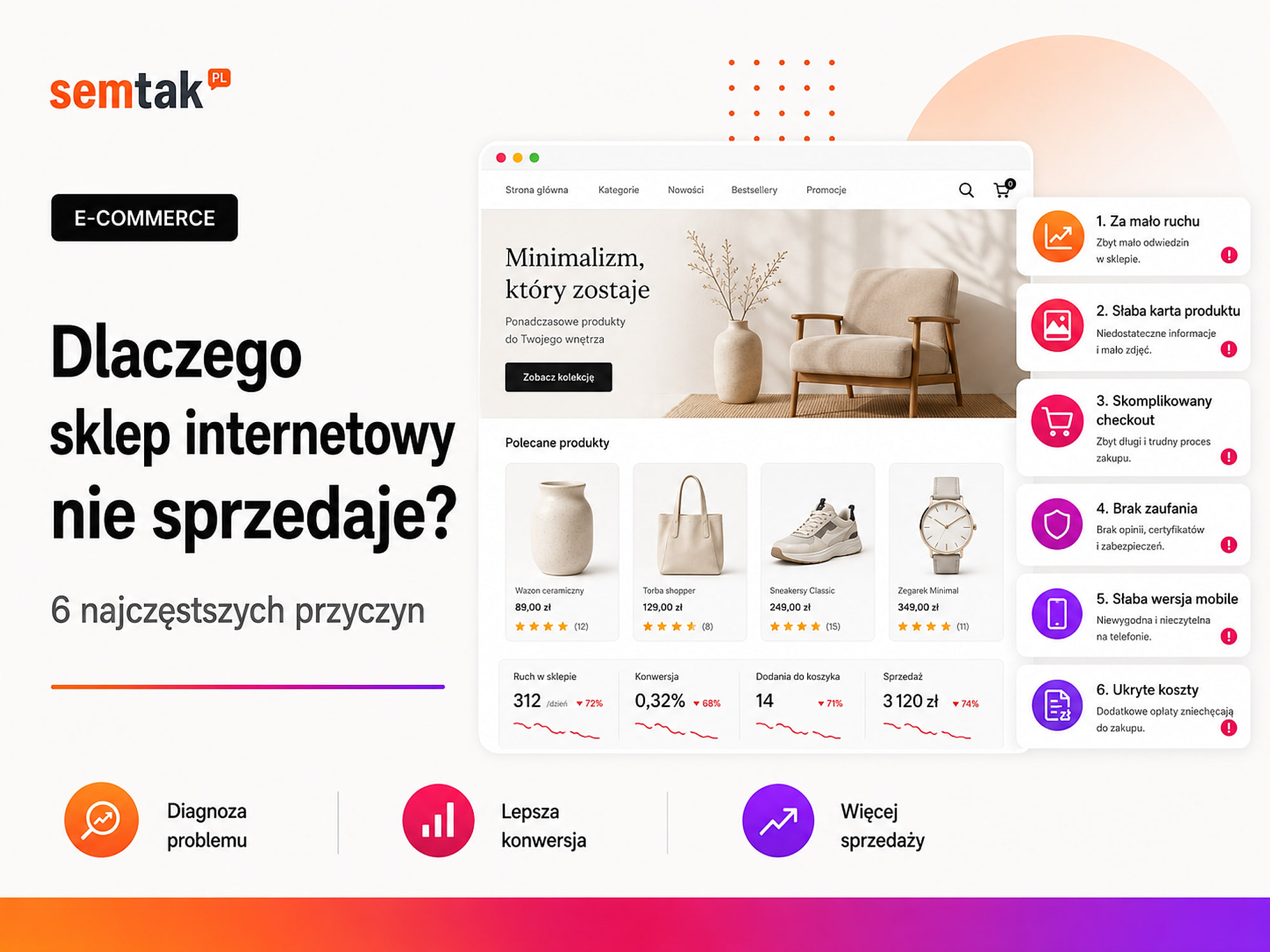
The store is up and running, the products have been added, yet there are no orders. In a situation like this it is easy to assume that the problem is too small an advertising budget or too high a price.
Often, however, the cause lies elsewhere. Customers may not be reaching the store, may be arriving from the wrong sources, may not understand the offer or may give up when choosing delivery. Sometimes a payment error visible only on a phone is what blocks sales.
The most important thing is to establish at which stage you are losing the customer. In this article we show the six most common reasons for a lack of sales, together with specific ways of checking each one.
In short
Most often a store fails to sell not because of too small an advertising budget, but because of one of 6 reasons: a lack of the right traffic, traffic from the wrong sources, an unclear offer, a weak product page, a checkout or payment that is too difficult, or a technical error visible only on a phone. Before you increase your advertising budget, check at which stage you are losing customers. Start the diagnosis with the data: traffic, conversion, cart abandonment.
In a nutshell (TL;DR)
- First, separate two problems: a lack of traffic and a lack of conversion.
- A large number of visits is not enough if the store is reached by people who are not interested in buying.
- The offer must clearly show the price, availability, delivery time, returns and the advantage over the competition.
- The product page should answer the customer's questions, not just present a photo and the manufacturer's description.
- Errors in the cart, payment and mobile version can block sales despite the store looking correct.
- Without correct analytics, you do not know where customers drop off and which traffic sources actually sell.
First establish: does the store have no traffic, or is it not turning traffic into sales?
A lack of sales may result from a lack of visitors, or from the fact that the people visiting the store do not complete their purchases. These are two different problems.
If the store is visited by a few dozen people a month, a lack of orders does not necessarily mean that the product page is poorly prepared — the store may simply not have enough visibility. If, on the other hand, hundreds or thousands of users view the products but almost nobody adds them to the cart, the problem may be the offer, the price or the way it is presented.
Start with one question: no traffic or no conversion?
This distinction determines the whole diagnosis. A lack of traffic is fixed with visibility (SEO, ads); a lack of conversion — with the offer, the product page, trust and the technical side. Increasing the advertising budget while the cart is broken only raises costs. First establish at which stage the customer disappears.
| Symptom | Possible cause |
|---|---|
| Very few visits to the store | A lack of visibility, ads or recognition |
| There are visits, but users do not move on to the products | Mismatched traffic or an unclear structure |
| Products are viewed, but they do not reach the cart | A weak offer, price or product page |
| The customer adds a product but does not start the order | Delivery cost, a lack of trust or unclear terms |
| The customer starts the order but does not pay | A problem with the checkout, the form or the payment |
| WooCommerce shows sales, but analytics does not see them | Incorrectly implemented measurement |
Checkout is the order-placing stage at which the customer enters their details and chooses the delivery and payment method. Conversion means the user performing a desired action — in a store the most important conversion is the purchase, but earlier on it is worth measuring the product view, the add to cart, the start of the order, the choice of delivery and the choice of payment too. The conversion rate shows what percentage of visits ended in a purchase. For example: 1,000 visits and 10 orders is a conversion rate of 1% — the figure alone, however, does not say where the problem lies; you have to compare traffic sources, products, devices and the individual purchase stages.
1. Too few people reach the store, or it is the wrong traffic
A store will not sell if customers cannot find it, or if it is reached by people who have no intention of buying the products on offer.
A lack of traffic is relatively easy to spot — Google Analytics 4 shows a small number of users, and Google Search Console has few impressions and clicks. GA4 is a tool that shows traffic, user behaviour and sales; GSC (Google Search Console) shows the store's visibility in Google's results, clicks, positions and indexing problems. Harder to recognise is mismatched traffic — you may have plenty of visits from queries such as "how to repair a chair yourself", "free bathroom design" or "how to make a face cream at home". If you sell new chairs, paid designs or ready-made cosmetics, a large proportion of such people have no intention of buying.
Where the wrong traffic comes from. The most common causes are a lack of visibility of categories and products in Google, incorrect indexing of the store, poorly chosen SEO keywords, campaigns targeted at queries that are too general, ads for unavailable products, a lack of up-to-date data in Google Merchant Center, ads leading to the homepage instead of to the product, and content that attracts purely informational traffic. Google Merchant Center is the place from which product data is fed into the free product results and into Google Shopping campaigns.
Mini-scenario. A store sells professional café espresso machines, but most of the traffic comes from the article "How to clean a coffee machine". The article generates visits, but the readers are looking for instructions, not a device costing several thousand. The report shows an increase in traffic, but not an increase in sales — the problem is not the look of the cart, but a lack of traffic with purchase intent.
What to check. In Google Search Console, analyse the queries generating impressions, the pages receiving clicks, the positions of the most important categories, the products Google is not indexing and the share of branded and non-branded traffic. In GA4 check the traffic sources, the landing pages, the devices, the products viewed after arrival and the sales attributed to the channels. If the problem is low visibility, the starting point may be an SEO audit of the store, and the next stage online store SEO. If you want to check interest in the products more quickly, Google Shopping campaigns can help — it is not worth increasing traffic, however, until you are sure the cart and payments are working correctly.
2. The offer does not give the customer enough reason to buy
The customer compares not only the product itself, but also the price, delivery, availability, returns, warranty and the risk of buying from a particular store.
A store owner often looks above all at the product price, whereas the buyer sees the whole cost and the terms of the transaction: the product price, the delivery cost, the fulfilment time, the available payments, the option to return, the availability of the variant, the reviews of the store, the quality of service and the security of the purchase. A store may have a product that is £2 cheaper, but lose the customer because of delivery that is £3 more expensive or an unclear dispatch time.
The offer may be correct, but unreadable. The page says "product available", but only in the terms and conditions does the customer find a note that fulfilment takes 10 to 14 working days. Formally the information exists, but it does not help with the decision — the customer may choose a competitor that shows the dispatch time right next to the buy button.
What most often weakens the offer: a price out of step with the market, a high delivery cost, a long or unclear fulfilment time, a lack of a popular variant, unclear return rules, no specific advantage, an offer identical to that in many other stores, a minimum order value revealed only in the cart, and promotions that do not look credible.
Is the solution always to lower the price? No. The customer may pay more if they receive faster shipping, better photos, more detailed information, secure packaging, easy contact, help with their choice, a convenient return, a product available immediately, or a valuable set or extra. Continually lowering prices may increase the number of orders, but at the same time worsen profitability.
How to compare the offer with the competition. Choose your five most important products and compare them with three competitors:
| Element | Your store | Competitor 1 | Competitor 2 |
|---|---|---|---|
| Product price | |||
| Delivery cost | |||
| Dispatch time | |||
| Availability | |||
| Returns | |||
| Number of photos | |||
| Reviews | |||
| Main advantage |
Such a comparison often shows that the problem is not the look of the store, but the total cost or the terms of purchase.
3. Product pages do not dispel the customer's doubts
The product page should replace a conversation with a salesperson and convey the information needed to make a decision.
A copied manufacturer's description, a single photo and an "Add to cart" button are often not enough. The customer cannot touch the product, check the material or ask the salesperson straight away — so the page should reduce uncertainty.
| Element | Which question does it answer? |
|---|---|
| Product name | What exactly am I looking at? |
| Photos | What does the product look like from different angles? |
| Description of benefits | Why might this product help me? |
| Specifications | Does it match my requirements? |
| Dimensions | Will it fit in the chosen place? |
| Variants | Is the right colour or size available? |
| Stock level | Can the product be bought now? |
| Delivery time | When will I receive the order? |
| Delivery cost | How much will I pay in total? |
| Returns and warranty | What happens if the product is not suitable? |
| Reviews | Were other customers satisfied? |
| Buy button | What should I do next? |
The most common problems on product pages: the description focuses on the manufacturer instead of on the customer's need, the photos are small or unclear, there is no photo of the product in use, the variants have incomprehensible names, it is unclear which variant is available, the specifications are buried in a long block of text, there is no delivery information, the description does not explain the differences between models, the buy button is barely visible on a phone, and the price changes after a variant is chosen without explanation.
Example. A store sells an office chair with the description "A modern, high-quality chair that will work well in any interior". The customer still does not know what height it is intended for, what the maximum load is, whether the armrests can be adjusted, what the range of the seat height is, whether the casters are suitable for laminate flooring and whether the chair needs assembly. The description sounds fine, but it does not help with the purchase.
How to check product pages. Choose products with a high number of views but a low number of add-to-carts, and then: open the page on a phone → find the price, the variant and the delivery time → check whether it is easy to compare similar models → see whether the photos show the scale → ask someone from outside the company to say what they still do not know → compare the page with the competition's well-prepared offers. Do not fix the whole catalogue at once — start with the products with the most traffic, margin or potential. How to write product pages is something we describe in the guide on SEO product descriptions.
4. The store does not inspire trust
A customer may give up on a good offer if they are not sure who runs the store and what will happen to their money.
In a well-known store the customer trusts the brand; in a new one they have to find signals that confirm credibility. Trust is built by: the full company name, address and tax number, a working phone number, an email address on its own domain, an SSL certificate, clear terms and conditions, clear return rules, complaint information, genuine reviews, well-known payment methods, popular delivery options, up-to-date availability data, a consistent site appearance and correct language. SSL encrypts the connection between the user and the store — you can recognise that it is working by an address starting with https://.
What can arouse suspicion: no business details, only a form with no phone and email, a mailbox on a random free domain, terms and conditions with another store's name, a promotion countdown that starts afresh every day, reviews with very similar wording, language errors in the cart, out-of-date banners, broken links, no return information and an unusually low price with no explanation.
Mini-scenario. A product in an unknown store costs £55, and at a well-known seller £59. The first store does not show its company details, has one photo and offers contact only through a form; the second gives a phone number, the dispatch time, the return rules and reviews. Many customers will pay the extra £4 to reduce the risk.
Symbols are no substitute for real security
A payment provider's logo will not help if the payment does not work. A "secure shopping" icon is no substitute for company details, a correct SSL and clear return rules. Trust should come from the store actually working, not just from additional graphics.
5. The checkout path is too difficult or technically does not work
Every unnecessary field, hidden cost and error between the product and the payment increases the risk of the purchase being abandoned.
A customer who has added a product to the cart is closer to buying than someone looking at the homepage — losing such a customer is particularly costly. What most often gets in the way of a purchase: a compulsory account registration, too many fields in the form, errors with no clear explanation, the lack of a popular payment method, the lack of a preferred delivery method, the shipping cost shown only at the end, a poorly working parcel-locker selection, no option to retry the payment, a button that does not work on a phone, a cart that removes products by itself, an out-of-stock message only after the form has been filled in, slow loading of the cart, a JavaScript script error and a conflict between the caching mechanism and WooCommerce. JavaScript is the language used in the browser to handle interactive elements (variants, cart, forms, pickup-point selection). Caching speeds up the site by storing ready-made versions of its elements — in WooCommerce it has to be configured so that it does not mix up the carts and data of different customers.
A slow store also limits sales. Do not check only the homepage — test the category, the product page, the search, the filters, the cart, the checkout, the pickup-point selection and the return from the payment provider separately. Core Web Vitals is a set of metrics describing loading speed, layout stability and the page's response to user actions; it is worth checking the results separately for computers and phones.
| Symptom | What might be the cause? |
|---|---|
| The buy button does not work with the chosen variant | A variant or script error |
| The cart takes a long time to recalculate the total | A server, plugin or database problem |
| Mobile results are much worse | An awkward form or a hidden button |
| The error occurs with one payment method | A problem with the provider integration |
| Orders have the wrong status | Incorrect communication from the payment page |
| The cart shows someone else's product or stock | Incorrect cache configuration |
How to test the checkout path correctly. Run the test in the browser's private mode, on a phone, as a new customer, with a real small payment, with the most popular delivery method, with a simple product and a variant product, with an interrupted payment, with a retried payment and with a return carried out. Afterwards check the order status, the change in stock level, the emails to the customer, the message to support, the sales document, the tracking number and the data in analytics.
"Thank you for your order" is not payment confirmation
The customer returning to the thank-you page does not always mean the provider has confirmed the payment. The store should receive a separate message (a webhook) from the provider and only then change the order status — otherwise some payments may be marked incorrectly, and orders "disappear" despite a successful transaction. Separate guides show how to configure payments in WooCommerce and shipping in WooCommerce.
If the errors return after updates, it is worth considering technical maintenance for WordPress and WooCommerce.
6. You do not measure sales, or the data is wrong
Without correct measurement you do not know at which stage you are losing customers, so any further changes to the store are guesswork.
A lack of analytics need not directly cause a lack of orders, but it does mean the problem can remain undetected for many months. The owner sees the end result ("the store does not sell"), but does not see whether users are not reaching the products, viewing them and leaving, adding to the cart, giving up at the delivery stage, starting the payment, or paying without the purchase being recorded in the reports.
What should be measured. The store's basic funnel covers the product view, the add to cart, the start of the order, the choice of delivery, the choice of payment, the purchase and the return. In GA4 these events can be recorded as view_item, add_to_cart, begin_checkout, add_shipping_info, add_payment_info, purchase and refund. An event is information about a specific action performed by the user — not every one should be marked as a main conversion.
The funnel shows where the customer disappears
A diagnostic example (not a benchmark): product view 1,000 → add to cart 100 → start of order 60 → purchase 12. In a case like this you need to look particularly closely at the stage between the start of the order and the purchase — the problem is unlikely to be a lack of traffic, given that users are reaching the checkout. Only such a breakdown tells you what to fix; the information "the store does not sell" alone is not enough.
The most common measurement errors: the purchase is recorded twice, the purchase has no value or currency, all orders are attributed to direct traffic, a button click is measured as a sale, the transaction is recorded before payment confirmation, returns do not reach the reports, staff traffic is mixed with customer traffic, Google Ads does not receive the order value, the transaction ID is not passed on, and cookie consent blocks measurement in an unforeseen way.
Which tools are needed: Google Analytics 4 (traffic, behaviour, sales), Google Tag Manager (managing measurement codes and events without editing every script), Google Search Console (visibility and indexing), Google Merchant Center (product data passed on to Google), Google Ads (ad costs and attributed conversions) and WooCommerce (the source of the actual orders and statuses). The reports will not always be identical down to a single visit or pound — but you do need to understand where the differences come from. If the data does not agree with WooCommerce, it is worth checking the analytics and conversion tracking.
The six reasons for a lack of sales — a diagnostic summary
| Cause | Typical symptom | What to check first? |
|---|---|---|
| Too little of the right traffic | Few visits or visits with no purchase intent | Search Console, traffic sources, ad queries |
| A weak offer | Products are viewed, but the customer chooses a competitor | Total price, delivery, time and returns |
| Weak product pages | Lots of views, few add-to-carts | Photos, description, specifications and variants |
| A lack of trust | Customers leave the store despite a good price | Company details, SSL, reviews, terms and contact |
| A difficult checkout path | Lots of carts, few transactions | Mobile, form, payments and delivery |
| No measurement | It is unclear where customers disappear | GA4, GTM, Search Console and WooCommerce data |
What to fix first?
First remove the errors blocking the purchase, then improve the offer, and only after that increase traffic.
1. Check whether it is possible to buy. Place a real order, pay a small amount and check the process to the end. If buying does not work, increasing the advertising budget makes no sense.
2. Verify the measurement. Check whether the purchase is recorded correctly in WooCommerce, GA4 and Google Ads. Without reliable data you cannot judge the effects of any further changes.
3. Find the biggest drop-off in the funnel. Establish whether the problem is between the visit and the product, the product and the cart, the cart and the checkout, or the checkout and the purchase.
4. Fix the single most important barrier. It may be a payment that does not work, delivery that is too expensive, a missing popular variant, a weak product page, a slow checkout or no return information. Do not change dozens of elements at once — it will be hard to judge later which fix affected the result.
5. Increase traffic only after the basic fixes. Once the checkout path works and sales are measured, you can develop SEO, Google Shopping and other channels more sensibly. You can also use the lost-sales calculator to estimate how much conversion or store-availability problems are costing. We describe further steps in the guide on how to increase online store sales.
What can you check yourself?
You will learn the most by going through the whole purchase path yourself — as a customer, on a phone, to the very end.
- Open the store in private mode.
- Place an order on a phone.
- Check every popular delivery method.
- Interrupt the payment and try to retry it.
- Send the contact form.
- Compare five important products with the competition.
- Note down the questions the product page does not answer.
- Check the company details, the terms and the returns.
- Compare the phone and computer results in GA4.
- Check category visibility in Search Console.
- Compare the purchases in GA4 and WooCommerce.
- Check the speed of categories, products and the checkout.
- Carry out a return of a test order.
- Ask someone from outside the company to go through the whole path without help.
When is it worth bringing in a specialist?
A specialist's help is needed when you cannot establish the source of the problem, or the store is losing customers in several places at once.
It is worth considering an audit when the store has traffic but almost no orders, sales have suddenly dropped, the results on phones are clearly worse, Google Ads is spending the budget with no measurable sales, the GA4 data does not agree with WooCommerce, some products do not appear in Google, Merchant Center rejects products, the cart or payment sometimes returns errors, it is unclear whether the problem lies in SEO/the offer/the technical side, the store has been rebuilt many times, or previous reports showed traffic but no sales. A good audit should not end with a list of several hundred warnings in no order — it should point out what is actually blocking sales, what the impact of the problem might be, what to fix first, what can be put off, who should implement the change and how to measure the effect.
Frequently asked questions
Why does a store have traffic but no sales?
Most often the problem is mismatched traffic, a weak offer, the product page, a lack of trust or a difficult checkout. Check in analytics at which stage customers give up.
How many visits are needed to judge whether a store sells?
There is no single number for every store. The fewer visits there are, the more cautiously the results should be judged. More important is comparing product views, carts, checkouts and purchases.
Will lowering prices increase sales?
It may help, but not always. Customers also assess delivery, time, returns, trust and the quality of the product presentation. A lower price will not fix a payment error or a weak product page.
How can I check whether the WooCommerce cart works correctly?
Place a real order as a new customer. Check the payment, the delivery, the emails, the status, the stock level and the option to retry an interrupted payment.
Does store speed affect sales?
Yes. Slow pages make it harder to browse products and go through the cart. The speed of product pages, filters and the checkout on a phone is particularly important.
What data needs to be measured in an online store?
The minimum is product views, add-to-carts, order starts, purchases, transaction values and returns. It is also worth measuring traffic sources and the results of individual products.
Is it worth running Google Ads when the store does not sell?
First check whether an order can be placed correctly and whether the purchase is measured. Increasing traffic to a store with a broken checkout usually increases costs, not sales.
Where should I start fixing the store?
With a test order and verifying the analytics. Then find the stage with the biggest drop-off and fix the single most important barrier.
Diagnosis first, redesign and budget later
An online store usually fails to sell for one of six reasons: it does not have the right traffic, the offer is weak or unclear, the product pages do not help with the decision, the store does not inspire trust, the checkout path is difficult or broken, or there is no reliable measurement.
In practice several problems may occur at once — a slow product page may have a weak description, while the checkout additionally shows the shipping cost only at the end. Do not start with a random redesign or by increasing the advertising budget; first place a test order, check the data and find the stage at which customers actually give up.
If you want to establish what is blocking sales in your store, we can carry out an SEO audit of the store extended with an analysis of the traffic, the product pages, the mobile version, the cart and the most important technical errors. Sales measurement will be put in order by analytics and conversion tracking, and further steps are described in the guide on how to increase online store sales.